Lobed gasket
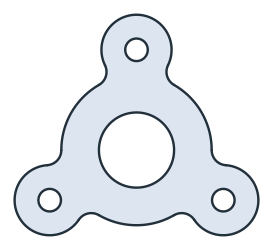
A lobed gasket seals a flange with three bolts. It is a ring around the bore with an ear around each bolt hole. Its outline is easiest to model with Boolean operations instead of a sketch, as the union of four discs with its inner corners rounded. Model the gasket from the drawing in planex2d or in any CAD system, then check its area against the value at the end of the page. A solution in planex2d follows.

[1]:
import math
import planex as px
The discs
The body is a disc of radius 30 around the origin. One ear, of radius 14, sits on the bolt circle of 80 straight above the center, and Rotated turns two copies of it by 120° and 240°. px.Unify unites the four discs into one face, whose only corners are the six where the ears meet the body (Figure 1).
[3]:
body = px.Circle((0, 0), 30).Face()
ear = px.Circle((0, 40), 14).Face()
lobes = px.Unify([body, ear, ear.Rotated((0, 0), 120), ear.Rotated((0, 0), 240)])
print("corners", len(lobes.vertices))
corners 6

The fillets and the holes
Fillet rounds the six corners with a radius of 6. The bore of 30 and the three bolt holes of 9, on the bolt circle like the ears, are made the same way and cut out with - (Figure 2):
[5]:
lobes.Fillet(lobes.vertices, 6)
hole = px.Circle((0, 40), 9 / 2).Face()
holes = px.Unify([px.Circle((0, 0), 30 / 2).Face(), hole, hole.Rotated((0, 0), 120), hole.Rotated((0, 0), 240)])
gasket = lobes - holes
The checks
This is the area, to compare with your own model. The gasket has three ears around one center, so its centroid lies on that center:
[7]:
print("area", round(gasket.mass, 2), "mm²")
print("centroid off the center by", round(math.hypot(*gasket.center[:2]), 6))
area 3703.75 mm²
centroid off the center by 0.0
The gasket as DXF in millimeters, for a cutting plotter or a laser cutter:
[8]:
gasket.WriteDXF("lobed_gasket.dxf", unit=px.mm, scale=1) # scale=1: the numbers as they are
The gasket as DXF: lobed_gasket.dxf