Relations between shapes
Two shapes can lie apart, touch, overlap, or one can lie inside the other. The dimensionally extended nine-intersection model, DE-9IM, records exactly how: it intersects the interior, the boundary and the exterior of one shape with those of the other, and notes the dimension of each of the nine intersections, 2 for an area, 1 for a line, 0 for points and F for nothing. a.Relate(b) returns these nine as a string, row by row: the interior of a against the interior, boundary and exterior of b,
then a’s boundary, then a’s exterior. What each object counts as:
Object |
Interior |
Boundary |
|---|---|---|
Face, Shape |
the region |
its loops |
open Wire |
the chain without its two ends |
its two ends |
closed Wire |
the loop itself, a ring |
none |
point, as a tuple |
the point |
none |
A closed wire is a line, not the region it encloses; wire.Face() gives the region. The relations are those of Shapely, named as planex2d names its calls: the verbs Intersects, Touches, Crosses, Overlaps, Contains, Covers and Equals, and with Is the adjectives IsDisjoint, IsWithin and IsCoveredBy.
[1]:
import planex as px
The matrix
The example is a square a of side 2 at the origin and a square b in five places: overlapping a, sharing an edge with it, touching it at a corner, apart from it, and inside it (Figure 1). The matrices of these standard cases are compared with their known strings:
[3]:
def square(x, y, s=2):
    return px.QuickSketch((x, y)).Rectangle(s, s).Face()


a = square(0, 0)
places = {"overlapping": square(1, 1), "sharing an edge": square(2, 0), "touching at a corner": square(2, 2),
          "apart": square(3, 0), "inside": square(0.5, 0.5, 1)}
expected = ["212101212", "FF2F11212", "FF2F01212", "FF2FF1212", "212FF1FF2"]
for (name, b), matrix in zip(places.items(), expected):
    print(name, a.Relate(b), "expected", matrix)
overlapping 212101212 expected 212101212
sharing an edge FF2F11212 expected FF2F11212
touching at a corner FF2F01212 expected FF2F01212
apart FF2FF1212 expected FF2FF1212
inside 212FF1FF2 expected 212FF1FF2
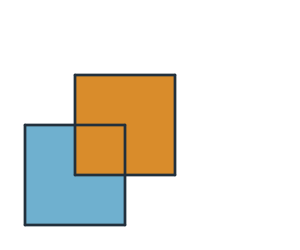
(a) overlapping
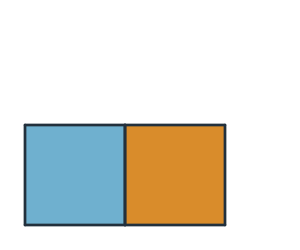
(b) sharing an edge
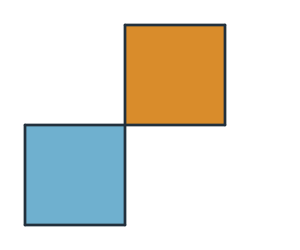
(c) touching at a corner
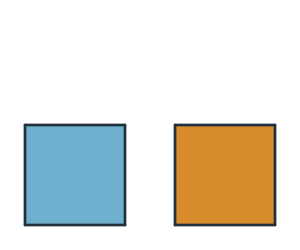
(d) apart
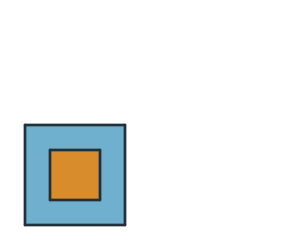
(e) inside
The first matrix, 212101212, reads: the interiors meet in an area (2), a’s interior meets b’s boundary in a line (1) and b’s exterior in an area (2); a’s boundary meets b’s interior in a line (1) and b’s boundary in two points (0), where the outlines cross, and b’s exterior in a line (1); and a’s exterior meets b’s interior, boundary and exterior in an area, a line and an area. Swapping a and b transposes the matrix.
Named relations
The named relations answer the common questions without reading the matrix:
Call |
True when |
|---|---|
|
the two have any point in common |
|
they have no point in common |
|
they meet only on their boundaries |
|
their interiors overlap, and each has parts outside the other, both of the same dimension |
|
a line passes through a face or another line, its interior partly inside and partly outside |
|
b lies in a, with some of b in a’s interior; a lies in b |
|
no point of b lies outside a; no point of a lies outside b |
|
both cover the same points |
For the five places (Figure 1):
[5]:
for name, b in places.items():
    print(name, "| intersects", a.Intersects(b), "touches", a.Touches(b), "overlaps", a.Overlaps(b),
          "contains", a.Contains(b), "disjoint", a.IsDisjoint(b))
overlapping | intersects True touches False overlaps True contains False disjoint False
sharing an edge | intersects True touches True overlaps False contains False disjoint False
touching at a corner | intersects True touches True overlaps False contains False disjoint False
apart | intersects False touches False overlaps False contains False disjoint True
inside | intersects True touches False overlaps False contains True disjoint False
Contains and Covers differ for a part that lies only on a’s boundary. A line along a’s bottom edge has no point in a’s interior, so a does not contain it, but no point of it lies outside a, so a covers it. Contains keeps its older form as well: given a point or an array of points, it tests them as on Inside or outside.
[6]:
edge = px.Line((0, 0), (2, 0))
print("along the edge", a.Relate(edge), "| contains", a.Contains(edge), "covers", a.Covers(edge))
print("points", a.Contains([(1, 1), (3, 3)]))
along the edge FF2101FF2 | contains False covers True
points [ True False]
Patterns
A pattern of nine characters tests the matrix: T for any dimension, F for nothing, * for either, and 0, 1 or 2 for that dimension. a.Relate(b, pattern) returns whether the matrix matches. Two squares that touch either share an edge, their boundaries meeting in a line, or a corner only, in a point:
[7]:
along_a_line, at_points = "F***1****", "F***0****"
for name in ("sharing an edge", "touching at a corner"):
    b = places[name]
    print(name, "| a line", a.Relate(b, along_a_line), "| points only", a.Relate(b, at_points))
sharing an edge | a line True | points only False
touching at a corner | a line False | points only True
Rings and regions
A closed wire is a ring. A point inside the ring lies in its exterior, since the ring is only the loop; the face the ring encloses contains it:
[8]:
ring = a.outer
print("ring", ring.Relate((1, 1)), "| face", a.Relate((1, 1)))
print("ring contains it", ring.Contains((1, 1)), "| face contains it", ring.Face().Contains((1, 1)))
ring FF1FFF0F2 | face 0F2FF1FF2
ring contains it False | face contains it True
Parts on a sheet
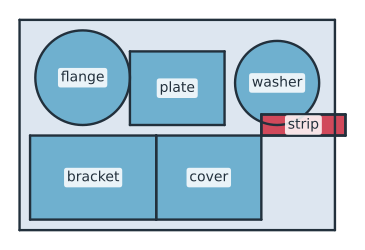
Before parts are cut from a sheet, every part must lie on the sheet, and no two parts may overlap. Two parts may share a cut, a straight edge that the laser cuts once for both, but they must not touch at single points, at a corner or where a round part touches a straight one, since the kerf would cut into both there. The example is a sheet of 300 × 200 with six parts (Figure 2), checked with one relation each:
a part off the sheet is not covered by it;
two parts overlap when their interiors meet, which is
Relate(q, "T********");two parts share a cut when their boundaries meet in a line and their interiors do not;
two parts touch at points when they touch and their boundaries meet only in points.
[9]:
sheet = px.QuickSketch().Rectangle(300, 200).Face()
parts = {
    "bracket": px.QuickSketch((10, 10)).Rectangle(120, 80).Face(),
    "cover": px.QuickSketch((130, 10)).Rectangle(100, 80).Face(),
    "flange": px.Circle((60, 145), 45).Face(),
    "plate": px.QuickSketch((105, 100)).Rectangle(90, 70).Face(),
    "washer": px.Circle((245, 140), 40).Face(),
    "strip": px.QuickSketch((230, 90)).Rectangle(80, 20).Face(),
}
for name, part in parts.items():
    if not sheet.Covers(part):
        print(name, "is off the sheet")
for (n, p), (m, q) in [(x, y) for i, x in enumerate(parts.items()) for y in list(parts.items())[i + 1:]]:
    if p.Relate(q, "T********"):
        print(n, "and", m, "overlap")
    elif p.Relate(q, "F***1****"):
        print(n, "and", m, "share a cut")
    elif p.Touches(q):
        print(n, "and", m, "touch at a point")
strip is off the sheet
bracket and cover share a cut
cover and strip touch at a point
flange and plate touch at a point
washer and strip overlap
See Inside or outside for points and Boolean operations for the intersections behind the relations.