Parameters shared by sketches
Parts that fit together share dimensions. A flange and its gasket have the same bolt circle, and when the bolt circle changes, both have to change with it. px.Parameters holds such values by name. A sketch that uses the set with sk.Use(p) can name the values in its expressions, and p.Update(...) sets new values in every sketch that uses them, in one step.
[1]:
import math

import planex as px
A flange and its gasket
The example is a round flange with an outer diameter of 120, four bolt holes of 9 on a bolt circle of 90 and a bore of 50, and its gasket, which has the same outline and holes but an opening of 70. The three shared values are parameters:
[3]:
p = px.Parameters(od=120, pcd=90, bolt=9)
print(p)
Parameters(od=120, pcd=90, bolt=9)
Both parts are drawn by one function. Each sketch dimensions its outline, its bore and one bolt hole, and three expressions tie the shared dimensions to the parameters. A circular pattern then repeats the hole four times:
[4]:
def part(bore):
    sk = px.Sketch().Use(p)
    sk.Circle((0, 0), 58, id="outer")
    sk.Constrain("outer.center", px.Fix)
    sk.Constrain("outer", px.Diameter, 116, id="outer_d")
    sk.Circle((0, 0), bore / 2, id="bore")
    sk.Constrain("bore", "outer", px.Concentric)
    sk.Constrain("bore", px.Diameter, bore, id="bore_d")
    sk.Circle((44, 0), 4, id="hole")
    sk.Constrain("hole", px.Diameter, 8, id="hole_d")
    sk.Constrain("hole.center", "outer.center", px.Distance, 44, id="hole_r")
    sk.Constrain("hole.center", "outer.center", px.Horizontal)
    sk.Expression("outer_d = od").Expression("hole_r = pcd / 2").Expression("hole_d = bolt")
    sk.CircularPattern("hole", "outer.center", 4)
    return sk


flange, gasket = part(50), part(70)
print("flange", flange.status, "gasket", gasket.status)
flange full gasket full
The outline and the hole were drawn at rough sizes. The expressions bring them to the parameters’ values, so both parts are fully constrained with an outer diameter of 120 and their holes on the bolt circle of 90 (Figure 1). Their areas are the disc less the bore and the four holes:
[5]:
for name, sk, bore in (("flange", flange, 50), ("gasket", gasket, 70)):
    print(name, "area", sk.Face().mass, "exact", math.pi / 4 * (120**2 - bore**2 - 4 * 9**2))
flange area 9091.76913948886 exact 9091.76913948886
gasket area 7206.813547334986 exact 7206.813547334986
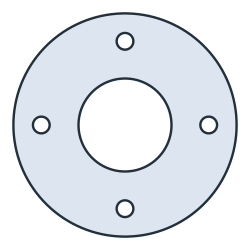
(a) The flange
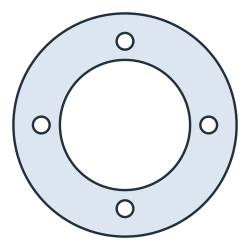
(b) The gasket
One update for both
A larger flange, with an outer diameter of 130, a bolt circle of 100 and bolts of 11, is one call. p.Update sets the three values and solves both sketches again:
[7]:
p.Update(pcd=100, od=130, bolt=11)
for name, sk, bore in (("flange", flange, 50), ("gasket", gasket, 70)):
    print(name, "area", sk.Face().mass, "exact", math.pi / 4 * (130**2 - bore**2 - 4 * 11**2))
flange area 10929.600841838892 exact 10929.60084183889
gasket area 9044.645249685014 exact 9044.645249685014
The bolt holes of the two parts stay in line, each of them at the same place in both:
[8]:
def holes(sk):
    centers = [sk.Measure(ref)["center"][:2] for ref in sk.elements["Circle"] if ref not in ("outer", "bore")]
    return sorted((round(x, 9), round(y, 9)) for x, y in centers)


print(holes(flange))
print(holes(flange) == holes(gasket))
[(-50.0, 0.0), (-0.0, -50.0), (0.0, 50.0), (50.0, 0.0)]
True
The rules
A parameter is set only by
p.Update. Setting it in a sketch, asflange["pcd"] = 110, raises an error, as do driving it and removing it there.Inside a sketch, its dimensions stay its own, with their own ids. No dimension or element of a sketch may have the name of a parameter, and
h,vandtare no parameter names, since curve formulas use them.p.Updatechanges all sketches or none. If one of them has no solution for the new values, it raises an error that names that sketch and leaves every sketch as it was.Curve formulas may name parameters too. See Parametric curves for curves.
[9]:
try:
    flange["pcd"] = 110
except ValueError as err:
    print(err)
pcd = 110: pcd is a global parameter (px.Parameters); its Update sets it in every sketch that uses it