Arcs from references
An arc needs a circle and two ends. Each can come from the geometry that is already drawn. The circle can have a given center (center=), share another arc’s center (concentric=), lie on another arc’s circle (congruent=), or touch two edges (tangent=). The ends can be targets, so the arc runs from one edge to the next.
[1]:
import math
import planex as px
An arc touching two edges: a root fillet
The example is an equal angle section of 40 × 40 × 5 with a root radius of 6 (Figure 1). The inner faces of the two legs are construction lines, and the root is an arc of radius 6 tangent to both. Two lines meet in four corners, so the point (40, 40) given with each face picks the corner the arc sits in. The outline then runs around the section and ends on the root.
[3]:
s = px.QuickSketch()
s.Move((-1, 5)).Line((41, 5), id="leg face", construction=True)
s.Move((5, -1)).Line((5, 41), id="web face", construction=True)

s.Arc(6, tangent=(("leg face", (40, 40)), ("web face", (40, 40))), id="root")
s.Line((5, 40), id="web").Line((0, 40)).Line((0, 0)).Line((40, 0)).Line((40, 5))
s.Line("root", congruent="leg face", id="leg")
angle = s.Face()
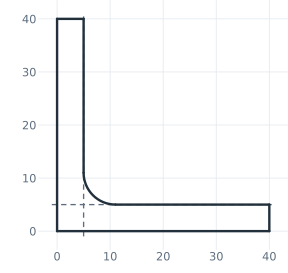
(a) The sketch, the inner faces dashed
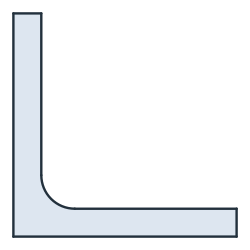
(b) The angle section
The root adds (1 − π/4) r² to the two legs. On a finished corner, Fillet does the same in one call (see Fillets and chamfers).
[5]:
print("area", angle.mass, "exact", 2 * 40 * 5 - 5**2 + (1 - math.pi / 4) * 6**2)
area 382.72566611769184 exact 382.72566611769184
Arcs between targets: a curved slot
The example is an adjustment plate of 62 × 62 with a pivot hole of radius 5 and a curved slot around the pivot, 8 wide, on a radius of 40, from 20° to 70° (Figure 2). The slot is built from references in three steps.
First, two construction rays from the pivot at 20° and 70° bound the slot, and its center line is a construction arc of radius 40 from ray to ray. Arc("ray0", "ray1", 40, center="pivot") is an arc of radius 40 around the pivot that runs from where it meets the first ray to where it meets the second.
[6]:
s = px.QuickSketch().Vertex("pivot", (0, 0))
s.Move("pivot").Line(80, angle=20, id="ray0", construction=True)
s.Move("pivot").Line(80, angle=70, id="ray1", construction=True)
s.Arc("ray0", "ray1", 40, center="pivot", id="centerline", construction=True);
Then the outline of the slot: the outer arc of radius 44 from ray to ray, a half circle around the end of the center line, the inner arc back to the first ray, concentric with the pivot, and a half circle around the start of the center line. Last come the plate and the pivot hole.
[7]:
s.Arc("ray0", "ray1", 44, center="pivot", id="outer")
s.Arc(center="centerline.end", sweep=180, id="cap1")
s.Arc("ray0", concentric="pivot", id="inner")
s.Arc(center="centerline.start", sweep=180, id="cap0")

s.Move((-12, -12), dir=(1, 0)).Rectangle(62, 62, id="plate")
s.Circle(0, 0, 5, id="pivot hole")
plate = s.Face()
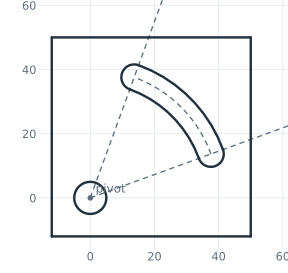
(a) The sketch, rays and center line dashed
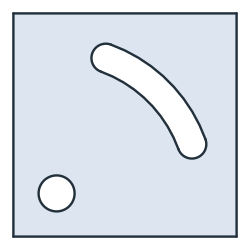
(b) The adjustment plate
The slot’s area is the length of its center line times its width, plus the two half circles at its ends:
[9]:
slot = math.radians(70 - 20) * 40 * 8 + math.pi * 8**2 / 4
print("area", plate.mass, "exact", 62**2 - math.pi * 5**2 - slot)
area 3435.9420208837255 exact 3435.9420208837255
ArcSlot draws the same slot in one call. See Slots, keyholes and polygons for details. The end arcs of the link are a third form, arcs on another circle with Arc(from, to, congruent=...), and Choosing between solutions shows the four corners in which an arc touching two lines can sit.