Motor mount plate
A motor mount plate carries a small motor on a frame. The motor’s pilot sits in the bore at its center, and four screws hold its flange. The plate is bolted down through four slots, so that it can slide to tension the belt. It is a rectangle with chamfered corners, and the screw holes and the slots are each one feature repeated in two directions. Model the plate from the drawing in planex2d or in any CAD system, then check its area against the value at the end of the page. A solution in planex2d follows.

[1]:
import math
import planex as px
The plate
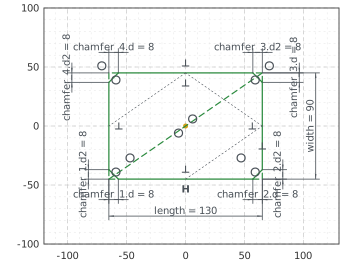
The plate is a RectangleC 130 by 90 around the origin. Its lines are plate.Line.1 to plate.Line.4, the first one the bottom edge, and its right angles are constraints already. With auto_constraint={"horizontal": True, "vertical": True}, its bottom edge, drawn level, stays horizontal, as the slots below do. Chamfer cuts its four corners at 8 from each corner, and each chamfer makes its lengths dimensions, chamfer_1.d and chamfer_1.d2 for the first (Figure 1):
[3]:
mount = px.Sketch(auto_constraint={"horizontal": True, "vertical": True})
mount.RectangleC(130, 90, id="plate")
mount.Constrain("plate.center", "origin", px.Coincident)
mount.Constrain("plate.Line.1", px.Distance, 130, id="length")
mount.Constrain("plate.Line.2", px.Distance, 90, id="width")
mount.Chamfer(["plate.Line.1.start", "plate.Line.2.start", "plate.Line.3.start", "plate.Line.4.start"], 8,
              id=["chamfer_1", "chamfer_2", "chamfer_3", "chamfer_4"])
print("status", mount.status, "| degrees of freedom", mount.dof)
status full | degrees of freedom 0
The holes and the slots
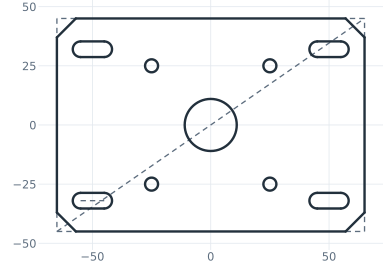
The motor’s pilot bore, 22 across, is centered at the origin. The first screw hole, 5.5 across, is 25 to the left of the vertical axis and 25 below the horizontal one. LinearPattern repeats it in a 2 by 2 grid, 50 apart both ways. The first slot, 10 long between the centers of its ends and 6.6 wide, lies along \(x\) with its middle 50 to the left and 32 below the center, and a second pattern repeats it 100 apart along \(x\) and 64 apart up (Figure 2):
[5]:
mount.Circle(22 / 2, center=(1, 1), id="pilot")
mount.Constrain("pilot.center", "origin", px.Coincident)
mount.Constrain("pilot", px.Diameter, 22, id="pilot_d")
mount.Circle(5.5 / 2, center=(-24, -24), id="screw")
mount.Constrain("screw", px.Diameter, 5.5, id="screw_d")
mount.Constrain("screw.center", "V", px.Distance, 25, id="screw_x")
mount.Constrain("screw.center", "H", px.Distance, 25, id="screw_y")
mount.LinearPattern("screw", px.H, 2, 50, dir2=px.V, count2=2, spacing2=50, id="screws")
mount.Move((-55, -32)).Slot(10, 6.6, id="slot")  # 10 between the centers of its ends, 6.6 wide
mount.Constrain("slot.spine", px.Distance, 10, id="slot_l")
mount.Constrain("slot.spine.mid", "V", px.Distance, 50, id="slot_x")
mount.Constrain("slot.spine.mid", "H", px.Distance, 32, id="slot_y")
mount.LinearPattern("slot", px.H, 2, 100, dir2=px.V, count2=2, spacing2=64, id="slots")
print("status", mount.status, "| degrees of freedom", mount.dof)
status full | degrees of freedom 0
The checks
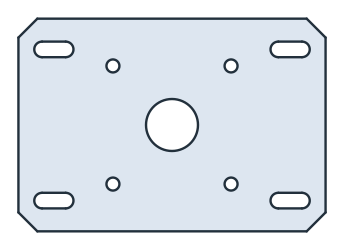
This is the area, to compare with your own model. It is the rectangle less the four triangles the chamfers cut off, \(8^2 / 2\) each, less the bore, the four screw holes and the four slots, each a rectangle 10 by 6.6 and a disc of 6.6. The plate is symmetric about both axes, so its centroid is the origin (Figure 3):
[7]:
face = mount.Face()
exact = (130 * 90 - 4 * 8**2 / 2 - math.pi * 11**2 - 4 * math.pi * 2.75**2
         - 4 * (10 * 6.6 + math.pi * 3.3**2))
c = face.center
print("area", round(face.mass, 2), "mm², exact", round(exact, 2))
print("centroid", tuple(round(v, 6) for v in c[:2]))
area 10695.99 mm², exact 10695.99
centroid (0.0, 0.0)
The plate as DXF in millimeters, for another CAD system or a laser cutter:
[9]:
mount.WriteDXF("motor_mount_plate.dxf", unit=px.mm, scale=1) # scale=1: the numbers as they are
The plate as DXF: motor_mount_plate.dxf