Offsets and profiles revisited
The profile tools and offsets from the Quick sketch pages work the same in a constraint sketch. Two things are added. Their sizes become dimensions with ids, such as a slot’s width or an offset’s distance, and the elements stay tied to what they were made from. A changed value then moves the whole profile, and expressions can keep sizes in proportion.
[1]:
import math
import planex as px
Slots and polygons
In a px.Sketch, a slot stays a slot when its spine moves, and its width is the dimension Slot.1.w. The radius of a keyhole’s hole is Keyhole.1.r, the radius of a polygon Polygon.1.r, and the width across flats of a hexagon Hexagon.1.af. The example widens a slot of 6.6 for M6 to 9 for M8 and solves the sketch again. Its area is a rectangle with two half circles:
[3]:
def slot(length, width):
    return length * width + math.pi * (width / 2) ** 2


sk = px.Sketch().Slot(20, 6.6)
print("width", sk["Slot.1.w"], "area", sk.Face().mass, "exact", slot(20, 6.6))
sk["Slot.1.w"] = 9
sk.Update()
print("width", sk["Slot.1.w"], "area", sk.Face().mass, "exact", slot(20, 9))
width 6.6 area 166.21194399759284 exact 166.21194399759284
width 9.0 area 243.61725123519332 exact 243.6172512351933
Fillets and chamfers
A fillet stays tangent to both edges, and its radius is the dimension Fillet.1.r. A chamfer is driven by Chamfer.1.d, and by Chamfer.1.d2 or Chamfer.1.angle. The constraints of the two cut edges stay in place and hold on to the sharp corner, so a length still runs to it. The example is a plate of 40 × 20 whose two right corners are rounded to 4, and then one of them to 8.
[4]:
sk = px.Sketch().Rectangle(40, 20, id="plate")
sk.Constrain("plate.Point.1", px.Fix)
sk.Constrain("plate.Line.1", px.Horizontal)
sk.Constrain("plate.Line.1", px.Distance, 40, id="a")
sk.Constrain("plate.Line.2", px.Distance, 20, id="b")
sk.Fillet(["plate.Line.1.end", "plate.Line.2.end"], 4)
print(sk.status, "area", sk.Face().mass, "exact", 800 - 2 * 4**2 * (1 - math.pi / 4))

sk["Fillet.1.r"] = 8
sk.Update()
print("Fillet.1 radius", sk.Measure("Fillet.1")["radius"], "area", sk.Face().mass)
print("exact", 800 - (8**2 + 4**2) * (1 - math.pi / 4))
full area 793.1327412287184 exact 793.1327412287184
Fillet.1 radius 8.0 area 782.8318530717959
exact 782.8318530717959
Offsets that follow
Every offset has its distance as a dimension, "<id>.d", and its elements follow when the source or the distance changes. The example is the motor plate from Offsets, with two slots around center lines and the washer clearances around them. The center lines are fixed with px.Fix, so that only the offsets move.
Two expressions keep both slots alike and the washer rim 3.5 outside the slot edge. One number then turns the plate from M8, with slots of 9 (Figure 1a), into M10, with slots of 11 (Figure 1b, c).
[5]:
plate = px.Sketch().RectangleC(120, 80, id="outline")
for k, y in enumerate((-25, 25)):
    plate.Move((-10, y)).Line(20, 0, px.Fix, id=f"center{k}", construction=True)
    plate.Offset(f"center{k}", 4.5, id=f"slot{k}", name="slot edge")
    plate.Offset(f"center{k}", 8, id=f"washer{k}", name="washer")
    plate(f"slot{k}").construction = False
m8 = plate.Copy()

plate.Expression("slot1.d = slot0.d", id="same slots")
for k in range(2):
    plate.Expression(f"washer{k}.d = slot{k}.d + 3.5", id=f"washer rim{k}")
plate["slot0.d"] = 5.5
plate.Update()
m10 = plate.Face()
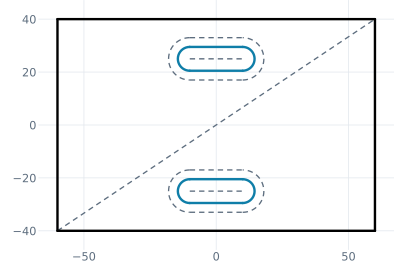
(a) Slots 9 for M8
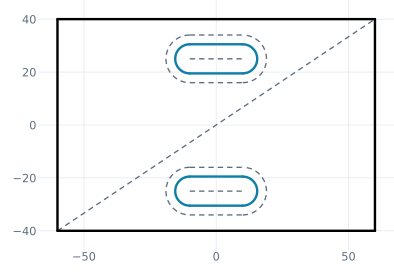
(b) Slots 11 for M10
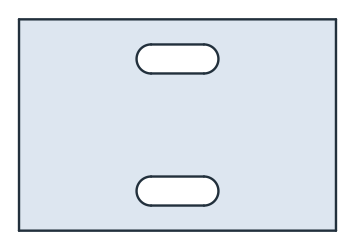
(c) The plate for M10
The slots and washers follow their rules, and the center lines stay where they are:
[7]:
slot_width, washer = 2 * plate["slot1.d"], 2 * plate["washer1.d"]
washers = sum(plate.Measure(f"washer{k}")["length"] for k in range(2))
print("slots", slot_width, "washers", washer)
print("area", m10.mass, "exact", 120 * 80 - 2 * (20 * slot_width + math.pi * slot_width**2 / 4))
print("washers", washers, "exact", 2 * (2 * 20 + math.pi * washer))
center = plate.Geometry("center0")
print("center line from", center["start"], "to", center["end"])
slots 11.0 washers 18.0
area 8969.933644457818 exact 8969.933644457818
washers 193.09733552923254 exact 193.09733552923257
center line from (-10.0, -25.0) to (10.0, -25.0)
A source that is neither fixed nor dimensioned is free, and the solver may move it slightly to reach the new distance. That is why the center lines above are fixed:
[8]:
for flags in ((), (px.Fix,)):
    sk = px.Sketch().Line(20, 0, *flags, id="midline")
    sk.Offset("midline", 4.5, id="slot")
    sk["slot.d"] = 6
    sk.Update()
    start, end = sk.Geometry("midline")["start"], sk.Geometry("midline")["end"]
    moved = max(math.dist(start, (0, 0)), math.dist(end, (20, 0)))
    print("fixed" if flags else "free", f"center line moved by {moved:.1e}")
free center line moved by 1.4e-04
fixed center line moved by 1.1e-23
A cam whose roller is a dimension
The cam from Offsets is the pitch curve offset inward by the roller radius. In a constraint sketch, the roller radius is the offset’s distance "profile.d", so a larger roller that still fits is a single number. The pitch curve is fixed, and the cam follows (Figure 2).
[9]:
def rise(deg):
    if deg < 120:
        return 10 * (1 - math.cos(math.pi * deg / 120)) / 2
    if deg < 180:
        return 10
    if deg < 300:
        return 10 * (1 + math.cos(math.pi * (deg - 180) / 120)) / 2
    return 0.0


path = []
for k in range(48):
    deg = 360 * k / 48
    rho, a = 25 + 8 + rise(deg), math.radians(deg)
    path.append((rho * math.cos(a), rho * math.sin(a)))

cam = px.Sketch(path[0])
cam.Spline(path[1:], px.Fix, periodic=True, id="pitch", construction=True)
cam.Offset("pitch", -8, id="profile")
cam("profile").construction = False
roller8 = cam.Face()
cam["profile.d"] = 9
cam.Update()
print("roller 8: cam area", roller8.mass, "roller 9:", cam.Face().mass)
roller 8: cam area 2867.429237225836 roller 9: 2680.5296435576006
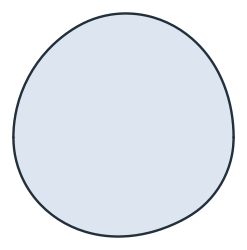
(a) Roller 8
(b) Roller 9: the cam follows
An offset keeps its shape
An offset is created with a fixed shape, made of a certain number of lines, arcs and corners. A change of its distance or its source that would need a different shape, such as an arc vanishing on the inside or a corner appearing, raises an error and changes nothing. In that case, remove the offset and create it again. While an offset exists, its source cannot be removed, and its parts cannot be edited on their own. The example is the O-ring groove from Offsets, in a constraint sketch:
[11]:
cover = px.Sketch().RectangleC(120, 80, id="outline")
cover.Move((-40, -30), dir=(1, 0))
for side in (100, 60, 100, 60):
    cover.Line(side - 20).Arc(10, 90)
cover.Finish(id_wire="seal")
cover("seal").construction = True
cover.Offset("seal", 2.4, both_sides=True, id="groove")
cover("groove").construction = False

for what, attempt in {"a wider groove": lambda: cover.Update({"groove.d": 12}),
                      "remove the seal line": lambda: cover.Remove(cover.wires["seal"][0]),
                      "remove a part": lambda: cover.Remove("groove.right.Line.1"),
                      "trim a part": lambda: cover.Trim("groove.right.Line.1", "outline")}.items():
    try:
        attempt()
    except ValueError as err:
        print(what + ":", err)
print("groove.d", cover["groove.d"])
a wider groove: groove.d = 12: Offset('groove'): the offset of Arc.1 would vanish at d = 12 > r = 10; make the offset again (Remove('groove'), then Offset)
remove the seal line: Remove('Line.1'): the offset 'groove' is made from it; keep it as construction with sk('Line.1').construction = True, or Remove('groove') first
remove a part: Remove('groove.right.Line.1'): part of the offset 'groove'; Remove('groove')
trim a part: Trim('groove.right.Line.1'): part of the offset 'groove'; Remove('groove')
groove.d 2.4
In a px.QuickSketch, nothing is tied, so the source and the parts of an offset can be removed or edited freely, and the offset stays as it was drawn.