Angle bracket
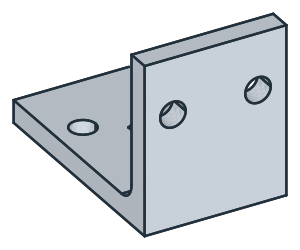
An angle bracket holds a part at a right angle to a base. It has two legs, a rib that stiffens the corner between them, and holes in both legs. As a solid, it is an L profile padded, a rib padded into its corner, and holes pocketed from two faces. Model the bracket from the drawing in planex2d or in any CAD system, then check its volume, mass and center of mass against the values at the end of the page. A solution in planex2d follows.

[1]:
import math
import netgen.occ as occ
import planex as px
The profile
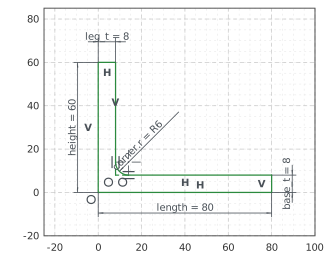
The profile is the side view of the L, sketched on px.YZ: \(y\) runs back from the front of the bracket and \(z\) up, with the origin at the bottom front corner. The outline runs along the bottom, up the back end of the base, forward along its top, up the back of the leg, over its top and down its front. With auto_constraint={"horizontal": True, "vertical": True}, the lines drawn level or plumb stay so. A fillet rounds the inner corner and makes its radius a dimension,
corner.r. The base’s top and the leg’s back get the name inner, which the faces padded from them carry; the rib is placed against those faces.
The base and the leg are 8 thick, the base 80 long and the leg 60 high. With these, nothing in the sketch is left free (Figure 1):
[3]:
side = px.Sketch(px.YZ, auto_constraint={"horizontal": True, "vertical": True})
side.Line(80, id="bottom")
side.Turn(90).Line(8, id="back_end")  # Turn(90) turns the pen left, Turn(-90) right
side.Turn(90).Line(70, id="base_top", name="inner")
side.Turn(-90).Line(50, id="leg_back", name="inner")
side.Turn(90).Line(8, id="leg_top")
side.Close(px.Vertical, id="leg_front")  # drawn only roughly plumb: the flag holds it
side.Fillet("base_top.end", 6, id="corner")
side.Constrain("bottom.start", "origin", px.Coincident)
side.Constrain("bottom", px.Distance, 80, id="length")
side.Constrain("leg_front", px.Distance, 60, id="height")
side.Constrain("back_end", px.Distance, 8, id="base_t")
side.Constrain("leg_top", px.Distance, 8, id="leg_t")
print("status", side.status, "| degrees of freedom", side.dof)
status full | degrees of freedom 0
The rib
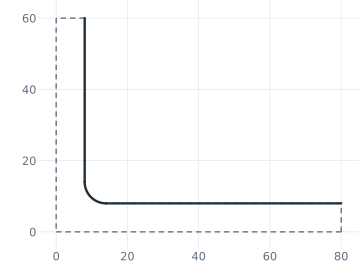
The rib stands in the inner corner, against the inner faces of the L. px.Pad first extrudes the profile 25 to both sides of its plane, 50 wide. Project brings the inner faces into the rib’s sketch on the same plane. Seen from the side, the base’s top and the leg’s back are lines, fixed in place, and the fillet is an arc. The projected edges get ids with netgen’s edge numbers, such as inner.Edge.3, which change when the shape changes (Figure 2):
[5]:
body = px.Pad(side, 25, length2=25)
rib = px.Sketch(px.YZ, auto_constraint=True)
rib.Project(occ.Compound(list(body.faces["inner"])), construction=False, id="inner")  # edges of the sketch, not construction
for e in rib.elements["Line"]:
    print(e, "from", rib.Location(e + ".start"), "to", rib.Location(e + ".end"))
inner.Edge.3 from (80.0, 7.999999999999999) to (14.0, 7.999999999999999)
inner.Edge.11 from (8.0, 14.0) to (8.0, 60.0)
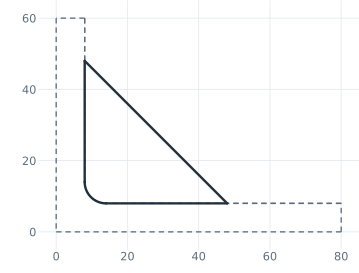
The rib’s slanted edge starts roughly on the base and runs up to the leg. Its ends are 40 from the leg’s back and 40 from the base’s top. Trimming the projections where the edge meets them leaves the rib’s outline, the edge and the inner faces up to it, the fillet included (Figure 3).
[7]:
rib.Move((50, 10)).Line(until="inner.Edge.11", angle=135, id="rib_edge")
rib.Constrain("rib_edge.start", "inner.Edge.3", px.Coincident)
rib.Constrain("rib_edge.start", "inner.Edge.11", px.Distance, 40, id="rib_l")
rib.Constrain("rib_edge.end", "inner.Edge.3", px.Distance, 40, id="rib_h")
rib.Trim(("inner.Edge.3", (75, 8)))  # the piece of the base's line nearest to (75, 8), beyond the rib, becomes construction
rib.Trim(("inner.Edge.11", (8, 59)))
print("status", rib.status, "| degrees of freedom", rib.dof, "| area", round(rib.Face().mass, 2))
status full | degrees of freedom 0 | area 792.27
The solid
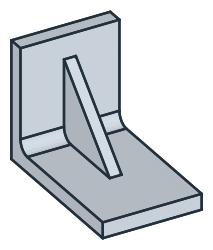
The rib is padded 3 to both sides of its plane, 6 thick, so that it stands in the middle of the bracket, and + fuses it with the L (Figure 4).
[9]:
block = body + px.Pad(rib, 3, length2=3)  # + fuses two solids
print("solids", len(block.solids), "| volume", round(block.mass, 1))
solids 1 | volume 57939.9
The holes
The holes in the base, 9 across, are sketched on the bottom of the bracket, its face lowest in \(z\). They are placed roughly and set by their spacing of 30 and their distance of 55 from the sketch’s horizontal axis, the front edge. until=px.last cuts them up through the base (Figure 5).
[11]:
base_holes = px.Sketch(block.faces.Min(occ.Z))
base_holes.Circle(9 / 2, center=(-10, -50), id="left_base_hole")
base_holes.Circle(9 / 2, center=(10, -50), id="right_base_hole")
base_holes.Constrain("left_base_hole", px.Diameter, 9, id="base_hole_d")
base_holes.Constrain("left_base_hole", "right_base_hole", px.Equal)
base_holes.Constrain("left_base_hole.center", "right_base_hole.center", px.Distance, 30, id="base_spacing")
base_holes.Constrain("left_base_hole.center", "H", px.Distance, 55, id="base_hole_y")
base_holes.Constrain("left_base_hole.center", "right_base_hole.center", "V", px.Symmetric)
block = px.Pocket(block, base_holes, until=px.last)  # through to the last flat face it crosses
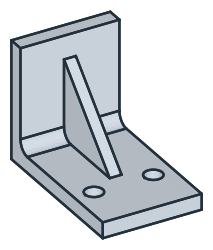
The holes in the leg are sketched on its front, the face lowest in \(y\), in the same way, 40 above the bottom edge (Figure 6):
[13]:
leg_holes = px.Sketch(block.faces.Min(occ.Y))  # on the front face, x to the right and z up
leg_holes.Circle(9 / 2, center=(-10, 35), id="left_leg_hole")
leg_holes.Circle(9 / 2, center=(10, 35), id="right_leg_hole")
leg_holes.Constrain("left_leg_hole", px.Diameter, 9, id="leg_hole_d")
leg_holes.Constrain("left_leg_hole", "right_leg_hole", px.Equal)
leg_holes.Constrain("left_leg_hole.center", "right_leg_hole.center", px.Distance, 30, id="leg_spacing")
leg_holes.Constrain("left_leg_hole.center", "H", px.Distance, 40, id="leg_hole_z")
leg_holes.Constrain("left_leg_hole.center", "right_leg_hole.center", "V", px.Symmetric)
block = px.Pocket(block, leg_holes, until=px.last)
The checks
These are the volume, the mass in steel S235 (7.85 g/cm³) and the center of mass, with the origin at the bottom front corner in the middle of the width, to compare with your own model. The bracket is symmetric about the plane \(x = 0\), so its center of mass lies on it:
[15]:
c = block.center
print("volume", round(block.mass, 1), "mm³")
print("mass", round(block.mass * 7.85e-6, 3), "kg")
print("center of mass", round(c.y, 2), "back,", round(c.z, 2), "up, off the middle by", round(abs(c.x), 6))
volume 55904.2 mm³
mass 0.439 kg
center of mass 25.2 back, 16.03 up, off the middle by 0.0
The bracket as STEP, for another CAD system:
[16]:
block.WriteStep("angle_bracket.step")
The bracket as STEP: angle_bracket.step