SVG files
SVG is the vector format of drawing programs, laser cutters, vinyl cutters and web pages. px.WriteSVG writes planex2d geometry as an SVG file at true scale, and px.FromSVG reads the paths of a drawing back as exact geometry. Writing needs no extra package. Reading needs svgelements (pip install svgelements), which parses the file and applies its transforms.
The picture that a notebook shows, ToSVG, is something else. It is sized in pixels for the screen and filled in the preview colors. See SVG in the plotting section for details.
[1]:
import math
from pathlib import Path
import planex as px
Writing
The example is the front panel of an instrument case, 120 × 70, with a window slot of width 24, an opening of diameter 22 for a rotary switch and four mounting holes of diameter 4.5. It is drawn counting in millimeters and scaled to meters, the unit that the files’ sizes refer to (see Units). The panel has a color, and the mounting holes have a color of their own.
[3]:
sketch = px.QuickSketch().RectangleC(120, 70, name="outline")
sketch.Move((-40, 0)).Slot(45, 24, name="window")
sketch.Circle((38, 0), 22 / 2, name="switch")
for x in (-52, 52):
    for y in (-27, 27):
        sketch.Circle((x, y), 4.5 / 2, name="mounting")
panel = sketch.Face().Scaled((0, 0), px.mm)
panel.col = (0.75, 0.8, 0.86)
panel.edges(name="mounting").col = (0.85, 0.2, 0.15)
WriteSVG fills each face in its color, its holes left open, and draws every edge on top, once, in its color. The edges go into one group per name, which drawing programs such as Inkscape show as layers. The width and height of the file are in millimeters, so the panel opens at its real size, and unit sets the unit that the numbers inside the file count in:
[4]:
panel.WriteSVG("panel.svg", unit=px.mm)
print(Path("panel.svg").read_text().splitlines()[1])
<svg xmlns="http://www.w3.org/2000/svg" xmlns:inkscape="http://www.inkscape.org/namespaces/inkscape" width="120mm" height="70mm" viewBox="-60 -35 120 70">
A laser cutter cuts along every path, so a file for cutting holds the outlines only. Wires are never filled, so writing the face’s wires instead of the face gives just the outlines. WriteSVG also takes a list of objects for one file.
[5]:
px.WriteSVG(panel.wires, "panel-cut.svg", unit=px.mm)
Lines, arcs, circles, ellipses and splines up to degree 3 are written exactly, as SVG lines, arcs and Bezier curves. A rational spline that is no part of an ellipse, or a spline of a higher degree, has no exact SVG form. It is written as its arc approximation, the geometry that Boolean operations use, with a warning that says how many curves went out that way.
Reading back
FromSVG returns the wires of the drawing, in meters, as FromDXF does. The names of the groups become the edge names, and px.Face builds the face. The panel read from the outlines’ file has the area it was written with (Figure 1):
[6]:
back = px.Face(px.FromSVG("panel-cut.svg"))
print("area difference", back.mass - panel.mass)
print(sorted({e.name for e in back.edges}))
area difference -1.734723475976807e-18
['mounting', 'outline', 'switch', 'window']
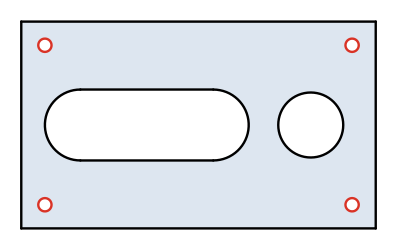
(a) Written, in its color
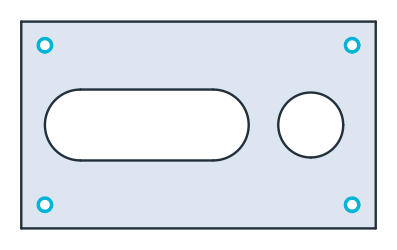
(b) Read back, the mounting holes in cyan
A drawing from another program
The example is a bracket of 100 × 50 mm as a drawing program saves it, with one corner rounded to radius 20, a hole of diameter 16 and an elliptical opening of 24 × 12. Each part of the drawing is on a layer of its own (a group with a label), the holes are moved into place by a transform, and a layer of center lines belongs to the drawing, not to the part.
[8]:
Path("bracket.svg").write_text("""<svg xmlns="http://www.w3.org/2000/svg"
     xmlns:inkscape="http://www.inkscape.org/namespaces/inkscape"
     width="100mm" height="50mm" viewBox="0 0 100 50">
  <g inkscape:groupmode="layer" inkscape:label="outline">
    <path d="M 0 50 L 80 50 A 20 20 0 0 0 100 30 L 100 0 L 0 0 Z" fill="none" stroke="#1f4e79"/>
  </g>
  <g inkscape:groupmode="layer" inkscape:label="holes" transform="translate(30 25)">
    <circle cx="0" cy="0" r="8" fill="none" stroke="#c0392b"/>
    <ellipse cx="40" cy="0" rx="12" ry="6" fill="none" stroke="#c0392b"/>
  </g>
  <g inkscape:groupmode="layer" inkscape:label="center lines">
    <line x1="18" y1="25" x2="88" y2="25" stroke="#27ae60" stroke-dasharray="6 2"/>
  </g>
</svg>""");
layers reads only the outline and the holes. Lines and circular arcs stay lines and arcs, and the ellipse is read as exact rational splines. Each edge takes its stroke color, and the center line, which is left out, is shown dashed (Figure 2).
[9]:
bracket = px.Face(px.FromSVG("bracket.svg", layers=["outline", "holes"]))
print(sorted({e.name for e in bracket.edges}), sorted({type(e.edge).__name__ for e in bracket.edges}))
['holes', 'outline'] ['ArcEdge', 'LineEdge', 'SplineEdge']
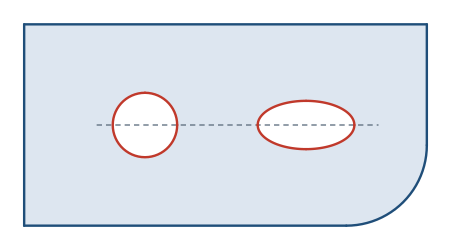
SVG counts \(y\) downward, and FromSVG turns it upward, as in planex2d, so the rounded corner lies at the bottom right. The area is that of the 100 × 50 outline with its corner rounded to a radius of 20, less the hole of radius 8 and the ellipse with half axes of 12 and 6, \(100 \cdot 50 - (1 - \pi/4)\,20^2 - \pi \cdot 8^2 - \pi \cdot 12 \cdot 6\) in mm²:
[11]:
exact = 100 * 50 - (1 - math.pi / 4) * 20**2 - math.pi * 8**2 - math.pi * 12 * 6
print("area", bracket.mass / px.mm**2, "exact", exact)
area 4486.902664470768 exact 4486.902664470767
Units
FromSVG takes the scale from the file’s width and height, which name their unit, such as mm, cm, in, pt or pc. A file whose width names no unit, as many drawings for the screen do, is read as CSS pixels of 1/96 inch, with a warning. unit sets the length of one unit of the drawing instead. The example is a rectangle of 80 × 30 in a file without units, read as millimeters:
[12]:
Path("plain.svg").write_text('<svg xmlns="http://www.w3.org/2000/svg" viewBox="0 0 100 50">'
                             '<rect x="10" y="10" width="80" height="30" fill="none" stroke="black"/></svg>')
print(px.Compound(px.FromSVG("plain.svg", unit=px.mm)).bounding_box)
((0.01, -0.04), (0.09, -0.01))
tol joins ends that are closer than the given length, as in FromDXF, and plane puts the wires on a plane other than the xy plane. See Files for the other formats.