The plane in 3D
Every sketch, wire, face and shape lies in a plane, and its coordinates within that plane are 2D, (h, v): h runs along the first axis of the plane and v along the second. The default plane is the xy plane, px.XY, and px.YZ and px.ZX are the other coordinate planes. A plane can be placed anywhere in 3D:
px.Plane(origin=, normal=, axis=)gives the origin, the normal and the direction of h;a planar face of an OpenCASCADE solid gives its own plane;
another planex2d object gives the plane it lies in;
netgen’s
occ.Axesis accepted as well.
The examples on this page use the faces of a box of 120 × 80 × 60.
[1]:
import math
import netgen.occ as occ
import planex as px

length, width, height = 120.0, 80.0, 60.0
On a given plane
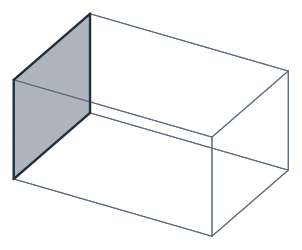
The box’s end plate lies on the plane x = 120, with its normal along x, h along y and v along z (Figure 1). ToXYZ converts a point of the plane into 3D, and ToHV converts a point in 3D into the plane:
[3]:
end_plane = px.Plane(origin=(length, 0, 0), normal=(1, 0, 0), axis=(0, 1, 0))
end = px.QuickSketch(end_plane).Rectangle(width, height).Face()
print("normal", end.Normal())
print("(80, 60) in 3D", end.ToXYZ((width, height)))
print("(120, 20, 30) in the plane", end.ToHV((length, 20, 30)))
normal (1.0, 0.0, 0.0)
(80, 60) in 3D (120.0, 80.0, 60.0)
(120, 20, 30) in the plane (20.0, 30.0)
Moving the plane
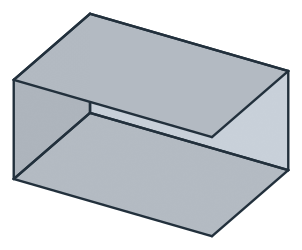
A motion with 3D arguments moves an object’s plane, while its 2D coordinates stay as they are. The example draws the bottom of the box on the xy plane, moves a copy of it up by 60 for the top, and turns a rectangle about the x axis for a side (Figure 2). The turn by 90° leaves rounding of order 1e-16 in the side’s normal and points, since cos 90° is not exactly zero in floating point.
[5]:
bottom = px.QuickSketch().Rectangle(length, width).Face()
top = bottom.Translated((0, 0, height))
side = px.QuickSketch().Rectangle(length, height).Face().Rotated((0, 0, 0), (1, 0, 0), 90)
print("top: (0, 0) in 3D", top.ToXYZ((0, 0)))
print("side: normal", side.Normal(), "(120, 60) in 3D", side.ToXYZ((length, height)))
top: (0, 0) in 3D (0.0, 0.0, 60.0)
side: normal (0.0, -1.0, 6.123233995736766e-17) (120, 60) in 3D (120.0, 3.67394039744206e-15, 60.0)
A plane itself can be moved the same way before anything is drawn on it. px.XY.Offset(60) is the xy plane lifted by 60, and Translated and Rotated work on planes too. See Moving, rotating, mirroring, scaling for motions in general.
On a face of a solid
px.QuickSketch(face) sketches on the plane of a planar OpenCASCADE face. Its axes follow one fixed rule:
the normal is the face’s normal, pointing out of the solid;
the origin is the global origin, projected onto the plane;
h is the global x axis projected onto the plane, or the global y axis where x is along the normal.
On the lid of the box, the sketch therefore uses the coordinates of the box itself, and on the end plate at x = 120, h runs along y. px.Plane(face, origin=, axis=) projects a different origin or axis instead. See Placing a sketch for projecting the solid’s edges into the sketch and drawing against them.
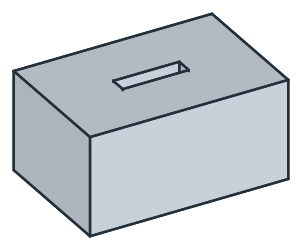
The example is a vent pocket of 40 × 10, 10 deep, in the middle of the lid of a solid box (Figure 3). The origin is moved to the middle of the lid, so RectangleC centers the vent there. The vent’s face is extruded downward and subtracted from the box with OpenCASCADE.
[7]:
box = occ.Box(occ.Pnt(0, 0, 0), occ.Pnt(length, width, height))
lid = px.QuickSketch(px.Plane(box.faces.Max(occ.Z), origin=(length / 2, width / 2, 0)))
vent = lid.RectangleC(40, 10).Face()
pocket = box - vent.ToOCCFace().Extrude(-10)
print("lid normal", lid.Normal(), "vent center", vent.center)
print("volume", pocket.mass, "exact", length * width * height - 40 * 10 * 10)
lid normal (0.0, 0.0, 1.0) vent center (60.0, 40.0, 60.0)
volume 572000.0000000001 exact 572000.0
On the plane of another object
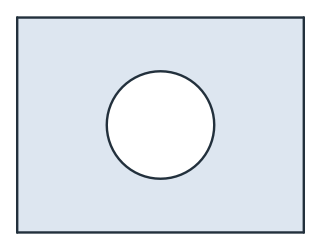
Given a planex2d face, shape, wire or sketch, px.QuickSketch starts an empty sketch on its plane. The example is a bore of diameter 30 in the middle of the end plate, drawn in the plate’s own coordinates (Figure 4):
[9]:
bore = px.QuickSketch(end).Circle(15, center=(width / 2, height / 2)).Face()
plate = end - bore
print("area", plate.mass, "exact", width * height - 225 * math.pi)
print("bore center in 3D", bore.center, "in the plane", bore.ToHV(bore.center))
area 4093.141652942297 exact 4093.141652942297
bore center in 3D (120.0, 40.0, 30.0) in the plane (40.0, 30.0)
Boolean operations need faces with the same plane and the same origin and axes in it. Two faces on the same geometric plane, but with different origins, raise an error, so a sketch for another face is best started on that face, as the bore above. SetOrigin moves the origin of a sketch within its plane, here to the middle of the end plate, and sketch.Copy() copies a sketch with its drawing and its plane.
[11]:
middle = px.QuickSketch(end).SetOrigin((width / 2, height / 2))
print("the new origin in 3D", middle.ToXYZ((0, 0)))
the new origin in 3D (120.0, 40.0, 30.0)