Column base
A column base carries a post on a plate that is bolted down through two holes. The post sits in the blind bore of a boss on the plate. As a solid, it is a plate padded from a sketch, a boss padded from a sketch on the plate’s top and fused with it, and a bore pocketed into the boss. Model the column base from the drawing in planex2d or in any CAD system, then check its volume, mass and center of mass against the values at the end of the page. A solution in planex2d follows.

[1]:
import math
import netgen.occ as occ
import planex as px
The plate
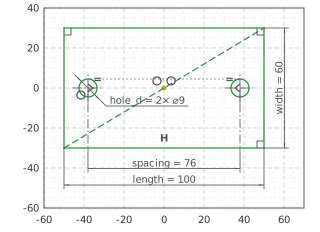
The plate is a rectangle around the origin, 100 by 60, drawn with RectangleC. Its lines are plate.Line.1 to plate.Line.4, the first one the bottom edge along \(x\) and the second the right edge. Its center is the origin, and with auto_constraint={"horizontal": True, "vertical": True} its edges, drawn level and plumb, stay so. The two holes, 9 across, lie on the horizontal axis, mirrored about the vertical one and 76 apart (Figure 1):
[3]:
base = px.Sketch(auto_constraint={"horizontal": True, "vertical": True})
base.RectangleC(100, 60, id="plate")
base.Constrain("plate.center", "origin", px.Coincident)
base.Constrain("plate.Line.1", px.Distance, 100, id="length")
base.Constrain("plate.Line.2", px.Distance, 60, id="width")
base.Circle(9 / 2, center=(-35, 0), id="left_hole")
base.Circle(9 / 2, center=(35, 0), id="right_hole")
base.Constrain("left_hole", px.Diameter, 9, id="hole_d")
base.Constrain("right_hole", "left_hole", px.Equal)
base.Constrain("left_hole.center", "right_hole.center", px.Distance, 76, id="spacing")
base.Constrain("left_hole.center", "H", px.Coincident)
base.Constrain("left_hole.center", "right_hole.center", "V", px.Symmetric)
print("status", base.status, "| degrees of freedom", base.dof)
status full | degrees of freedom 0
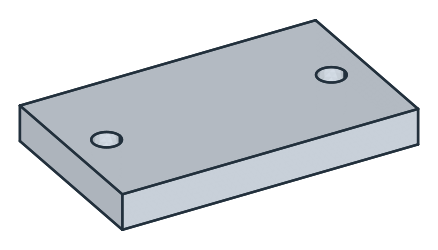
px.Pad extrudes the sketch 12 up, the plate’s thickness (Figure 2):
[5]:
block = px.Pad(base, 12)
The boss
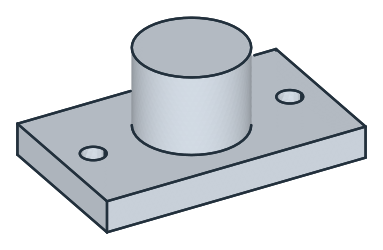
The boss is a circle of 40 around the origin, sketched on the plate’s top, the face highest in \(z\). It is padded 30 up from the face, and + fuses it with the plate (Figure 3):
[7]:
boss = px.Sketch(block.faces.Max(occ.Z))
boss.Circle(40 / 2, id="boss")
boss.Constrain("boss.center", "origin", px.Coincident)
boss.Constrain("boss", px.Diameter, 40, id="boss_d")
block = block + px.Pad(boss, 30)  # + fuses two solids
The bore
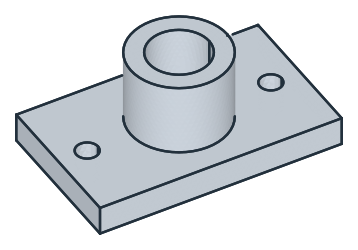
The bore for the post, 25 across, is sketched on the boss’s top, now the face highest in \(z\), and pocketed 35 deep. It ends 7 above the plate’s bottom (Figure 4):
[9]:
bore = px.Sketch(block.faces.Max(occ.Z))
bore.Circle(25 / 2, id="bore")
bore.Constrain("bore.center", "origin", px.Coincident)
bore.Constrain("bore", px.Diameter, 25, id="bore_d")
block = px.Pocket(block, bore, 35)  # 35 deep, against the face's normal: down
The checks
These are the volume, the mass in steel S235 (7.85 g/cm³) and the center of mass, with the origin in the middle of the plate’s bottom, to compare with your own model. The volume is the plate, \(100 \cdot 60 \cdot 12\), less its two holes, plus the boss, \(\pi \cdot 20^2 \cdot 30\), less the bore, \(\pi \cdot 12.5^2 \cdot 35\). The column base is symmetric about two planes, so its center of mass lies on the vertical axis:
[11]:
exact = 100 * 60 * 12 - 2 * math.pi * 4.5**2 * 12 + math.pi * 20**2 * 30 - math.pi * 12.5**2 * 35
c = block.center
print("volume", round(block.mass, 1), "mm³, exact", round(exact, 1))
print("mass", round(block.mass * 7.85e-6, 3), "kg")
print("center of mass", round(c.z, 2), "above the bottom, off the axis by", round(math.hypot(c.x, c.y), 6))
volume 90991.7 mm³, exact 90991.7
mass 0.714 kg
center of mass 11.21 above the bottom, off the axis by 0.0
The column base as STEP, for another CAD system:
[12]:
block.WriteStep("column_base.step")
The column base as STEP: column_base.step