planex2d

About

  • Installation
    • Optional packages
  • API conventions
    • Chaining and copies
    • Reading the arguments
    • Points
    • Planes
    • Angles and units
    • Queries
    • Errors and warnings
  • How planex2d is tested
    • Tests written by hand
    • Agentic testing
    • Fuzz tests
  • Building and contributing
    • Requirements
    • Build
    • Tests
    • Documentation
    • Contributing
  • How AI is used in this project
    • Development
    • Documentation
    • Testing
  • License and notices
    • Eigen 3.4.0
      • Licenses of the Eigen files planex2d compiles
    • pybind11
    • Taskflow 4.1.0
    • Libraries planex2d uses but does not include
    • Packages planex2d imports when they are installed
    • Data files under other licenses
  • Roadmap
    • Installation
    • Kernel
    • Sketch
    • Constraints
    • Measuring
    • OpenCASCADE
    • Files and integrations
    • Experimental

Core

  • Basics
    • Objects
      • Objects in planex2d
      • Lines and arcs
      • Splines
      • Wires and faces
      • Faces, shapes and compounds
    • In space
      • The plane in 3D
      • Moving, rotating, mirroring, scaling
    • Data
      • Names and colors
      • Units
      • Tolerances
    • 3D
      • Pad and Pocket
  • Plotting
    • General
      • matplotlib
      • plotly
      • SVG
      • Marking edges
      • In 3D
    • Sketches
      • Sketch plots
    • Measurements and fields
      • Measurements
      • Fields
    • Everything at a glance
  • Quick sketch
    • Drawing
      • Sketch or QuickSketch
      • Lines and arcs
      • Circles and rectangles
      • Slots, keyholes and polygons
      • Splines
      • Several loops
    • References
      • To, from and until
      • Parallel, perpendicular, angle
      • Tangents
      • Arcs from references
      • Choosing between solutions
      • Construction elements and points
      • Automatic ids
    • Editing
      • Fillets and chamfers
      • Extending edges
      • Offsets
      • Trimming and splitting
      • Symmetry
    • Placement
      • Placing a sketch
    • Design
      • Parametric design
    • Everything at a glance
  • Constraint sketches
    • Constraining
      • Drawing with constraints
      • Converting sketches
      • Constraints and dimensions
      • Fully, under- and over-constrained
    • Changing the design
      • Changing dimensions
      • Expressions: design rules
      • Formulas: a dipstick for a tank
    • More geometry
      • Symmetry and patterns
      • Splines
      • Trim, split and project
      • Offsets and profiles revisited
    • Beyond drawings
      • Mechanisms: the sketch as a solver
  • Booleans
    • Two faces
      • Three operations
      • Union
      • Difference and intersection
      • Names are kept
    • Many faces at once
      • A perforated sheet
      • A Reuleaux triangle
      • A stress test
    • Faces and wires
      • A truss from its member center lines
      • Glued, the members stay separate
      • Overlapping stretches are kept once
    • Splitting and trimming
      • A segmented ring
      • Trimming a blank
      • Closed cutters punch holes
      • Wires
      • Cutters from 3D
      • The rules
    • Traces and pads
      • Check
      • Pads and drills
    • Everything at a glance
  • Measuring
    • Measurements
      • Areas, centroids and second moments
      • Boxes, crossings and open ends
      • Distances and clearances
      • Inside or outside
      • Dimensions in a sketch
    • Analysis
      • Part analysis
    • Everything at a glance
  • Files
    • DXF
      • A gasket drawing
      • Polylines with arcs
      • Units
      • Gaps
    • STEP and BREP
    • SVG
    • shapely
    • KiCad
    • gmsh
  • Defeaturing and simplification
    • Small gaps
      • A square that does not close
      • On export and when reading
    • Small edges
      • A step of 10⁻⁵
      • On export
    • Collinear lines
      • A bottom in four pieces
    • Fitting arcs
      • A measured bore
      • Tolerance
      • On export
    • Fitting splines
      • An ellipse from 128 segments
      • Arcs first
    • The steps, in order
  • Comparison with other libraries
    • Union of many discs
    • Union of traces
    • Merging split edges
    • Nearly coincident edges
    • Gluing many faces

Integrations

  • OpenCASCADE
    • Export
      • To OCC shapes
      • Export options
      • Splines as arcs
    • Modeling
      • A C-clamp, step by step
      • Sketching on and projecting 3D geometry
      • Lofting sections
      • Lofts with guide curves
    • Everything at a glance
  • netgen and NGSolve
    • Getting started
      • Coming from netgen's WorkPlane
      • Naming and marking
      • Identifications
    • Meshing and fields
      • Meshing a face
      • Fields and cuts
      • Solids and meshes in the webgui
      • Field solvers as measurements
      • From level sets
  • gmsh and FEniCSx
    • A minimal example
    • A trimmed resistor
    • The mesh
    • The resistance
    • Drawing the result
    • More
  • shapely
    • A minimal example
    • To shapely
    • Predicates and distances
    • From shapely and back to arcs
    • Line strings
  • SciPy
    • A minimal example
    • A dimension from a requirement
    • Optimizing a cold plate
    • Fitting a sketch to measured points
    • At a glance
    • In 3D
  • PyTorch
    • A minimal example
    • The plate and its two measurements
    • The baseline: COBYLA from the regular grid
    • 40 layouts that fill the space
    • The surrogate
    • Search the model, solve the winners
    • Polish the winner
    • More
    • In 3D
  • KiCad
    • A minimal example
    • A real board
    • Both copper layers
    • What the board looks like
    • Copper per net
    • A clearance check
    • The board in 3D
    • Writing a board
    • Boards from other programs
  • NumPy
    • A minimal example
    • Arrays in
    • Arrays out
    • A million points at once
    • More

Examples

  • Machines and vehicles
    • Toy plane
    • Model rocket
    • Rear wing with DRS
    • Suspension kinematics
    • Excavator arm
    • Spur gears under load
    • Planetary gearbox
    • Wankel engine
    • Idler plate
  • Mechanisms
    • Four-bar linkage
    • Hood hinge
    • Jansen linkage
    • Straight-line linkages
    • Geneva drive
    • Cycloidal drive
    • Belt drives
    • Drilling a square hole
  • Physics
    • Isospectral drums
    • Boat stability
    • Flow through sand
    • Solar shading
  • Fields and simulation
    • Surface magnet motor
    • Heat sink
    • Hilbert heater
    • Parallelogram flexure
    • Vivaldi antenna
    • Patch antenna
    • Voronoi bone
    • Lens ray tracing
    • Airplane windows
  • Manufacturing
    • Gear cutting
    • Pocket milling
    • A slicer for 3D printing
    • Laser-cut box
    • Stencil lettering
  • Geometry and design
    • Penrose tiling
    • Rose window
    • Path planning
    • The moving sofa
    • Prince Rupert's cube
    • The coastline paradox
    • Drawing a logo

Experimental

  • Deformable shapes
    • Displacements and topology changes
      • Moving the hole up
      • What happens at a topology change
      • Results
    • Displacements from NGSolve
      • A harmonic extension
      • In motion

API

  • API reference
    • Geometry
      • Edges and wires
      • Faces, shapes and compounds
      • Planes
    • Sketches
      • Constraints and dimensions
      • References
    • Boolean operations and transformations
    • Selections and views
    • Files and other libraries
    • OpenCASCADE and netgen
    • Plotting
    • Measurements
    • Units, settings and warnings
    • Experimental
planex2d
  • Examples
  • Drawing a logo
  • View page source

Drawing a logo

Can planex2d draw its own logo? The example is planex2d’s mark, read from its SVG file: a Reuleaux triangle of width s = 74, the curve of constant width, split into the three curved faces of a tetrahedron seen from one corner and meshed into 27 curved triangles. Each triangle is three quadratic Bézier curves, and the outline is three arcs. planex2d draws every Bézier curve exactly as a B-spline of degree 2 and every arc as an arc, and the drawing is checked against what it should satisfy: the outline is equally wide in every direction, and the triangles cover it without gaps or overlaps. Lengths are in the units of the SVG.

The planex2d mark, drawn by planex2d from its own SVG

[1]:
import math
import re
import matplotlib.pyplot as plt
import planex as px

The path data

The SVG holds 30 paths. The d attribute of each is a list of drawing commands:

  • M x y moves the pen to (x, y);

  • Q cx cy x y draws a quadratic Bézier curve to (x, y), with the control point (cx, cy);

  • A r r 0 0 0 x y draws an arc of radius r to (x, y);

  • Z closes the path.

The SVG’s y axis points down and planex2d’s up, so a point (x, y) of the SVG becomes (x, 100 − y). commands splits the d of a path into its commands, and curves gives its Bézier curves as (start, control point, end):

[3]:
svg = open("../_static/brand/planex2d-mark.svg").read()
paths = [dict(re.findall(r'([a-z-]+)="([^"]*)"', tag)) for tag in re.findall(r"<path [^>]*>", svg)]


def point(x, y):
    return (x, 100 - y)


def commands(d):
    return [(letter, [float(v) for v in args.split()]) for letter, args in re.findall(r"([MQA])([^MQAZ]*)", d)]


def curves(d):
    pen, out = None, []
    for letter, values in commands(d):
        if letter == "M":
            pen = point(*values)
        else:
            out.append((pen, point(*values[:2]), point(*values[2:])))
            pen = out[-1][2]
    return out


triangle_paths = [p for p in paths if p["fill"] != "none"]
mesh_lines = next(p for p in paths if p["stroke"] == "#ffffff")
dividers = next(p for p in paths if p["fill"] == "none" and "Q" in p["d"] and p["stroke"] != "#ffffff")
rim = next(p for p in paths if "A" in p["d"])
print(len(triangle_paths), "triangles, the mesh lines, the dividers and the outline")
print("outline:", rim["d"])
27 triangles, the mesh lines, the dividers and the outline
outline: M50 12.3A74 74 0 0 0 13 76.4A74 74 0 0 0 87 76.4A74 74 0 0 0 50 12.3Z

The outline

The outline is a Reuleaux triangle: three arcs of radius 74, each about the corner opposite to it. Arc(end, r) draws an arc of radius r from the pen to the end; without reverse, it takes the short way between two corners (Figure 1).

[4]:
start, *arcs = commands(rim["d"])
sketch = px.QuickSketch(point(*start[1]))
for _, values in arcs:
    sketch.Arc(point(*values[-2:]), values[0])
outline = sketch.Face()
s = arcs[0][1][0]
corners = [point(*values[-2:]) for _, values in arcs]
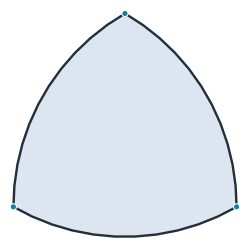
Three arcs of radius 74 about the opposite corners
Figure 1: The outline, a Reuleaux triangle

Check: a Reuleaux triangle is as wide in every direction as its arcs’ radius, like a circle, and its area is (π − √3)/2 s². Turned in steps of 5° and measured across, the outline is 74 wide to within the 0.1 to which the SVG rounds its points. The same rounding makes two of its sides 74.01 long, and its area a little larger than the exact one:

[6]:
widths = []
for angle in range(0, 360, 5):
    (x0, _), (x1, _) = outline.Rotated((50, 50), angle).bounding_box
    widths.append(x1 - x0)
print("width from", min(widths), "to", max(widths))
print("area", outline.mass, "exact", (math.pi - math.sqrt(3)) / 2 * s**2)
width from 74.00000269399769 to 74.01412011995154
area 3860.3705784051845 exact 3859.3255744052676

The curved triangles

A quadratic Bézier curve is the B-spline of degree 2 with the curve’s three points as poles and the knots 0, 0, 0, 1, 1, 1, so px.BSpline draws it exactly. Each triangle is the face bounded by its three curves, in its color from the SVG (Figure 2).

[7]:
def bezier(start, control, end):
    return px.BSpline([start, control, end], [0, 0, 0, 1, 1, 1], degree=2)


triangles = [px.Face([bezier(*c) for c in curves(p["d"])]) for p in triangle_paths]
colors = [p["fill"] for p in triangle_paths]
The 27 curved triangles in the colors of the SVG
Figure 2: The curved triangles

Check:

  • The triangles neither overlap nor leave gaps: their areas add up to the area of their union, which is one face.

  • Glued, they share their edges exactly: 27 faces, 45 edges and 19 vertices. A curved triangle of order 2 carries a node in the middle of each edge, so the mesh has 19 + 45 = 64 nodes, as the brand panel says.

  • The rim of the triangles is made of Bézier curves, not arcs, and it follows the outline closely: the area between the two is less than a thousandth of the mark’s.

[9]:
union = px.Unify(triangles)
print("sum of the areas", sum(t.mass for t in triangles), "union", union.mass, "in", len(union.faces), "face")
glued = px.Glue(triangles)
print(len(glued.faces), "faces,", len(glued.edges), "edges,", len(glued.vertices), "vertices,",
      len(glued.vertices) + len(glued.edges), "nodes of order 2")
print("between the rim and the outline", (outline - union).mass + (union - outline).mass)
sum of the areas 3860.826418203769 union 3860.8264182040425 in 1 face
27 faces, 45 edges, 19 vertices, 64 nodes of order 2
between the rim and the outline 2.9542237009093966

The mark

The mark is drawn in the SVG’s own colors and line widths: each triangle filled and edged in its color, the mesh lines white at 60 % opacity, and the dividers and the outline in ink, over the SVG’s view box of 78 × 78.

[10]:
(np.float64(11.0), np.float64(89.0), np.float64(11.7), np.float64(89.7))

See Splines for B-splines given by their poles and knots, and Booleans for unions and glued faces.

Previous Next

© 2026 Sebastian Hirnschall · Imprint · Privacy · GitHub · PyPI

Built with Sphinx using a theme provided by Read the Docs.