Ratchet pawl
A pawl swings on a pin next to a ratchet wheel. A spring holds its tip against the teeth, it rides over their backs one way, and its catch face stops the wheel at a tooth’s radial face the other way. Its outline is a boss around the pivot, a back and an underside tangent to the boss, and a tooth at the tip, where the back and the catch face meet at an angle. As a sketch, it is one chain around the outline. Model the pawl from the drawing in planex2d or in any CAD system, then check its area and centroid against the values at the end of the page. A solution in planex2d follows.

[1]:
import planex as px
The outline
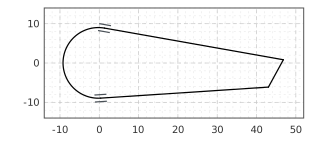
The origin is the pivot. The chain starts under the boss, runs clockwise around it and along the back to the tip, turns down the catch face, and Close draws the underside back to the start, all roughly. auto_constraint=True ties the joints and keeps the back tangent to the boss, the smooth joint of the chain. The underside meets the boss at an angle as drawn, so its tangency is a constraint of its own (Figure 1):
[3]:
pawl = px.Sketch(auto_constraint=True)
pawl.Move((0, -9), dir=(-1, 0)).Arc(9, -190, id="boss")  # a negative sweep runs clockwise
pawl.Line(46, id="back")
pawl.Turn(-110).Line(8, id="catch_face")  # Turn(-110) turns the pen right by 110°
pawl.Close(id="underside")
pawl.Constrain("underside", "boss", px.Tangent)
print("status", pawl.status, "| degrees of freedom", pawl.dof)
status under | degrees of freedom 7
The dimensions
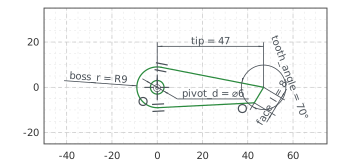
The boss has a radius of 9 around the pivot, and the pivot hole is 6 across, concentric with it. The tip lies on the horizontal axis, 47 from the pivot. The catch face is 8 long, at 70° to the back, the angle of the tooth. With these, nothing in the sketch is left free (Figure 2):
[5]:
pawl.Circle(6 / 2, concentric="boss", id="pivot")
pawl.Constrain("boss.center", "origin", px.Coincident)
pawl.Constrain("boss", px.Radius, 9, id="boss_r")
pawl.Constrain("pivot", px.Diameter, 6, id="pivot_d")
pawl.Constrain("back.end", "H", px.Coincident)
pawl.Constrain("back.end", "V", px.Distance, 47, id="tip")
pawl.Constrain("catch_face", px.Distance, 8, id="face_l")
pawl.Constrain("back", "catch_face", px.Angle, 70, id="tooth_angle")
print("status", pawl.status, "| degrees of freedom", pawl.dof)
status full | degrees of freedom 0
The checks
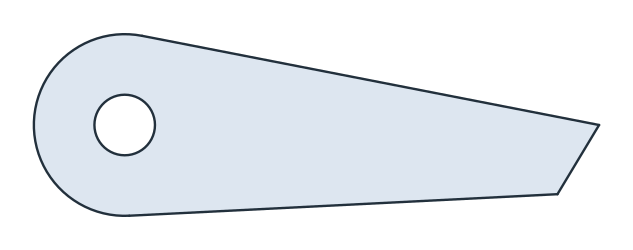
These are the area and the centroid, with the origin at the pivot and the tip on the positive x axis, to compare with your own model (Figure 3):
[7]:
face = pawl.Face()
c = face.center
print("area", round(face.mass, 2), "mm²")
print("centroid", tuple(round(v, 2) for v in c[:2]))
area 668.61 mm²
centroid (15.67, -1.09)
The pawl as DXF in millimeters, for another CAD system or a laser cutter:
[9]:
pawl.WriteDXF("ratchet_pawl.dxf", unit=px.mm, scale=1) # scale=1: the numbers as they are
The pawl as DXF: ratchet_pawl.dxf