Flange gasket
A flange gasket seals the joint between two pipe flanges, with the bolts of the joint through its holes. The holes sit on a bolt circle, equally spaced, which makes the gasket an exercise in patterns. Model the gasket from the drawing in planex2d or in any CAD system, then check its area against the value at the end of the page. A solution in planex2d follows.

[1]:
import math
import planex as px
The circles
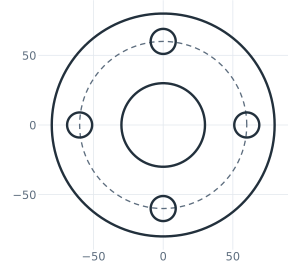
The gasket is drawn as four circles around the origin, the outside, the bore, the bolt circle as a construction circle, and the first hole, placed roughly on the bolt circle to the right. The first three are drawn at the pen, the sketch’s current point, so they share one center, and auto_constraint makes them concentric. CircularPattern copies the hole around the origin, 4 in all, and keeps the copies tied to it, 90° apart. The sizes are rough, and the dimensions in the next section set
them (Figure 1).
[3]:
gasket = px.Sketch(auto_constraint=True)
gasket.Circle(80, id="outside")
gasket.Circle(30, id="bore")
gasket.Circle(60, id="bolt_circle", construction=True)
gasket.Circle(9, center=(60, 0), id="hole")
gasket.CircularPattern(["hole"], "origin", 4, id="holes");
The dimensions
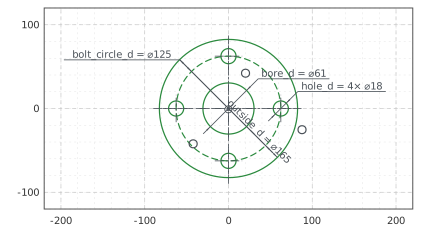
The outside’s center is the origin, which the bore and the bolt circle share, and the first hole sits on the bolt circle and on the horizontal axis. Its copies follow. The four diameters give the sizes (Figure 2):
[5]:
gasket.Constrain("outside.center", "origin", px.Coincident)
gasket.Constrain("hole.center", "bolt_circle", px.Coincident)  # a point on a circle
gasket.Constrain("hole.center", "H", px.Coincident)
gasket.Constrain("outside", px.Diameter, 165, id="outside_d")
gasket.Constrain("bore", px.Diameter, 61, id="bore_d")
gasket.Constrain("bolt_circle", px.Diameter, 125, id="bolt_circle_d")
gasket.Constrain("hole", px.Diameter, 18, id="hole_d")
print("status", gasket.status, "| degrees of freedom", gasket.dof)
status full | degrees of freedom 0
The checks
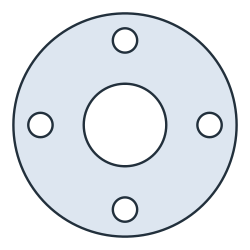
This is the area, to compare with your own model. It is the outside less the bore and the four holes, \(\tfrac{\pi}{4} \cdot (165^2 - 61^2 - 4 \cdot 18^2)\) (Figure 3):
[7]:
face = gasket.Face()
print("area", round(face.mass, 2), "mm², exact", round(math.pi / 4 * (165**2 - 61**2 - 4 * 18**2), 2))
area 17442.12 mm², exact 17442.12
The gasket as DXF in millimeters, for a cutting plotter or a laser cutter:
[9]:
gasket.WriteDXF("flange_gasket.dxf", unit=px.mm, scale=1) # scale=1: the numbers as they are
The gasket as DXF: flange_gasket.dxf