Parallel, perpendicular, angle
A line can take its direction from another edge instead of from the pen. parallel= runs it parallel to the edge, and with distance= it becomes a parallel copy at that distance. perpendicular= runs it at a right angle to the edge, and angle=(a, edge) at the angle a to it. Together with an end on a target, this draws most machined profiles without a single computed point.
[1]:
import math
import planex as px
A dovetail slide
The example is a slide, a block of 60 × 30 with a dovetail groove that is 24 wide at the surface and 10 deep, with flanks at 60° (Figure 1). The block is drawn in two steps.
First the construction lines. The bottom is the reference. The top and the floor of the groove are parallel copies of it, 30 and 20 above. The line of the left flank runs at 60° to the bottom through the groove’s left corner at the surface, (−12, 30).
[3]:
s = px.QuickSketch((-30, 0))
s.Line(60, id="bottom")
s.Line(-60, parallel="bottom", distance=30, id="top", construction=True)
s.Line(-60, parallel="bottom", distance=20, id="floor", construction=True)
s.Line(20, angle=(180 + 60, "bottom"), through=(-12, 30), id="left flank line", construction=True);
Then the outline, counterclockwise from the end of the bottom. The right flank runs down at 60° until it meets the floor, the groove floor runs back until it meets the left flank’s line, and the left flank runs up on that line until it meets the top.
[4]:
s.Turn(90).Line(30, id="right side")
s.Turn(90).Line(18, id="right shoulder")
s.Line("floor", angle=(-60, "bottom"), id="right flank")
s.Line("left flank line", parallel="bottom", id="groove floor")
s.Line("top", congruent="left flank line", id="left flank")
s.Line((-30, 30), id="left shoulder").Close(id="left side")
slide = s.Face()
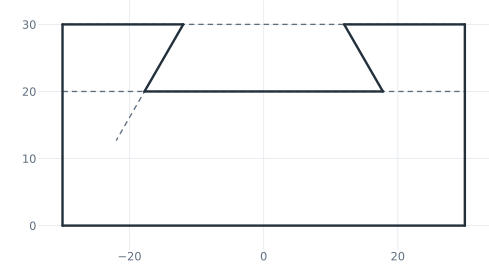
(a) The sketch, its construction lines dashed
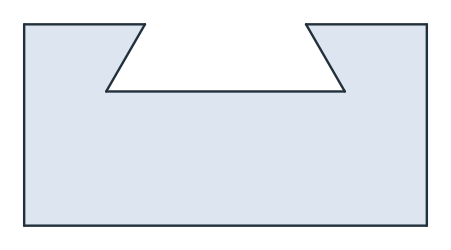
(b) The slide
The area is the block minus the groove, a trapezoid 24 wide at the top and 10 deep:
[6]:
print("area", slide.mass, "exact", 60 * 30 - 10 * (24 + 10 / math.tan(math.radians(60))))
area 1502.2649730810376 exact 1502.2649730810374
A bracket with a constant wall
The example is a triangular bracket, 10 long, with a wall 0.8 thick all around (Figure 2). Its outer contour is a ramp at 35° from the corner to the wall, the wall down to the ground, and the ground back. The ground and the wall are construction lines.
[7]:
t = 0.8
b = px.QuickSketch()
b.Move((-1, 0)).Line((12, 0), id="ground", construction=True)
b.Move((10, -1)).Line((10, 8), id="wall", construction=True)

b.Move((0, 0)).Line("wall", angle=35, id="ramp")
b.Line("ground", congruent="wall", id="back")
b.Close(id="base");
The inner contour is made of parallel copies of the three sides, each at the distance t inward, so the wall thickness is a single number. Two more lines join the copies where they meet. Last, the axis of a drain hole runs perpendicular to the ramp, from its midpoint down to the ground.
[8]:
b.Move((0, 0), dir=(1, 0)).Line(14, parallel="ramp", distance=-t, id="ramp in", construction=True)
b.Move((0, 0), dir=(1, 0)).Line(12, parallel="ground", distance=t, id="ground in", construction=True)
b.Move((0, 0), dir=(0, 1)).Line(9, parallel="wall", distance=t, id="wall in", construction=True)
b.Line("ground in", "wall in", congruent="ramp in")
b.Line("ground in", congruent="wall in")
b.Close()

b.Move("ramp.mid")
b.Line("ground", perpendicular="ramp", id="drain", construction=True)
bracket = b.Face()
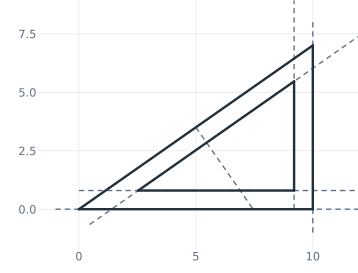
(a) The sketch: offsets and the drain axis
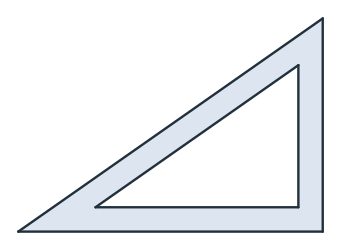
(b) The bracket
The inner triangle is the outer one shrunk toward the center of its incircle, so the area follows from the inradius. The drain axis, from the ramp’s midpoint to the ground, is a/2 · tan β / cos β long, with a = 10 and β = 35°:
[10]:
beta = math.radians(35)
height = 10 * math.tan(beta)
outer = 10 * height / 2
inradius = outer / ((10 + height + math.hypot(10, height)) / 2)
print("area", bracket.mass, "exact", outer * (1 - ((inradius - t) / inradius) ** 2))
print("drain", b.Edge("drain").mass, "exact", 5 * math.tan(beta) / math.cos(beta))
area 19.468607780995338 exact 19.46860778099532
drain 4.273977847528156 exact 4.273977847528149
For a wall of constant thickness around a closed outline, Offset does the same in one call. See Offsets for details.