Slots, keyholes and polygons
Some outlines come up in almost every part: a slot for an adjustable screw, an arc slot for an angle adjustment, a keyhole for hanging a part on a screw head, and a hexagon for a nut. Each of them is one call in a sketch:
Call |
Draws |
|---|---|
|
A straight slot of width w along a spine of length l, with round ends |
|
A slot of width w along an arc of radius r and the angle sweep, in degrees |
|
A slot of width w that starts in a round hole of radius r |
|
A regular polygon with n corners on a circle of radius r |
|
A regular hexagon with the width across flats af, as for a nut |
The spine of a slot or a keyhole is placed like a line, so Slot takes every form of Line and ArcSlot every form of Arc, with the width as the last number. Polygon and Hexagon are placed like a circle. The spine and the polygon’s circle are construction elements.
[1]:
import math
import planex as px
A motor mounting plate
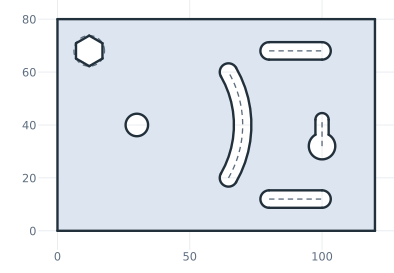
The example is a mounting plate of 120 × 80 for a small motor, with every one of these shapes (Figure 1):
a pivot hole of 8.5 at (30, 40), about which the motor turns;
an arc slot 6.6 wide around the pivot, on a radius of 40, from −30° to 30°, for the screw that holds the motor;
two slots 6.6 wide and 20 long for the screws of a belt tensioner;
a keyhole, so that the plate can hang on a screw head;
a hexagonal opening that holds an M6 nut, 10 across flats.
The spine of each straight slot and of the keyhole starts at the pen and runs along the direction given to Move. The arc slot uses the keyword form of Arc: its start point, the width, and the center and sweep of its spine. The hexagon takes its center as the first two numbers, like a circle.
[3]:
sk = px.QuickSketch().Rectangle(120, 80, id="plate")
sk.Circle(30, 40, 4.25, id="pivot")
a = math.radians(-30)
sk.ArcSlot((30 + 40 * math.cos(a), 40 + 40 * math.sin(a)), 6.6, center=(30, 40), sweep=60, id="tilt")
for k, y in enumerate((12, 68)):
    sk.Move((80, y), dir=(1, 0)).Slot(20, 6.6, id=f"tension {k + 1}")
sk.Move((100, 32), dir=(0, 1)).Keyhole(10, 5, 5, id="hanger")
sk.Hexagon(12, 68, 10, id="nut")
plate = sk.Face()
Each opening has a closed form for its area. A slot is a rectangle with two half discs, and an arc slot the band along its arc with two half discs. A keyhole is the hole and the slot with its end cap, less the strip of the slot inside the hole. A hexagon with the width across flats af has the area √3/2 af².
[5]:
def slot(length, width):
    return length * width + math.pi * (width / 2) ** 2


def keyhole(length, width, radius):
    inside = width / 2 * math.sqrt(radius**2 - width**2 / 4) + radius**2 * math.asin(width / (2 * radius))
    return math.pi * radius**2 + length * width + math.pi * (width / 2) ** 2 / 2 - inside


openings = math.pi * 4.25**2 + slot(math.radians(60) * 40, 6.6) + 2 * slot(20, 6.6)
openings += keyhole(10, 5, 5) + math.sqrt(3) / 2 * 10**2
print("area", plate.mass, "exact", 120 * 80 - openings)
area 8699.114450362462 exact 8699.11445036246
The parts of a shape
Every opening is a wire of its own, tilt, tension 1 and so on, and its parts have ids of their own: the sides left and right, the caps startcap and endcap, and for a keyhole the hole. The spine is the construction line spine. The parts can be measured, selected and referred to like any other element:
[6]:
for part in ("left", "right", "startcap", "endcap", "spine"):
    print("tension 1." + part, "length", sk.Measure("tension 1." + part)["length"])
tension 1.left length 20.0
tension 1.right length 20.0
tension 1.startcap length 10.367255756846319
tension 1.endcap length 10.367255756846319
tension 1.spine length 20.0
In a constraint sketch, the width of a slot, the radius of a keyhole’s hole and the size of a polygon are dimensions that can change later. See Offsets and profiles revisited for details. See Circles and rectangles for rectangles from corners and around a center, and Fillets and chamfers for rounding the corners of a part.