Altium
Altium Designer saves a board in a binary file with the extension .PcbDoc, Altium CircuitStudio as .CSPcbDoc and Altium CircuitMaker as .CMPcbDoc, in variants of the same format. px.FromKiCad converts them with kicad-cli, the command line tool of KiCad 10 or later, and returns the same dict of layers as for a KiCad board. KiCad’s importer takes over the copper layers with their tracks, vias, pads and polygon pours, the outline and cutouts, the silkscreen, solder mask, paste
and mechanical layers, and the nets. See KiCad, Altium, Eagle and more for how the tool is found and how the copper pours of a converted board are filled.
[1]:
import collections
import planex as px
The board
The example is the LCD baseboard that Antmicro designed in Altium Designer for the Parallella board, a four-layer board released as open hardware under the Apache-2.0 license, Copyright (c) 2014-2023 Antmicro. Download: parallella-lcd-baseboard.PcbDoc (7.8 MB) and its license.
[3]:
board = px.FromKiCad("parallella-lcd-baseboard.PcbDoc")
for name, layer in board.items():
    print(f"{name:10} {len(layer.faces):4} faces, {1e6 * layer.mass:9.2f} mm²")
PlanexWarning: FromKiCad: 139 texts, 8 dimensions left out (not supported yet)
F.Cu        367 faces,    820.83 mm²
In1.Cu      121 faces,   7381.47 mm²
In2.Cu      183 faces,   7287.78 mm²
B.Cu        213 faces,    448.35 mm²
Edge.Cuts     1 faces,   7679.25 mm²
F.Paste     439 faces,    189.35 mm²
F.SilkS     111 faces,    201.15 mm²
F.Mask      459 faces,    796.98 mm²
B.Mask      109 faces,    494.15 mm²
User.2        1 faces,     70.54 mm²
User.3        4 faces,      6.34 mm²
User.13       1 faces,      4.67 mm²
User.15       2 faces,      1.39 mm²
The four copper layers come first, from the top, then the outline and the layers that hold something. Altium’s mechanical layers arrive as KiCad’s user layers, User.2 for Mechanical 2 and so on. The text and the dimensions on the board are not read yet, and FromKiCad reports how much it left out.
Four copper layers
The outer layers carry the tracks and pads, and the two inner layers are planes (Figure 1).

(a) F.Cu

(b) In1.Cu

(c) In2.Cu

(d) B.Cu
The share of the board that each net of an inner layer covers shows what the planes are. In1.Cu is a ground plane, and In2.Cu is a power plane split between three supplies:
[5]:
for name in ("In1.Cu", "In2.Cu"):
    area = collections.Counter()
    for f in board[name].faces:
        area[f.name or "(no net)"] += f.mass
    print(name, [(net, f"{100 * a / outline.mass:.1f} %") for net, a in area.most_common(3)])
In1.Cu [('GND', '94.3 %'), ('SYS_5P0V', '0.4 %'), ('+3.3V', '0.2 %')]
In2.Cu [('SYS_5P0V', '59.9 %'), ('+3.3V', '25.1 %'), ('VDD_GPIO', '3.8 %')]
The gaps of the split plane
Where a plane is split, the gap between its regions has to stay above the manufacturer’s minimum. Measure(net, to=other) gives the distance between the faces of two nets, so each pair of supplies on In2.Cu is one call. The pours are KiCad’s fills of the imported zones, so the gaps follow the clearances that KiCad took over from the Altium file.
[6]:
plane = board["In2.Cu"]
for a, b in (("SYS_5P0V", "+3.3V"), ("SYS_5P0V", "VDD_GPIO"), ("+3.3V", "VDD_GPIO")):
    print(a, "to", b, round(1e3 * plane.Measure(a, to=b)["distance"], 4), "mm")
SYS_5P0V to +3.3V 0.2037 mm
SYS_5P0V to VDD_GPIO 0.259 mm
+3.3V to VDD_GPIO 0.259 mm
The narrowest gap of the split plane, 0.2037 mm, lies between SYS_5P0V and +3.3V, and the other two pairs are 0.259 mm apart. These are the numbers to compare with the minimum of the board’s manufacturer.
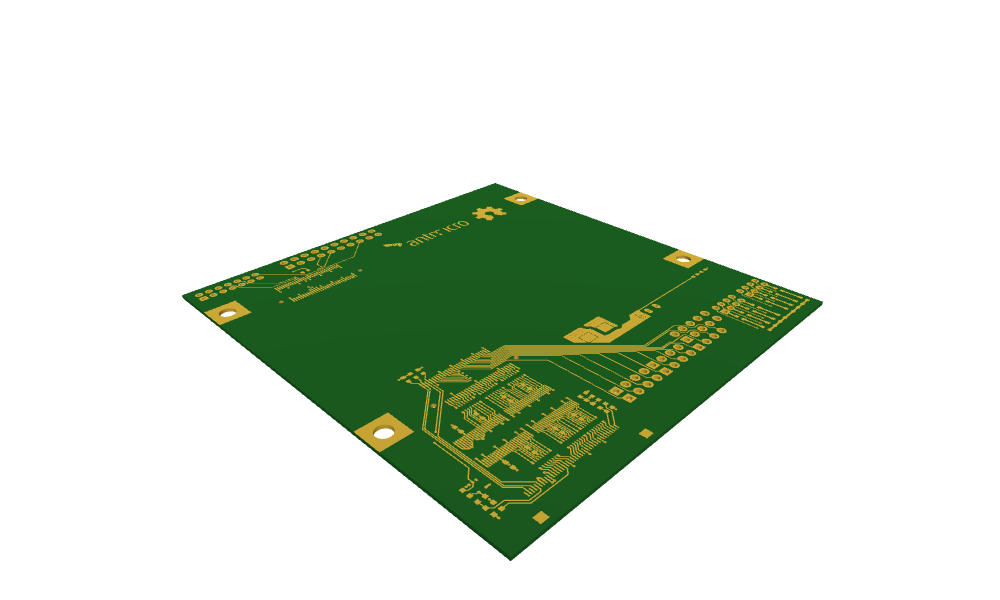
The board in 3D
With a stackup instead of a layer name, FromKiCad returns the board as one glued OpenCASCADE shape, with a dielectric between every two copper layers, drilled, the hole walls named "pth" and "npth" and the copper at its heights, named by net. See The board in 3D on the KiCad page for details. KiCad takes over the stackup of the Altium file, so px.stackups.kicad builds the board with its own three dielectrics. The thickness of each comes from its top
and bottom faces:
[7]:
import netgen.occ as occ
from ngsolve_webgpu.jupyter import Draw


def thicknesses(solid):
    return [round(1e3 * (s.faces.Max(occ.Z).center.z - s.faces.Min(occ.Z).center.z), 4) for s in solid.solids]


solid = px.FromKiCad("parallella-lcd-baseboard.PcbDoc", px.stackups.kicad)
walls = {n: sum(1 for f in solid.faces if f.name == n) for n in ("pth", "npth")}
print("dielectrics", thicknesses(solid), "mm from the top")
print("hole walls:", walls["pth"], "plated,", walls["npth"], "unplated")
Draw(solid, settings={"Objects": {"Edges": False}})
PlanexWarning: FromKiCad: 4 texts left out (not supported yet)
dielectrics [0.32, 0.127, 0.254] mm from the top
hole walls: 666 plated, 12 unplated
A manufacturer’s table gives the board as it would be made there. JLCPCB’s 7628 stackup for four layers has a core of 1.065 mm between two prepregs of 0.2104 mm, and the dielectrics of the board come out at these thicknesses:
[8]:
made = px.FromKiCad("parallella-lcd-baseboard.PcbDoc", px.stackups.jlc7628)
print("table", px.stackups.jlc7628[4], "| board", thicknesses(made))
PlanexWarning: FromKiCad: 4 texts left out (not supported yet)
table [0.2104, 1.065, 0.2104] | board [0.2104, 1.065, 0.2104]