Lines and arcs
A sketch has a pen with a position and a direction. Every line and arc starts at the pen and leaves the pen at its end, pointing along the end of what it drew, so the next element continues from there. A line is given in one of three ways:
Line(l)draws a length l along the pen’s direction;Line(dh, dv)draws by an offset from the pen;Line((h, v))draws to a point.
Turn(angle) turns the pen by an angle in degrees, counterclockwise for a positive angle. An arc either continues the pen’s direction, as in Arc(r, sweep), or runs to a point and leaves the pen along a given direction, as in Arc(to, tangent=(dh, dv)). Close() joins the outline to its start. The four parts below show these forms, each checked against its area formula.
[1]:
import math
import planex as px
By length, offset and point
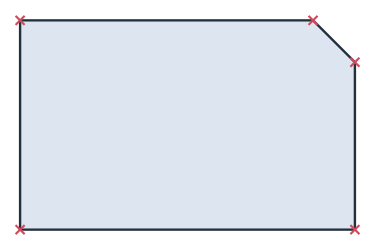
The example is a plate of 40 × 25 with one corner chamfered by 5 (Figure 1). It starts with a length along the pen’s direction, continues with two offsets, up and then diagonally across the chamfer, and goes to a point. Close draws the last side. The corners are marked.
[3]:
plate = px.QuickSketch().Line(40).Line(0, 20).Line(-5, 5).Line((0, 25)).Close().Face()
[5]:
print("plate", plate.mass, "exact", 40 * 25 - 5**2 / 2)
plate 987.5 exact 987.5
With Turn
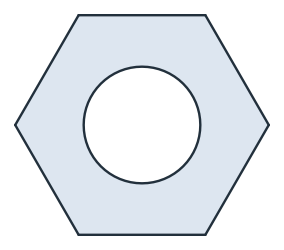
The example is an M10 hex nut, 16 across flats, with a tapped hole of 8.5 (Figure 2). Its side is 16/√3 long. Five sides are drawn by length and a turn of 60°, and Close draws the sixth. Hexagon(16) draws the same nut in one call (see Slots, keyholes and polygons). Here it is drawn side by side to show the pen.
[6]:
side = 16 / math.sqrt(3)
nut = px.QuickSketch((-side / 2, -8))
for _ in range(5):
    nut.Line(side).Turn(60)
nut.Close().Circle(0, 0, 4.25)
hexagon = nut.Face()
[8]:
print("nut", hexagon.mass, "exact", math.sqrt(3) / 2 * 16**2 - math.pi * 8.5**2 / 4)
nut 164.9574860633507 exact 164.95748606335064
Arcs that continue the pen
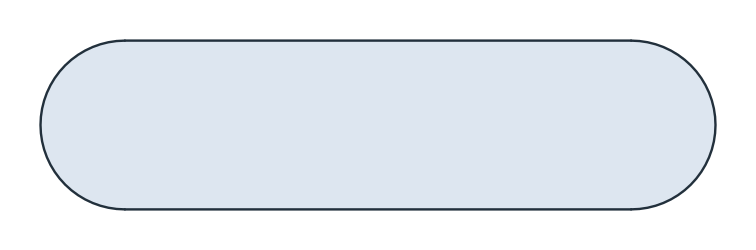
Arc(r, sweep) continues the pen’s direction on a circle of radius r and turns left for a positive sweep. The example is a slot of 30 × 10: a line of 30, a half turn on a radius of 5, the line back and the second half turn (Figure 3). Slot(30, 10) draws it in one call.
[9]:
slot = px.QuickSketch((-15, -5)).Line(30).Arc(5, 180).Line(30).Arc(5, 180).Face()
[11]:
print("slot", slot.mass, "exact", 30 * 10 + math.pi * 5**2)
slot 378.53981633974485 exact 378.53981633974485
Arcs to a point
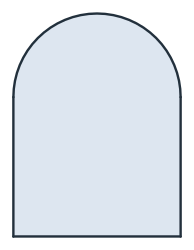
Arc(to, tangent=(dh, dv)) runs to a point, starting along the given direction. The example is an arched window, 12 wide and 10 high to the start of its arch (Figure 4). The arch starts straight up from the right side, which makes it a half circle over the width.
[12]:
window = px.QuickSketch().Line(12).Line(0, 10).Arc((0, 10), tangent=(0, 1)).Close().Face()
[14]:
print("window", window.mass, "exact", 12 * 10 + math.pi * 6**2 / 2)
window 176.54866776461628 exact 176.54866776461628
See To, from and until for lines that end on other edges, and Arcs from references for arcs on other circles or touching other edges.