Changing dimensions
sk["id"] = value sets one dimension and solves, while sk.Update({"a": 1, "b": 2}) sets several dimensions and solves once. The solver starts from the current geometry and moves it as little as it can, so a part keeps the shape it was drawn in.
[1]:
import math
import warnings
import planex as px
A parameter study
The example is a bottle in profile, drawn as one half from the axis around to the axis again, with the shoulder as a spline tangent to the body and the neck (see splines). Its volume as a solid of revolution follows from Pappus’s theorem as the area of the half times the path of its centroid, 2π x̄. Update changes the shoulder radius in a loop, and the volume follows.
[3]:
def bottle():
    sk = px.Sketch(id="bottle")
    sk.Move(sk.origin, px.Coincident).Line(30, 2, px.Horizontal, id="bottom")
    sk.Line(1, 50, px.Vertical, id="body")
    sk.Spline([(24, 66), (11, 76)], px.Tangent, id="shoulder")
    sk.Line(0, 14, px.Vertical, px.Tangent, id="neck")
    sk.Line(-10, 0, px.Horizontal, id="lip")
    sk.Constrain("lip.end", px.V, px.Coincident)
    waist = "shoulder.p1"
    sk.Constrain("bottom", px.Distance, 30, id="r")
    sk.Constrain("body", px.Distance, 50, id="h")
    sk.Constrain("neck", px.V, px.Distance, 10, id="r_neck")
    sk.Constrain("neck", px.Distance, 14)
    sk.Constrain("neck.start", px.H, px.Distance, 76, id="z_neck")
    sk.Constrain(waist, px.V, px.Distance, 27, id="r_shoulder")
    sk.Constrain(waist, px.H, px.Distance, 64, id="z_shoulder")
    sk.Close(id="axis")
    return sk


def volume(sk):
    half = sk.Face()
    return half.mass * 2 * math.pi * half.center[0]


sk = bottle()
print(sk.status, f"volume {volume(sk) / 1000:.2f} cm³")
radii = [20, 22, 24, 26, 27, 28]
volumes = [volume(sk.Update({"r_shoulder": r})) / 1000 for r in radii]
print([f"{v:.2f}" for v in volumes])
full volume 195.89 cm³
['184.60', '187.43', '190.50', '193.98', '195.89', '197.93']
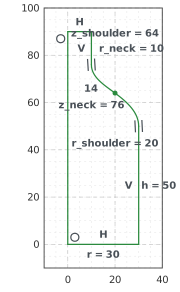
(a) r_shoulder 20
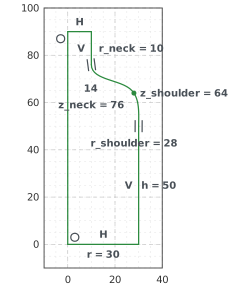
(b) r_shoulder 28
![Volume [cm³] over Shoulder radius: Update, then Pappus 20 185, 22 187, 24 191, 26 194, 27 196, 28 198](fig_8d9e28da6ea8d446.svg)
Walking in steps
A large change can turn a part around: a link swings through, or an arc flips. Update therefore halves every step that would turn a line or an arc by more than 30°, and follows the branch the sketch was drawn in. steps= requests more steps from the start.
Branch changes
If even the smallest step turns something around, the change is a branch change. For example, a line pulled back through its fixed start points the other way afterwards. A branch change produces a warning. With error_on_branch_change=True, which is on in strict mode, it is an error, and nothing changes.
[5]:
def pulled(**options):
    sk = px.Sketch(**options)
    sk.Move((0.5, 0), px.Fix).Line(0.5, 0, id="l")
    sk.Constrain("l", px.Horizontal)
    sk.Constrain("l.end", px.V, px.Distance, 1, id="x")
    return sk


with warnings.catch_warnings(record=True) as caught:
    warnings.simplefilter("always")
    pulled().Update({"x": 0.1})
print(caught[0].message)

strict = pulled(error_on_branch_change=True)
try:
    strict.Update({"x": 0.1})
except ValueError as e:
    print(e)
print("unchanged:", strict["x"], strict.Location("l.end"))
Update(x = 0.1): l turned round (180 degrees in one smallest step): the sketch leaves the branch it was drawn in
Update(x = 0.1): l turned round (180 degrees in one smallest step): the sketch leaves the branch it was drawn in; nothing changed (error_on_branch_change)
unchanged: 1.0 (1.0, 0.0)