NumPy
Points go into planex2d as arrays, shapes come out as arrays, and every query answers a whole array of points at once, in C++ without the Python interpreter in the loop. A mask, a signed distance field or a Monte Carlo integral of the exact geometry each take one call.
[1]:
import time
import numpy as np
import shapely
import planex as px
A minimal example
The example is a plate of 40 × 20 with a hole of radius 4. A hundred thousand random points, tested in one call, estimate its area, and the exact area is plate.mass:
[3]:
plate = px.QuickSketch().Rectangle(40, 20).Circle(4, center=(20, 10)).Face()
rng = np.random.default_rng(0)
points = rng.uniform((0, 0), (40, 20), size=(100_000, 2))
inside = plate.Contains(points)
print("Monte Carlo area", inside.mean() * 40 * 20, "exact", plate.mass)
Monte Carlo area 748.832 exact 749.7345175425633
Arrays in
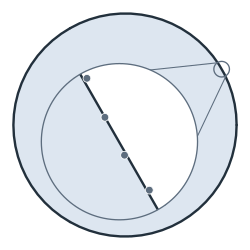
Every point argument takes an array row, and every list of points takes an array of shape (n, 2). px.FromPolyline builds a wire through all rows in one call. The example is a bore of radius 10, measured at 256 points with a scatter of ±0.03. It becomes a polyline face, and arc fitting turns it back into three arcs with radii within 0.04 of 10 (Figure 1):
[4]:
rng = np.random.default_rng(1)
t = np.linspace(0, 2 * np.pi, 256, endpoint=False)
r = 10 + rng.uniform(-0.03, 0.03, t.size)
scan = np.c_[r * np.cos(t), r * np.sin(t)]

bore = px.FromPolyline(scan, closed=True).Face()
fitted = bore.Copy().FitArcs(tol=0.1, max_edge_length=0.5)
print(len(bore.edges), "lines ->", len(fitted.edges), "arcs")
print("radii", [round(e.edge.radius, 4) for e in fitted.edges])
256 lines -> 3 arcs
radii [9.9683, 9.9619, 9.9928]
Arrays out
Polylines(tol) returns a shape as arrays, one per loop: the outer loop first and counterclockwise, then the holes clockwise, each closed by repeating its first point. For a single wire, wire.ToPolyline(tol) returns one array that runs the way the wire’s edges run. Every chord stays within tol of the exact edge.
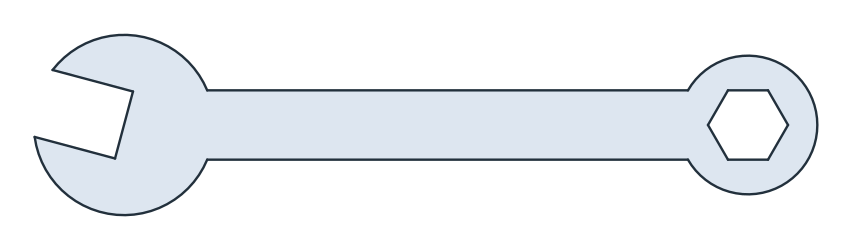
The example is a combination spanner for 10 mm across flats, with an open jaw at one end and a hexagonal ring at the other. Its two ends are discs in one sketch, the handle is a line offset by 5, and the jaw and the hexagon are cut out:
[6]:
ends = px.QuickSketch().Circle(13).Circle(90, 0, 10).Shape()
handle = px.Line((0, 0), (90, 0)).Offset(5)
jaw = px.QuickSketch((-30, -5)).Rectangle(30, 10).Face().Rotated((0, 0), -15)
hexagon = px.QuickSketch().Hexagon(90, 0, 10).Face()
spanner = px.Subtract([ends + handle, jaw, hexagon])
Because the holes run clockwise, the shoelace areas of all loops simply add up, and they converge to the exact area as tol shrinks. The same arrays make a shapely polygon without a loop over edges:
[7]:
def shoelace(a):
    x, y = a[:, 0], a[:, 1]
    return 0.5 * np.sum(x[:-1] * y[1:] - x[1:] * y[:-1])


for tol in (1e-2, 1e-4, 1e-6):
    loops = spanner.Polylines(tol)
    print("tol", tol, "points", sum(len(a) for a in loops), "area", sum(shoelace(a) for a in loops))
print("exact area", spanner.mass)

loops = spanner.Polylines(1e-6)
print("shapely:", shapely.Polygon(loops[0], loops[1:]).area)
tol 0.01 points 133 area 1308.6479687539072
tol 0.0001 points 1200 area 1309.377795239351
tol 1e-06 points 11865 area 1309.385261573812
exact area 1309.3853372296394
shapely: 1309.3852615738076
A million points at once
Contains, Distance and ClosestPoint take an array of points and return an array. A grid of 1000 × 1000 points over the spanner gives the mask in one call (Figure 2a). Distance(points, signed=True) is the signed distance to the boundary, negative inside (Figure 2b), and its level sets are the offsets of the face, drawn as contour lines.
[8]:
(x0, y0), (x1, y1) = spanner.bounding_box
xs = np.linspace(x0 - 5, x1 + 5, 1000)
ys = np.linspace(y0 - 5, y1 + 5, 1000)
gx, gy = np.meshgrid(xs, ys)
points = np.c_[gx.ravel(), gy.ravel()]

start = time.perf_counter()
inside = spanner.Contains(points)
print(len(points), "points: Contains", round(time.perf_counter() - start, 2), "s")
start = time.perf_counter()
sdf = spanner.Distance(points, signed=True)
print(len(points), "points: Distance", round(time.perf_counter() - start, 2), "s")
1000000 points: Contains 0.02 s
1000000 points: Distance 0.07 s
(a) Contains: the mask

(b) Distance(signed=True)
Three checks compare the results with the exact geometry:
the pixels of the mask add up to the area, up to the pixels on the boundary;
the points deeper inside than d form the face shrunk by d, so their pixels add up to the area of
spanner.Offset(-d, inplace=False);a million random points estimate the area and the centroid to about three digits, as a Monte Carlo integral should.
[10]:
pixel = (xs[1] - xs[0]) * (ys[1] - ys[0])
print("mask: area", inside.sum() * pixel, "exact", spanner.mass)
for d in (1, 3):
    print("area deeper than", d, (sdf < -d).sum() * pixel, "offset by", -d, spanner.Offset(-d, inplace=False).mass)

rng = np.random.default_rng(2)
sample = rng.uniform((x0, y0), (x1, y1), size=(10**6, 2))
hits = sample[spanner.Contains(sample)]
print("Monte Carlo: area", len(hits) / len(sample) * (x1 - x0) * (y1 - y0), "exact", spanner.mass)
print("centroid", hits.mean(axis=0).round(4), "exact", np.round(spanner.center[:2], 4))
mask: area 1310.5272887129374 exact 1309.3853372296394
area deeper than 1 989.6997046427721 offset by -1 989.6849618568102
area deeper than 3 417.0089250922367 offset by -3 417.09572215520456
Monte Carlo: area 1308.2566698434014 exact 1309.3853372296394
centroid [40.3909 -0.152 ] exact [40.3255 -0.1588]
More
The SciPy page puts planex2d measurements into scipy.optimize, and the PyTorch page trains a surrogate model on them. The level set page shows how level sets of NGSolve functions become planex2d shapes.