Symmetry and patterns
Most parts contain repetition. A sketch draws the repeated part once and copies it with constraints, so the copies follow every change of the original. This page covers mirrored halves, symmetry lines, and circular and linear patterns.
[1]:
import math
import planex as px
A mirrored half
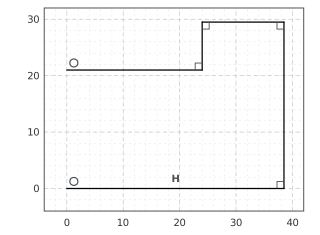
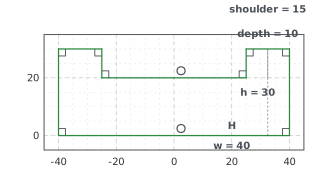
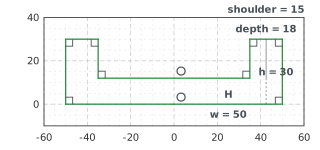
The example is a profile with a notch, drawn as its right half in one chain from the V axis and back to it (Figure 1a). Every chain gets an id, and Chain.-1 is the last one drawn. Mirrored(ids, px.V) copies its elements mirrored under Mirrored.1, each copy named after its original (such as Mirrored.1.bottom) and tied to it by one symmetry. Four dimensions make the profile fully constrained (Figure 1b). A changed width and notch depth move both halves (Figure 1c), and the halves
bound one face.
[3]:
sk = px.Sketch()
sk.Move(sk.origin, px.Coincident).Line(38, 2, px.Horizontal, id="bottom")
sk.Line(1, 29, px.Perpendicular, id="side").Line(-14, 1, px.Perpendicular, id="top")
sk.Line(-1, -9, px.Perpendicular).Line(-24, 1, px.Perpendicular, id="notch")
sk.Constrain("notch.end", px.V, px.Coincident)
half = sk.Copy()
sk.Mirrored("Chain.-1", px.V)
sk.Constrain("bottom", px.Distance, 40, id="w")
sk.Constrain("bottom", "top", px.Distance, 30, id="h")
sk.Constrain("notch", "top", px.Distance, 10, id="depth")
sk.Constrain("top", px.Distance, 15, id="shoulder")
full = sk.Copy()
sk.Update({"w": 50, "depth": 18})
exact = 2 * 50 * 30 - 2 * (50 - 15) * 18
print(full.status, "area", sk.Face().mass, "exact", exact)
full area 1739.9999999999998 exact 1740
(a) The half
(b) Mirrored and dimensioned
(c) w 50, depth 18
Symmetry lines
SymmetryLine(a, b) adds the line that mirrors a onto b: the bisector or the midline for two lines, and the perpendicular bisector of the line between the centers for two circles. It is an infinite construction line held in place by symmetry constraints, so it moves when its references move. With 60° between a and b, the line bisects them at 60° to a, which runs at 0°, while b runs at 120° (Figure 2).
[5]:
sk = px.Sketch()
sk.Move((0, 0)).Line(4, 0, px.Fix, id="a").Move((0, 0)).Line(3, 3, id="b")
sk.SymmetryLine("a", "b", id="axis")
before = sk.Copy()
sk.Constrain("b", "a", px.Angle, 60)
axis = sk.Geometry("axis")["normal_angle"] + 90
print("b at", sk.Geometry("b")["angle"], "degrees, the symmetry line at", axis)
b at 120.00000000000001 degrees, the symmetry line at 60.00000000000001
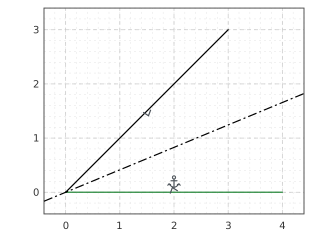
(a) SymmetryLine('a', 'b')
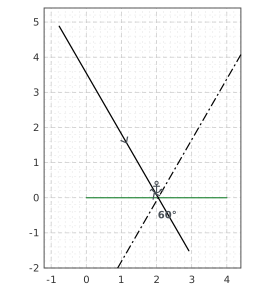
(b) 60° between a and b: the line follows
Circular patterns
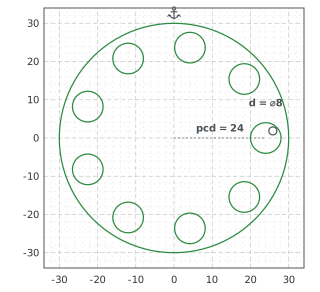
CircularPattern(ids, center, count) copies elements around a center. The copies are tied to the original through a pattern whose angle and count are dimensions like any other, CircularPattern.1.angle and CircularPattern.1.count. Each copy is named by its step and the original, such as CircularPattern.1.3.bolt. LinearPattern(ids, dir, count, spacing) works the same way along a direction, with LinearPattern.1.spacing and LinearPattern.1.count as its dimensions. The
example is a bolt circle with one hole on the pitch circle and its copies, six in all (Figure 3a). The holes then become larger and 30° apart on a larger pitch circle (Figure 3b), and finally nine holes 40° apart, which adds copies (Figure 3c).
[7]:
sk = px.Sketch()
sk.Circle(0, 0, 30, px.Fix, id="rim")
sk.Circle(20, 0, 3, id="bolt")
sk.Constrain("bolt.center", px.H, px.Coincident)
sk.Constrain(sk.origin, "bolt.center", px.Distance, 20, id="pcd")
sk.Constrain("bolt", px.Diameter, 6, id="d")
sk.CircularPattern("bolt", sk.origin, 6)
six = sk.Copy()
sk.Update({"CircularPattern.1.angle": 30, "pcd": 24, "d": 8})
turned = sk.Copy()
sk.Update({"CircularPattern.1.count": 9, "CircularPattern.1.angle": 40})
print(sk.status, sk.dimensions)
print("area", sk.Shape().mass, "exact", math.pi * (30**2 - 9 * 4**2))
full {'pcd': 24.0, 'd': 8.0, 'CircularPattern.1.angle': 40.0, 'CircularPattern.1.count': 9}
area 2375.044046113885 exact 2375.0440461138837
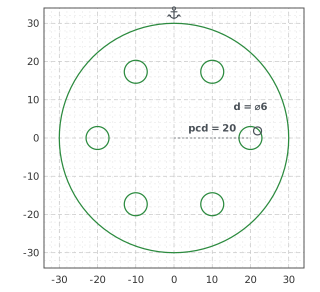
(a) Six bolts
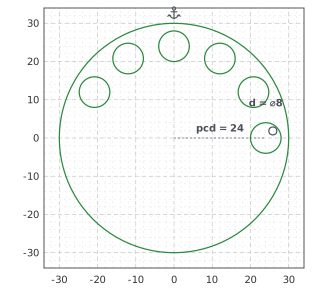
(b) angle 30, pcd 24, d 8
(c) count 9, angle 40
A tooth, named as a chain
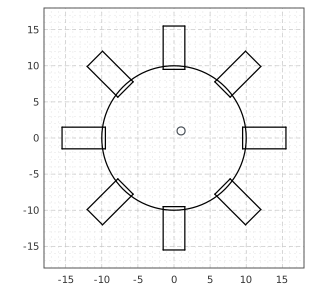
id_wire= at the end of a chain names its elements together, and the name works wherever groups are accepted: patterns, mirrors, RigidGroup and Remove. Figure 4 shows a tooth drawn on a hub, kept rigid and patterned eight times:
[9]:
sk = px.Sketch()
sk.Circle(0, 0, 10, id="hub")
sk.Constrain("hub.center", sk.origin, px.Coincident)
sk.Move((9.5, -1.5)).Line(6, 0).Line(0, 3).Line(-6, 0)
sk.Close(id="root", id_wire="tooth")
sk.RigidGroup("tooth", id="tooth shape")
sk.CircularPattern("tooth", sk.origin, 8)
print(sk.wires)
{'CircularPattern.1.1.tooth': ['CircularPattern.1.1.Line.1', 'CircularPattern.1.1.Line.2', 'CircularPattern.1.1.Line.3', 'CircularPattern.1.1.root'], 'CircularPattern.1.2.tooth': ['CircularPattern.1.2.Line.1', 'CircularPattern.1.2.Line.2', 'CircularPattern.1.2.Line.3', 'CircularPattern.1.2.root'], 'CircularPattern.1.3.tooth': ['CircularPattern.1.3.Line.1', 'CircularPattern.1.3.Line.2', 'CircularPattern.1.3.Line.3', 'CircularPattern.1.3.root'], 'CircularPattern.1.4.tooth': ['CircularPattern.1.4.Line.1', 'CircularPattern.1.4.Line.2', 'CircularPattern.1.4.Line.3', 'CircularPattern.1.4.root'], 'CircularPattern.1.5.tooth': ['CircularPattern.1.5.Line.1', 'CircularPattern.1.5.Line.2', 'CircularPattern.1.5.Line.3', 'CircularPattern.1.5.root'], 'CircularPattern.1.6.tooth': ['CircularPattern.1.6.Line.1', 'CircularPattern.1.6.Line.2', 'CircularPattern.1.6.Line.3', 'CircularPattern.1.6.root'], 'CircularPattern.1.7.tooth': ['CircularPattern.1.7.Line.1', 'CircularPattern.1.7.Line.2', 'CircularPattern.1.7.Line.3', 'CircularPattern.1.7.root'], 'tooth': ['Line.1', 'Line.2', 'Line.3', 'root']}