Ratchet wheel
A ratchet wheel turns one way only. A pawl rides over the sloping backs of its teeth and catches on their radial faces when the wheel tries to turn back. Its outline is twelve equal teeth. One tooth is drawn, its radial face and its back, and a circular pattern repeats it around the wheel. Tying the tooth’s back to the first copy closes the outline. Model the wheel from the drawing in planex2d or in any CAD system, then check its area against the value at the end of the page. A solution in planex2d follows.

[1]:
import math
import planex as px
The first tooth
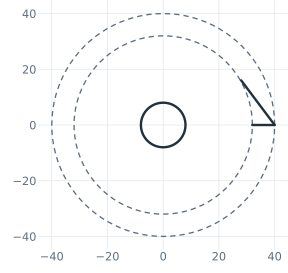
The teeth lie between two construction circles around the origin, the root circle of radius 32 and the tip circle of 40. The first tooth’s face runs radially along the horizontal axis from the root circle to the tip circle, and its back runs from the tip toward the root of the next tooth, drawn roughly. The back’s end stays free until the pattern, which leaves 2 degrees of freedom. The bore in the middle is 16 across. The circles drawn at the origin are concentric, the face’s ends lie on the
root and tip circles, and the face is drawn level, so auto_constraint with "horizontal" switched on holds all of these without a constraint of their own (Figure 1):
[3]:
wheel = px.Sketch(auto_constraint={"horizontal": True})
wheel.Circle(32, id="root", construction=True)
wheel.Circle(40, id="tip", construction=True)
wheel.Move((32, 0), dir=(1, 0)).Line(8, id="face")
wheel.Line((28, 16), id="back")
wheel.Circle(16 / 2, center=(0, 0), id="bore")  # at its center, not at the pen
wheel.Constrain("root.center", "origin", px.Coincident)
wheel.Constrain("root", px.Radius, 32, id="root_r")
wheel.Constrain("tip", px.Radius, 40, id="tip_r")
wheel.Constrain("bore", px.Diameter, 16, id="bore_d")
wheel.Constrain("face.start", "H", px.Coincident)
print("status", wheel.status, "| degrees of freedom", wheel.dof)
status under | degrees of freedom 2
The pattern
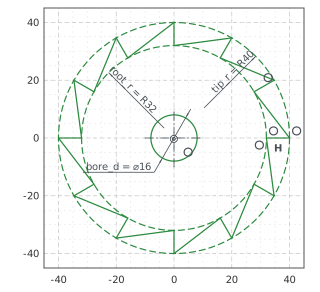
CircularPattern repeats the face and the back around the origin, 12 times in all and 30° apart. The copies are teeth.1.face and teeth.1.back to teeth.11.face and teeth.11.back. The back’s end is still free. Tied to the start of the first copy’s face, it reaches the next tooth’s root, and the outline closes, since each copy’s back then reaches the copy after it. Nothing in the sketch is left free (Figure 2):
[5]:
wheel.CircularPattern(["face", "back"], "origin", 12, id="teeth")
wheel.Constrain("back.end", "teeth.1.face.start", px.Coincident)
print("status", wheel.status, "| degrees of freedom", wheel.dof)
status full | degrees of freedom 0
The checks
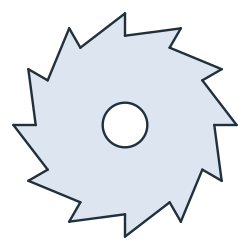
This is the area, to compare with your own model. Seen from the center, each tooth is a triangle with the tip radius, the next tooth’s root radius and the pitch of 30° between them, \(\tfrac{1}{2} \cdot 40 \cdot 32 \cdot \sin 30^\circ\). Twelve of them, less the bore, give the area. The wheel is symmetric under its turn by 30°, so its centroid is the center (Figure 3):
[7]:
face = wheel.Face()
exact = 12 * 0.5 * 40 * 32 * math.sin(math.radians(30)) - math.pi * 8**2
c = face.center
print("area", round(face.mass, 2), "mm², exact", round(exact, 2))
print("centroid", tuple(round(v, 6) for v in c[:2]))
area 3638.94 mm², exact 3638.94
centroid (-0.0, -0.0)
The wheel as DXF in millimeters, for another CAD system or a laser cutter:
[9]:
wheel.WriteDXF("ratchet_wheel.dxf", unit=px.mm, scale=1) # scale=1: the numbers as they are
The wheel as DXF: ratchet_wheel.dxf