Symmetry
A symmetric part can be drawn as one half and mirrored. Mirrored(ids, axis) adds mirrored copies of the given elements under Mirrored.1, each named after its original, such as Mirrored.1.base, and with the original’s properties, including its name. Ends on the axis stay exactly on it, so the half and its mirror bound one face. Mirror(axis) mirrors the whole sketch instead. SymmetryLine(a, b) adds the axis between two points, two lines, or two circles or arcs, as an infinite
construction line.
[1]:
import math
import planex as px
A lifting lug
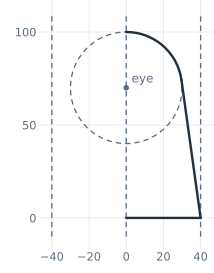
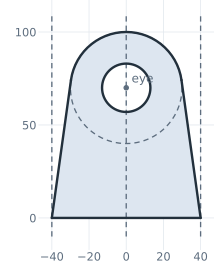
The example is a lifting lug cut from flat bar 80 wide, with an eye of radius 30 whose center lies 70 above the base, and a pin hole of 26 (Figure 1). The lug is drawn as its right half in two steps.
First the construction. The two edges of the bar are construction lines, and SymmetryLine adds the center line between them as the axis. The eye is a point with a construction circle around it.
[3]:
lug = px.QuickSketch()
lug.Move((-40, -10)).Line((-40, 110), id="left edge", construction=True)
lug.Move((40, -10)).Line((40, 110), id="right edge", construction=True)
lug.SymmetryLine("left edge", "right edge", id="axis")
lug.Vertex("eye", (0, 70))
lug.Circle(30, center="eye", id="eye circle", construction=True);
Then the right half, from the axis along the base until the right edge, tangent to the eye, and around the eye back to the axis (Figure 1a). Mirrored adds its mirror image, and the pin hole completes the lug (Figure 1b).
[4]:
lug.Move((0, 0), dir=(1, 0))
lug.Line(until="right edge", id="base")
lug.Line(tangent=("eye circle", (30, 70)), id="flank", name="flank")
lug.Arc("axis", congruent="eye circle", id="crown")
half = lug.Copy()

lug.Mirrored(["base", "flank", "crown"], "axis")
lug.Circle(13, center="eye", id="pin hole")
face = lug.Face()
(a) The right half
(b) Mirrored, with the pin hole
The mirrored flank also has the name flank, so lug(name="flank") selects both. Each flank is a tangent from a base corner to the eye, with a length of √((B/2)² + He² − Re²), where B = 80 is the width, He = 70 the height of the eye and Re = 30 its radius. The area is that of the polygon through the base corners, the touch points and the eye’s center, plus the sector over the top, minus the hole:
[6]:
B, He, Re = 80.0, 70.0, 30.0
L0 = math.hypot(B / 2, He)
for e in lug(name="flank"):
    print(e.id, e.Measure()["length"], "exact", math.sqrt(L0**2 - Re**2))

theta = math.atan2(-He, B / 2) + math.acos(Re / L0)
T = (Re * math.cos(theta), He + Re * math.sin(theta))
polygon = [(-B / 2, 0), (B / 2, 0), T, (0, He), (-T[0], T[1])]
pairs = zip(polygon, polygon[1:] + polygon[:1])
shoelace = 0.5 * sum(p[0] * q[1] - q[0] * p[1] for p, q in pairs)
print("area", face.mass, "exact", shoelace + 0.5 * Re**2 * (math.pi - 2 * theta) - math.pi * 13**2)
Sketch.1.flank 74.83314773547883 exact 74.83314773547882
Sketch.1.Mirrored.1.flank 74.83314773547883 exact 74.83314773547882
area 5803.697953996632 exact 5803.697953996631
What SymmetryLine accepts
a, b |
Symmetry line |
|---|---|
Two points |
The perpendicular bisector |
Two parallel lines |
The midline |
Two crossing lines |
The bisector that maps a onto b best; |
Two circles or arcs |
The perpendicular bisector of their centers |
The symmetry line is an infinite construction line with the id given by id=. In a constraint sketch, it stays symmetric to its references when they move. See Symmetry and patterns for details.