Step block
A step block holds a link at a step above its base. Two bolt holes in the low step fix it, the link sits in the slot of the high step, and a pin through the cross hole holds it. Nothing on the block is symmetric about its origin, and each feature is dimensioned from the edges of the face it sits on, as the drawing gives it. Model the block from the drawing in planex2d or in any CAD system, then check its volume, mass and center of mass against the values at the end of the page. A solution in planex2d follows.

[1]:
import math
import netgen.occ as occ
import planex as px
The profile
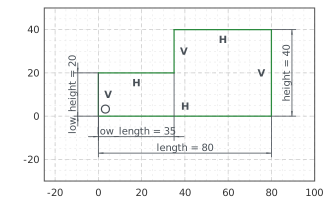
The profile is the front view, sketched in the front plane, the plane with its normal toward the viewer, \(-y\). It has \(x\) to the right and \(z\) up, with the origin at the block’s bottom left front corner. The outline runs from the origin along the bottom, up the right end, back over the high step, down the step and over the low step. With auto_constraint={"horizontal": True, "vertical": True}, the lines drawn level or plumb stay so, and their directions are set as they are
drawn. The tops of both steps and the face between them get names, which the faces padded from them carry; the features are sketched on those faces.
The block is 80 long and 40 high, and its low step is 35 long and 20 high. With these, nothing in the sketch is left free (Figure 1):
[3]:
front = px.XZ
profile = px.Sketch(front, auto_constraint={"horizontal": True, "vertical": True})
profile.Line(80, id="bottom")
profile.Turn(90).Line(40, id="right_end")  # Turn(90) turns the pen left, Turn(-90) right
profile.Turn(90).Line(45, id="high_top", name="high_top")
profile.Turn(90).Line(20, id="step", name="step")
profile.Turn(-90).Line(35, id="low_top", name="low_top")
profile.Close(id="left_end")
profile.Constrain("bottom.start", "origin", px.Coincident)
profile.Constrain("bottom", px.Distance, 80, id="length")
profile.Constrain("right_end", px.Distance, 40, id="height")
profile.Constrain("left_end", px.Distance, 20, id="low_height")
profile.Constrain("low_top", px.Distance, 35, id="low_length")
print("status", profile.status, "| degrees of freedom", profile.dof)
status full | degrees of freedom 0
The block
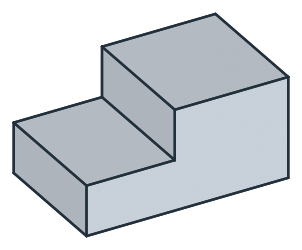
px.Pad extrudes the profile 50 deep. It extrudes along the plane’s normal, toward the viewer, and reverse=True extrudes it the other way, so that the block lies behind the front plane, from \(y = 0\) to 50 (Figure 2):
[5]:
block = px.Pad(profile, 50, reverse=True)
print("volume", block.mass, "area × 50", profile.Face().mass * 50)
volume 124999.99999999999 area × 50 125000.0
The slot
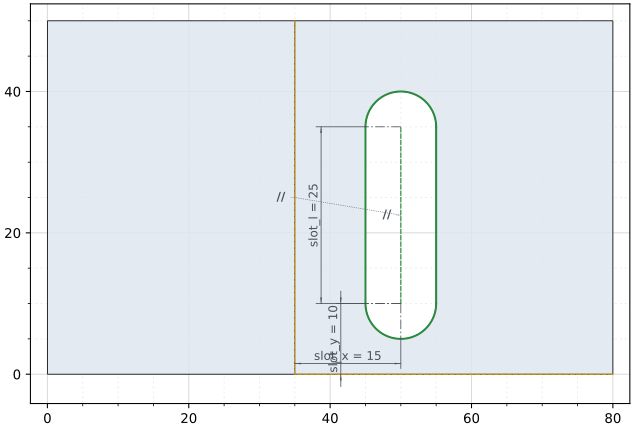
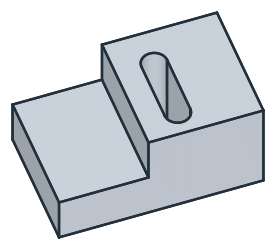
The slot is sketched on the high step’s top. Project brings two of the face’s edges into the sketch as fixed edges, the one at the step, lowest in \(x\), and the front one, lowest in \(y\). A projection’s edges are numbered from 0, so the step’s edge is step_edge.Edge.0. The slot is 10 wide with its end centers 25 apart. It is drawn roughly, and its spine runs parallel to the step’s edge, 15 from it, and starts 10 from the front edge. until=px.last cuts it down through the
block (Figure 3):
[7]:
top = block.faces["high_top"][0]  # the one face of that name
slot = px.Sketch(top)
slot.Project(top.edges.Min(occ.X), id="step_edge")
slot.Project(top.edges.Min(occ.Y), id="front_edge")
slot.Move((52, 10), dir=(0, 1)).Slot(20, 10, id="slot")
slot.Constrain("slot.spine", "step_edge.Edge.0", px.Parallel)
slot.Constrain("slot.spine.start", "step_edge.Edge.0", px.Distance, 15, id="slot_x")
slot.Constrain("slot.spine.start", "front_edge.Edge.0", px.Distance, 10, id="slot_y")
slot.Constrain("slot.spine", px.Distance, 25, id="slot_l")
print("status", slot.status, "| degrees of freedom", slot.dof)
block = px.Pocket(block, slot, until=px.last)  # through to the last flat face it crosses
status full | degrees of freedom 0
(a) The slot on the high step, the block under it
(b) The slot through the high step
The bolt holes
The bolt holes, 9 across, are sketched on the low step’s top in the same way, from three of its edges. Both are 12 from the left end, the front one 12 from the front edge and the back one 12 from the back edge. They keep their place if the depth of the block changes (Figure 4):
[9]:
low = block.faces["low_top"][0]
holes = px.Sketch(low)
holes.Project(low.edges.Min(occ.X), id="left_edge")
holes.Project(low.edges.Min(occ.Y), id="front_edge")
holes.Project(low.edges.Max(occ.Y), id="back_edge")
holes.Circle(9 / 2, center=(10, 10), id="front_hole")
holes.Circle(9 / 2, center=(10, 40), id="back_hole")
holes.Constrain("front_hole", px.Diameter, 9, id="hole_d")
holes.Constrain("back_hole", "front_hole", px.Equal)
holes.Constrain("front_hole.center", "left_edge.Edge.0", px.Distance, 12, id="hole_x")
holes.Constrain("back_hole.center", "left_edge.Edge.0", px.Distance, 12)
holes.Constrain("front_hole.center", "front_edge.Edge.0", px.Distance, 12, id="front_y")
holes.Constrain("back_hole.center", "back_edge.Edge.0", px.Distance, 12, id="back_y")
print("status", holes.status, "| degrees of freedom", holes.dof)
block = px.Pocket(block, holes, until=px.last)
status full | degrees of freedom 0
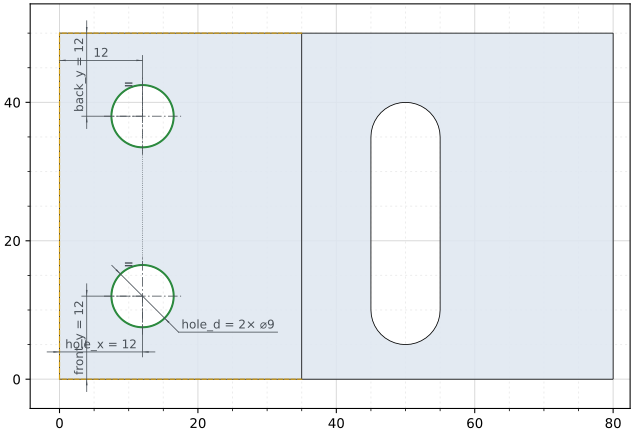
(a) The bolt holes on the low step, the block under it
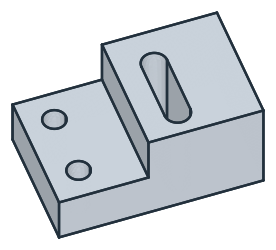
(b) Both bolt holes through the low step
The cross hole
The cross hole for the pin, 8 across, is sketched on the step, the face between the two tops, and runs from it through the high step to the right end, across the slot. The sketch on this face has its default axes. Its origin is the global origin projected onto the face, and its \(h\) axis runs along \(y\), since \(x\) is the face’s normal. Its \(v\) axis then points down:
[11]:
step = block.faces["step"][0]
cross = px.Sketch(step)
print("(0, 0) lies at", cross.ToXYZ((0, 0)), "| (10, 0) at", cross.ToXYZ((10, 0)), "| (0, 10) at", cross.ToXYZ((0, 10)))
(0, 0) lies at (35.0, 0.0, 0.0) | (10, 0) at (35.0, 10.0, 0.0) | (0, 10) at (35.0, 0.0, -10.0)
Dimensioned from the face’s projected edges, the hole does not depend on those axes. Its center is 10 below the top edge and 25 from the front edge. It is placed roughly, below the step’s top edge, which lies at \(v = -40\) (Figure 5):
[12]:
cross.Project(step.edges.Max(occ.Z), id="top_edge")
cross.Project(step.edges.Min(occ.Y), id="front_edge")
cross.Circle(8 / 2, center=(20, -28), id="cross_hole")
cross.Constrain("cross_hole", px.Diameter, 8, id="cross_d")
cross.Constrain("cross_hole.center", "top_edge.Edge.0", px.Distance, 10, id="cross_z")
cross.Constrain("cross_hole.center", "front_edge.Edge.0", px.Distance, 25, id="cross_y")
print("status", cross.status, "| degrees of freedom", cross.dof, "| center", cross.Measure("cross_hole")["center"])
block = px.Pocket(block, cross, until=px.last)
status full | degrees of freedom 0 | center (35.0, 25.0, 30.0)
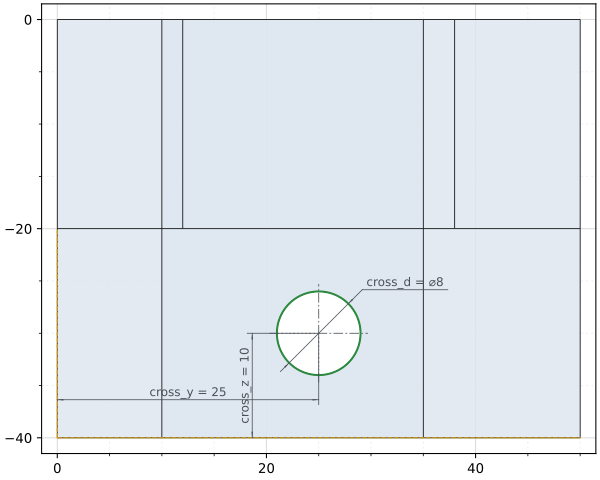
(a) The cross hole on the step, in the sketch's axes, v down
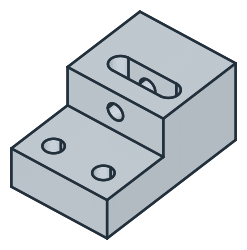
(b) The cross hole from the step through the slot
The checks
These are the volume, the mass in steel S235 (7.85 g/cm³) and the center of mass, with the origin at the bottom left front corner, to compare with your own model. The volume is the profile’s area times 50, less three holes. The slot runs through the 40 of the high step, the bolt holes through the 20 of the low step, and the cross hole along the 45 of the high step, but for the 10 where it crosses the slot:
[14]:
exact = 2500 * 50 - (25 * 10 + math.pi * 5**2) * 40 - 2 * math.pi * 4.5**2 * 20 - math.pi * 4**2 * (45 - 10)
c = block.center
print("volume", round(block.mass, 1), "mm³, exact", round(exact, 1))
print("mass", round(block.mass * 7.85e-6, 3), "kg")
print("center of mass", tuple(round(v, 2) for v in (c.x, c.y, c.z)))
volume 107554.4 mm³, exact 107554.4
mass 0.844 kg
center of mass (46.44, 25.31, 16.82)
The block as STEP, for another CAD system:
[15]:
block.WriteStep("step_block.step")
The block as STEP: step_block.step