Splines
Spline(points, periodic=False, tangents={index: (dh, dv)}) runs from the pen through the points, as in a QuickSketch. In a constraint sketch, its points are point elements that take constraints like any other point, and its tangent directions are unknowns. px.Tangent where the spline meets a line, an arc or another spline turns its direction there, so the spline bends while its points stay. The curve is the planex2d cubic interpolation (style="px", the default), and the export
uses the same curve. See Splines for how planex2d handles splines in general.
[1]:
import planex as px
A bottle
The example is a bottle, drawn as half of its profile from the axis and back, with the shoulder as a spline tangent to the body and to the neck (Figure 1a). The spline’s third point, the waist, is placed by two dimensions. Mirrored, the half bounds the whole profile (Figure 1b). With a narrower shoulder and a shorter body, the spline stays tangent at both ends (Figure 1c).
[3]:
sk = px.Sketch(id="bottle")
sk.Move(sk.origin, px.Coincident).Line(30, 2, px.Horizontal, id="bottom")
sk.Line(1, 50, px.Vertical, id="body")
sk.Spline([(24, 66), (11, 76)], px.Tangent, id="shoulder")
sk.Line(0, 14, px.Vertical, px.Tangent, id="neck")
sk.Line(-10, 0, px.Horizontal, id="lip")
sk.Constrain("lip.end", px.V, px.Coincident)
waist = "shoulder.p1"
sk.Constrain("bottom", px.Distance, 30, id="r")
sk.Constrain("body", px.Distance, 50, id="h")
sk.Constrain("neck", px.V, px.Distance, 10, id="r_neck")
sk.Constrain("neck", px.Distance, 14)
sk.Constrain("neck.start", px.H, px.Distance, 76, id="z_neck")
sk.Constrain(waist, px.V, px.Distance, 27, id="r_shoulder")
sk.Constrain(waist, px.H, px.Distance, 64, id="z_shoulder")
half = sk.Copy()
sk.Mirrored("Chain.-1", px.V)
print(sk.status, sk.dof, round(sk.Face().mass, 6))
whole = sk.Copy()
sk.Update({"r_shoulder": 23, "h": 40});
full 0 4509.857442
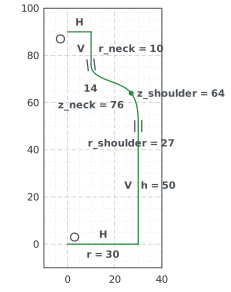
(a) Half: tangent where the spline meets body and neck
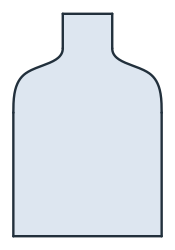
(b) Mirrored
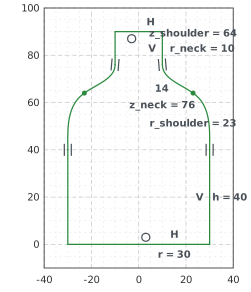
(c) r_shoulder 23, h 40
A cam, a roller and a probe
"cam.p2" is the spline’s point 2, counted like tangents= with the start as p0, and "cam.t0" is the tangent line at point 0, so an angle on it turns the start of the curve. A point can lie on the curve (Coincident), and a circle can touch it between its points (Tangent); each gets its position along the curve as an unknown. In the example, the cam’s dip and rise are dimensions, a roller rolls on it at a fixed x, and a probe ends on the curve (Figure 2a). With a deeper dip
and a flatter rise, the roller and the probe follow (Figure 2b).
[5]:
sk = px.Sketch()
sk.Move((0, 0), px.Fix).Spline([(15, 12), (30, 6), (45, 16), (60, 10)], id="cam")
sk.Constrain("cam.p4", px.Fix)
sk.Constrain("cam.p2", px.H, px.Distance, 6, id="dip")
sk.Constrain(px.H, "cam.t0", px.Angle, 40, id="rise")
sk.Circle(30, 14.5, 4, id="roller")
sk.Constrain("roller", px.Radius, 4)
sk.Constrain("roller.center", px.V, px.Distance, 30, id="x_roller")
sk.Constrain("roller", "cam", px.Tangent)
sk.Move((12, 30)).Line(0, -15, px.Vertical, id="probe")
sk.Constrain("probe.start", px.H, px.Distance, 30)
sk.Constrain("probe.end", "cam", px.Coincident)
sk.Constrain("probe", px.V, px.Distance, 12)
print(sk.status, sk.dof)
before = sk.Copy()
sk.Update({"dip": 11, "rise": 15})
roller = sk.Measure("roller", to="cam")["distance"]
probe = sk.Measure("probe.end", to="cam")["distance"]
print(round(roller, 4), round(probe, 4))
under 5
0.0 0.0
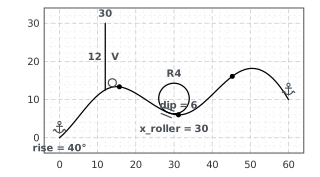
(a) Roller and probe on the cam
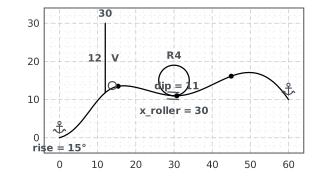
(b) dip 11, rise 15
Closed splines and trimming
A closed spline (periodic=True) is smooth at its seam. Trim cuts it like a line, but the spline itself remains. Its pieces run between positions along it, and each cut point lies on both the spline and its cutter, so the cut follows the cutter. Figure 3 shows a blob cut by a chord (a), trimmed to the part above (b), and the chord moved up (c):
[7]:
sk = px.Sketch()
blob = [(20, 0), (15, 15), (0, 10), (-8, 2)]
sk.Move((3, -10)).Spline(blob, periodic=True, id="blob")
sk.Move((-20, 4)).Line(50, 0, px.Horizontal, id="chord")
sk.Constrain("chord", px.H, px.Distance, 4, id="height")
sk.Constrain("chord.start", px.V, px.Distance, 20)
drawn = sk.Copy()
sk.Trim(("blob", (3, -10)), "chord")
sk.Trim(("chord", (-19, 4)))
sk.Trim(("chord", (29, 4)))
trimmed = sk.Copy()
low = sk.Face().mass
sk["height"] = 9
print(round(low, 6), "->", round(sk.Face().mass, 6))
213.377449 -> 165.054866
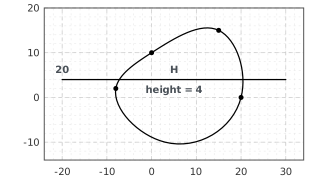
(a) A closed spline and a chord
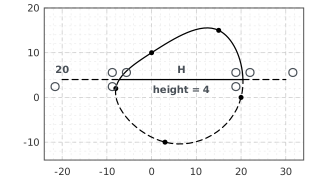
(b) Trimmed: the rest is construction
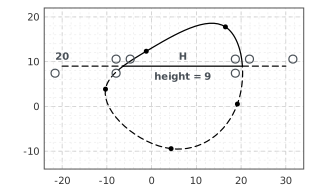
(c) Height 9: the cuts follow