Names and colors
Edges and faces carry properties: a name, a color col, and mesh sizes such as maxh and hpref. They are given with the drawing calls, as in Line(2.2, name="wall"), or set later. They survive Boolean operations, cleanup and export, so a boundary named in the drawing can be found again in the CAD model or in the mesh, for example to set a boundary condition. face.edges(name="wall") selects the edges with a name, and the selection takes properties for all of them at once. See
Boxes, crossings and open ends for more ways to select.
[1]:
import math
import planex as px
A channel named for a simulation
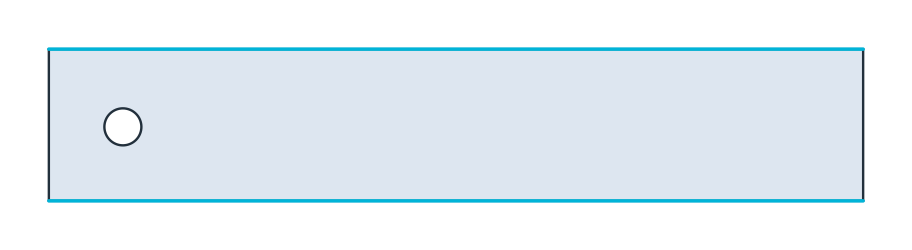
The example is the channel of the flow around a cylinder benchmark (Schäfer and Turek), 2.2 long and 0.41 high, with a cylinder of radius 0.05 (Figure 1). Its boundaries are named as a solver needs them: the walls, the inlet, the outlet and the cylinder cyl. The cylinder also gets a finer mesh size, maxh=0.01.
[3]:
sketch = px.QuickSketch().Line(2.2, name="wall").Line(0, 0.41, name="outlet")
channel = sketch.Line(-2.2, 0, name="wall").Close(name="inlet").Face()
cylinder = px.QuickSketch().Circle(0.2, 0.2, 0.05, name="cyl", maxh=0.01).Face()

fluid = channel - cylinder
fluid.name = "fluid"
print(sorted({e.name for e in fluid.edges}))
['cyl', 'inlet', 'outlet', 'wall']
Through Boolean operations
The names come through the difference. A difference keeps the name of its first face, so the result is still fluid. The edges of the cylinder keep their own names, and the pieces of the walls keep the name of the wall.
[5]:
print(fluid.name, "area", fluid.mass, "exact", 2.2 * 0.41 - math.pi * 0.05**2)
fluid area 0.8941460183660256 exact 0.8941460183660256
Colors
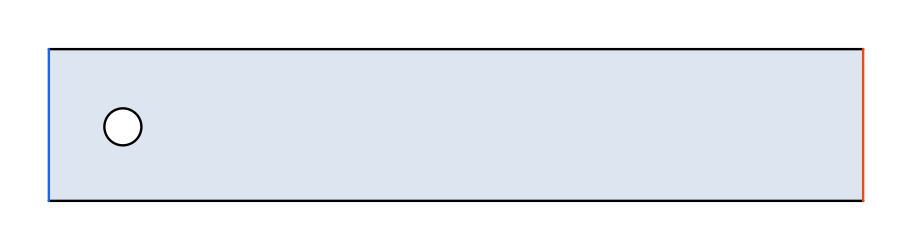
Colors are set the same way, here on the inlet in blue and the outlet in orange. px.Plot(fluid, line_col="property") draws the edges in their own colors (Figure 2):
[6]:
fluid.edges(name="inlet").col = (0.1, 0.4, 0.9)
fluid.edges(name="outlet").col = (0.9, 0.3, 0.1)
On all edges at once
Assigning a property through edges itself sets it on every edge of an object:
[8]:
obstacle = px.QuickSketch().Circle(0.2, 0.2, 0.05).Face()
obstacle.edges.name = "cyl"
print(obstacle.edges.name)
cyl
Mesh sizes
maxh, hpref and layer work the same way as names and colors. netgen uses maxh as the largest element size along an edge or in a face, and hpref for geometric refinement toward it. See Naming and marking for details.
Vertices
Where edges meet, a vertex can carry a name, a maxh and an hpref: for a named point in the mesh, a local mesh size, or geometric refinement toward a corner. vertices lists the vertices of every wire, face and shape.
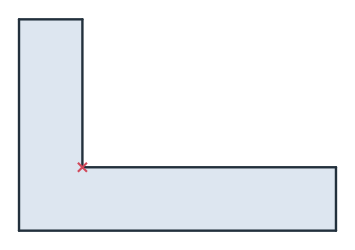
In a sketch, vertex properties are set on its points. Vertex("corner") places a point with the id corner at the pen’s position, and s("corner").maxh = 1 sets a property on it. s(kind="point", near=(12, 12)) selects the point nearest to a location instead. The example marks the re-entrant corner of an L bracket, 60 × 40 with legs 12 thick, where the stress in a part like this peaks (Figure 3).
[9]:
s = px.QuickSketch().Line(60).Turn(90).Line(12).Turn(90).Line(48).Vertex("corner")
s.Turn(-90).Line(28).Turn(90).Line(12).Close()
s("corner").name = "corner"
s("corner").hpref = 1
s("corner").maxh = 1
bracket = s.Face()
The face’s vertices can be selected by name like its edges:
[11]:
corner = bracket.vertices(name="corner")
print(len(bracket.vertices), "vertices")
print("corner: hpref", corner.hpref, "maxh", corner.maxh, "at", corner.center)
6 vertices
corner: hpref 1.0 maxh 1.0 at (12.0, 12.0, 0.0)
Vertex properties survive Boolean operations, gluing, splitting and motions, and they reach the OpenCASCADE vertices of the export. See netgen and NGSolve for meshing with them.