Sketching on and projecting 3D geometry
px.Project(shape, plane) lays an OpenCASCADE shape flat onto a plane and returns its edges as a list of clean wires. Lines stay lines, circles and arcs parallel to the plane stay circles and arcs, and all other curves become exact splines. Edges that fall onto each other are kept once, with the name of the one nearest to the viewer. In a sketch, Project adds the result as construction elements to draw against.
[1]:
import math
import netgen.occ as occ
from ngsolve_webgpu.jupyter import Draw
import planex as px
The examples use the C-clamp frame with its screw hole from A C-clamp, step by step, with the throat depth of 60, the jaw gap of 40, the wall thickness t = 12, the fillet radius r = 6 and the frame thickness b = 16:
[3]:
depth, gap, t, r, b = 60, 40, 12, 6, 16
W, H = t + depth, gap + 2 * t

side = px.QuickSketch(px.Plane(normal=(0, -1, 0), axis=(1, 0, 0)))
side.Move((r + t, 0), dir=(1, 0))
side.Line(W - r - t, name="bottom").Turn(90).Line(t, name="lower tip").Turn(90)
side.Line(W - t - r, name="lower jaw").Arc(r, -90, name="lower fillet")
side.Line(gap - 2 * r, name="throat").Arc(r, -90, name="upper fillet")
side.Line(W - t - r, name="upper jaw").Turn(90).Line(t, name="upper tip").Turn(90)
side.Line(W - r - t, name="top").Arc(r + t, 90, name="upper bend")
side.Line(H - 2 * (r + t), name="rear").Arc(r + t, 90, name="lower bend")

frame = px.Pad(side.Face(), b)
top = px.QuickSketch(frame.faces.Max(occ.Z))
frame = px.Pocket(frame, top.Circle(W - 20, -b / 2, 5), 2 * t)
Draw(frame)
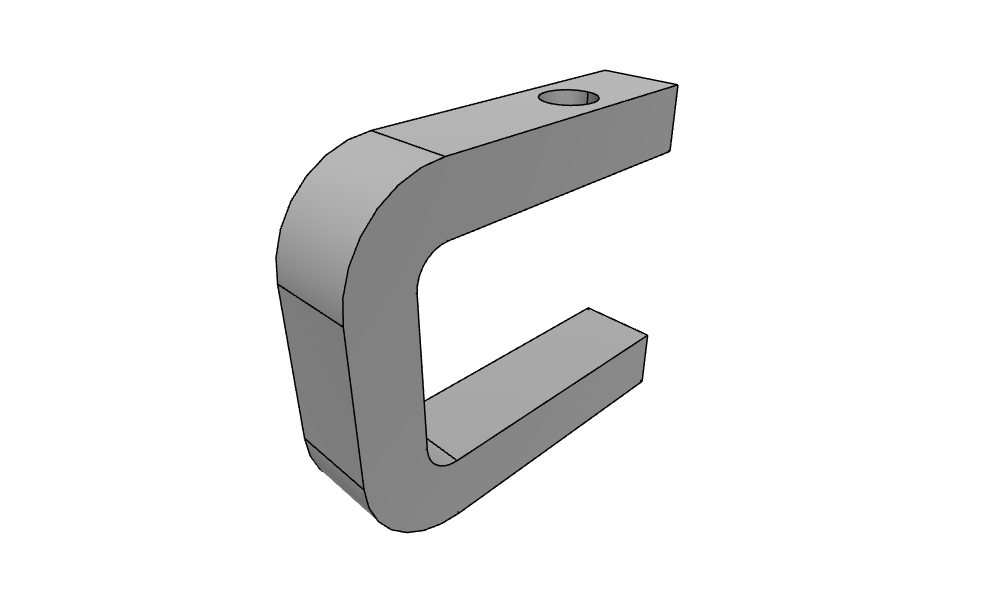
Edges as targets: a marking groove
Edges of the solid can be targets in a sketch, so lines can start and end on them or run parallel to them. They are projected into the sketch plane on the way and never become part of the sketch. The example is a marking groove on the roof of the frame, parallel to its front edge and 2 in from it, running from the seam where the bend begins to the tip. The groove is the line offset by 0.5, pocketed 0.5 deep.
[4]:
roof = frame.faces.Max(occ.Z)
front = roof.edges.Max(occ.Y)
tip = roof.edges.Max(occ.X)
seam = roof.edges.Min(occ.X)

top = px.QuickSketch(roof)
top.Line(seam, tip, parallel=front, through=(0, -2), name="groove")
Draw(px.Pocket(frame, top.Wire().Offset(0.5), 0.5))
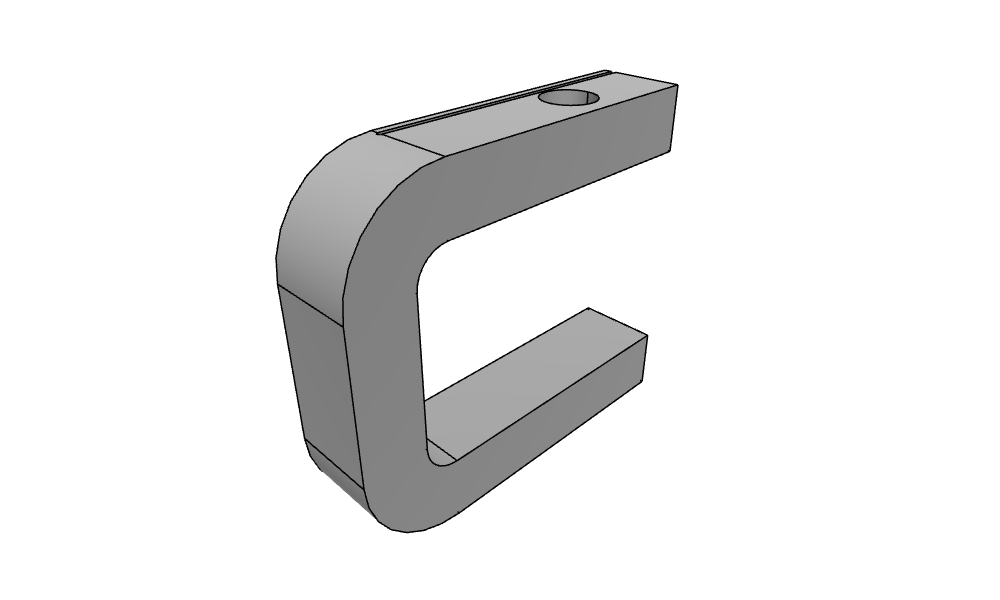
A top view
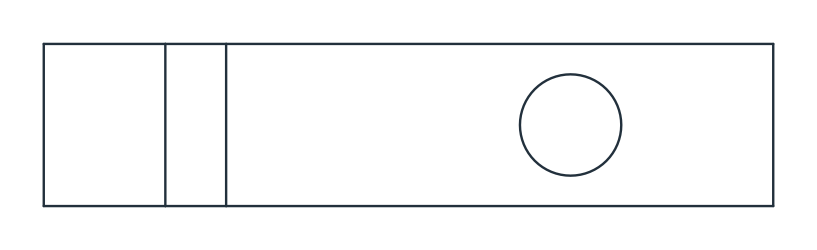
Figure 1 shows every edge of the solid seen from above, on the default xy plane. The profile seen edge-on gives the two long sides, the edges along the extrusion give the cross lines, and the screw hole gives its circle.
[5]:
wires = px.Project(frame)
edges = [e for w in wires for e in w.edges]
print(len(wires), "wires,", len(edges), "edges:", sorted({type(e.edge).__name__ for e in edges}))
view = px.Compound(wires)
4 wires, 11 edges: ['CircleEdge', 'LineEdge']
One face of the solid
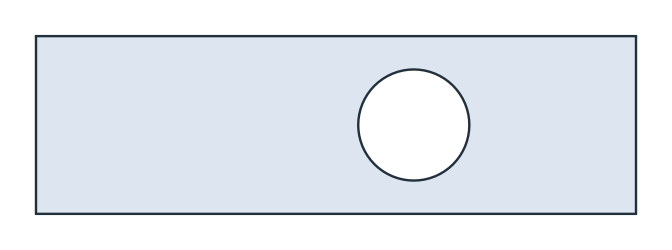
The roof runs from the bend to the tip and contains the screw hole. Its projection is a face of the same area (Figure 2).
[7]:
roof = frame.faces.Max(occ.Z)
plan = px.Face(px.Project(roof))
exact = (W - r - t) * b - math.pi * 5**2
print("area", plan.mass, "exact", exact, "OCC", roof.mass)
area 785.4601836602552 exact 785.4601836602552 OCC 785.4601836602551
Inclined circles
A round port on a face inclined at 60° looks like an ellipse from above. The example is a circle of radius 10 tilted by 60°, whose projection has the area π 10² cos 60°. The projection keeps it as an exact spline. The planex2d area comes from the spline’s arc approximation, while the exported OpenCASCADE face uses the exact curve.
[9]:
tilt = math.radians(60)
port = occ.Circle(occ.Pnt(0, 0, 0), occ.Dir(0, math.sin(tilt), math.cos(tilt)), 10)
ellipse = px.Face(px.Project(port))
exact = math.pi * 10**2 * math.cos(tilt)
occ_area = sum(f.mass for f in ellipse.ToOCCFace().faces)
print([type(e.edge).__name__ for e in ellipse.edges])
print("planex2d", ellipse.mass, "OCC", occ_area, "exact", exact)
['SplineEdge', 'SplineEdge']
planex2d 157.0796805204156 OCC 157.07963267948975 exact 157.0796326794897
In a sketch
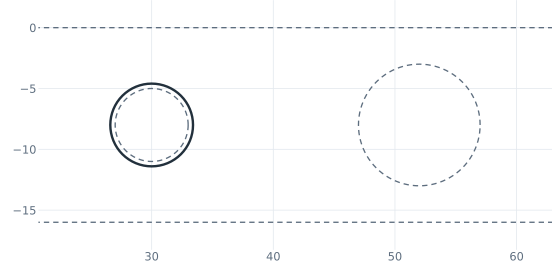
sketch.Project(shape, id=...) adds construction edges, or drawn edges with construction=False, and name names them all. The projected elements get ids under the projection’s id, using the same edge numbers that netgen’s webgui shows on a click. Here, pin.Edge.0 is the pin’s circle, one edge, and pin.Center.1 is its center. An edge seen end-on becomes a point. In the example, a dowel pin standing on the roof is projected into a sketch on the roof and places the clearance hole
for the mating part concentric with it (Figure 3):
[10]:
pin = occ.Cylinder(occ.Pnt(30, -b / 2, H), occ.Z, 3, 10)
deck = px.QuickSketch(roof)
deck.Project(roof, id="roof")
deck.Project(pin, id="pin")
print(sorted(deck.elements["Circle"]))
deck.Circle(3.4, concentric="pin.Edge.0", id="clearance")
print(deck.Measure("clearance")["center"], "exact", (30.0, -b / 2, H))
['pin.Edge.0', 'roof.Edge.4']
(30.0, -8.0, 64.0) exact (30.0, -8.0, 64)
OpenCASCADE shapes are also targets of Line, Arc and Circle (as shown above) and cutters of Split and Trim (see Splitting and trimming), and they are projected on the way.