To, from and until
A line often has to end where it meets another edge. Instead of computing that intersection, you give the edge as the line’s end, and planex2d finds the point. The end can be a named target, as in Line("web", angle=...), or the first or last edge ahead of the pen, with until=px.first or until=px.last.
[1]:
import math
import planex as px
To an edge
The example is a gusset plate welded between a flange and a web. It runs 60 along the flange, its free edge rises at 35° until it meets the web, and its inner corner is sniped by 8 to clear the weld (Figure 1). The web is a construction line. Line("web", angle=180 - 35) draws the free edge: the angle sets its direction, and the web sets its end.
[3]:
s = px.QuickSketch()
s.Move((0, -5)).Line((0, 60), id="web", construction=True)
s.Move((8, 0), dir=(1, 0)).Line(52, id="flange side")
s.Line("web", angle=180 - 35, id="free edge")
s.Line((0, 8), id="web side").Close(id="snipe")
gusset = s.Face()
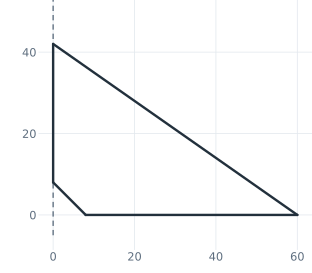
(a) The sketch, the web dashed
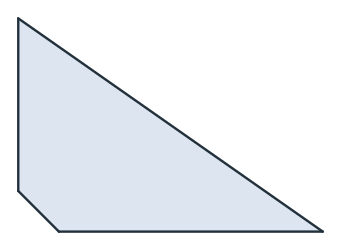
(b) The gusset plate
The area is the triangle between the flange and the free edge, less the snipe:
[5]:
print("area", gusset.mass, "exact", 60**2 * math.tan(math.radians(35)) / 2 - 8**2 / 2)
area 1228.3735687774779 exact 1228.3735687774774
From one edge to another
With two targets, a line runs from the first to the second, and a helper such as parallel= sets the line it runs on. The example is a rib between a hub and a wall, parallel to the pen’s direction (Figure 2a).
[6]:
rib = px.QuickSketch().Circle(0, 0, 1, id="hub")
rib.Move((4, -2)).Line((4, 2), id="wall")
rib.Move((0, 0.3), dir=(1, 0))
rib.Line("hub", "wall", parallel=rib.pen, id="rib");
Until the first or last edge
until=px.first stops a line at the first edge it meets ahead of the pen, and until=px.last at the last one, construction edges included. The example is the link from Tangents, with rays every 15° from a point inside it, each ending on the first edge it meets (Figure 2b).
[7]:
link = px.QuickSketch()
link.Circle(0, 0, 1.5, id="boss1", construction=True)
link.Circle(6, 0, 1.0, id="boss2", construction=True)
link.Line(tangent=("boss1", "boss2"), id="upper")
link.Line(tangent=("boss1", "boss2"), reverse=True, id="lower")
link.Arc("lower", "upper", congruent="boss2", id="end2")
link.Arc("upper", "lower", congruent="boss1", id="end1")
link.Circle(0, 0, 0.6, id="hole1").Circle(6, 0, 0.4, id="hole2")
rays = link.Copy()
for angle in range(0, 360, 15):
    rays.Move((3, 0.3)).Line(angle=angle, until=px.first, col=(0.85, 0.35, 0))
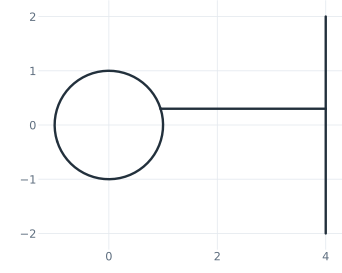
(a) A rib from the hub to the wall
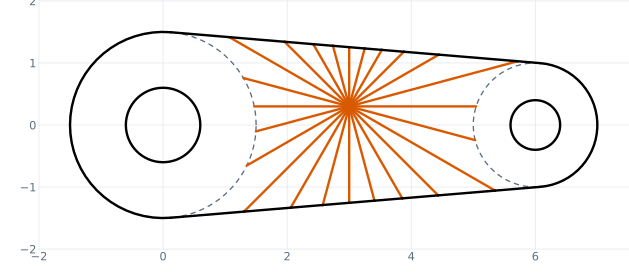
(b) Rays until the first edge
The difference between the two shows on a line that crosses a circle twice. A line along x from the origin meets a construction circle of radius 1 around (3, 0) at x = 2 and at x = 4, and the pen ends at the first or the second point:
[9]:
s = px.QuickSketch().Circle(3, 0, 1, construction=True).Move((0, 0), dir=(1, 0))
print("until=px.first:", s.Copy().Line(until=px.first).pen.position)
print("until=px.last:", s.Copy().Line(until=px.last).pen.position)
until=px.first: (2.0, 0.0)
until=px.last: (4.0, 0.0)
To other objects
A target does not have to be part of the sketch. Faces, wires and single edges work as well. The example draws a line from (−3, 0.5) along x until it meets a plate of 4 × 2 centered on the origin, at (−2, 0.5):
[10]:
plate = px.QuickSketch().RectangleC(4, 2).Face()
end = px.QuickSketch((-3, 0.5), dir=(1, 0)).Line(until=plate).pen.position
print("the line ends at", end)
the line ends at (-2.0, 0.5)