Parametric design
A part can be written as a Python function of its parameters. The function draws the part from references, so every point follows from the parameters, and a parameter study simply calls the function again. This is parametric design without a solver. A constraint sketch offers the other kind, where the dimensions of one sketch are changed and the sketch is solved again.
The example is the lamination of a permanent magnet motor, with the number of slots, the magnet arc and the magnet thickness as parameters. The sizes that stay the same in every design are constants. See the motor example for the full motor with its magnetic field.
[1]:
import math
import planex as px
[3]:
R_out, R_bore, slot_d, open_d = 50.0, 30.0, 12.0, 1.0
R_rotor, R_shaft, poles = 26.0, 8.0, 8


def disc(r):
    return px.Circle((0, 0), r).Face()
One slot and one magnet
A slot has its sides parallel to the slot axis and runs from the bore, through the slot opening, to the slot bottom, with its mouth and its bottom on their circles. The slot width is half the slot pitch at the bore. The sides are construction lines at half the width from the axis, and the outline runs between the circles on them. A point in the middle of the slot, given with every reference it decides (as in ("bore", middle)), selects the intersections on the correct side of the center. The
slot bottom runs clockwise (reverse=True).
[4]:
def slot_face(slots):
    width = 0.5 * 2 * math.pi * R_bore / slots
    middle = (R_bore + (open_d + slot_d) / 2, 0)
    s = px.QuickSketch()
    s.Circle(R_bore, id="bore", construction=True)
    s.Circle(R_bore + open_d + slot_d, id="bottom", construction=True)
    s.Move((0, 0)).Line(R_out, id="axis", construction=True)
    s.Move((0, 0), dir=(1, 0)).Line(R_out, parallel="axis", distance=width / 2, id="left side", construction=True)
    s.Move((0, 0), dir=(1, 0)).Line(R_out, parallel="axis", distance=-width / 2, id="right side", construction=True)
    s.Line(("bore", middle), ("bottom", middle), congruent="left side")
    s.Arc(("left side", middle), ("right side", middle), congruent="bottom", reverse=True)
    s.Line(("bottom", middle), ("bore", middle), congruent="right side")
    s.Arc(("right side", middle), ("left side", middle), congruent="bore")
    slot = s.Face()
    slot.name = "coil"
    return slot
A magnet lies on the rotor between two rays, at half the magnet’s angle on either side of the axis, and its top is the circle at the magnet’s thickness. The same kind of middle point picks the intersections.
[5]:
def magnet_face(magnet_arc, magnet_thickness):
    half = 180 / poles * magnet_arc
    center = (R_rotor + magnet_thickness / 2, 0)
    m = px.QuickSketch()
    m.Circle(R_rotor, id="rotor", construction=True)
    m.Circle(R_rotor + magnet_thickness, id="top", construction=True)
    m.Move((0, 0)).Line(R_out, angle=-half, id="start", construction=True)
    m.Move((0, 0)).Line(R_out, angle=half, id="end", construction=True)
    m.Arc(("start", center), ("end", center), congruent="rotor")
    m.Line(("rotor", center), ("top", center), congruent="end")
    m.Arc(("end", center), ("start", center), congruent="top", reverse=True)
    m.Line(("top", center), ("rotor", center), congruent="start")
    magnet = m.Face()
    magnet.name = "magnet"
    return magnet
The lamination
The lamination turns copies of the slot and the magnet around the center and combines everything with px.Glue into the regions of one shape: magnets, rotor, coils, stator, and the air that fills the gap and the shaft. Where parts overlap, the first one listed wins, so the magnets, the rotor and the coils come before the stator and the air. Every part has a name, and the names travel with the regions, so a solver or a measurement can find them again in every design.
[6]:
def GetGeometry(slots, magnet_arc, magnet_thickness):
    slot, magnet = slot_face(slots), magnet_face(magnet_arc, magnet_thickness)
    coils = [slot.Rotated((0, 0), 360 * k / slots) for k in range(slots)]
    magnets = [magnet.Rotated((0, 0), 360 * k / poles) for k in range(poles)]
    stator = px.Subtract([disc(R_out), disc(R_bore), *coils])
    rotor = disc(R_rotor) - disc(R_shaft)
    air = disc(R_out)
    stator.name, rotor.name, air.name = "stator", "rotor", "air"
    return px.Glue([*magnets, rotor, *coils, stator, air])
Three designs
Each design is one call (Figure 1). The first has 12 slots and magnets over 90 % of the pole, 3 thick (a). The second has 24 slots and magnets over 80 %, 2.5 thick (b), and the third has 36 slots and magnets over 70 %, 2 thick (c).
[7]:
designs = [(12, 0.9, 3.0), (24, 0.8, 2.5), (36, 0.7, 2.0)]
laminations = [GetGeometry(*design) for design in designs]
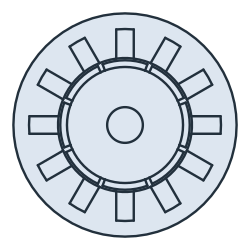
(a) 12 slots, 90% of the pole, 3.0 thick
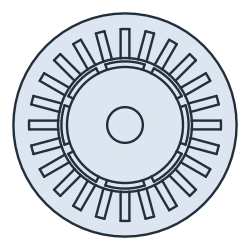
(b) 24 slots, 80% of the pole, 2.5 thick
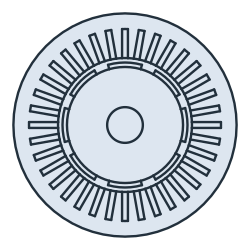
(c) 36 slots, 70% of the pole, 2.0 thick
The glued regions fill the outer disc exactly. The magnets are selected by their name, and each is a ring sector whose angle is the pole angle times the magnet arc:
[9]:
for lamination, (slots, arc, thickness) in zip(laminations, designs):
    sweep = 2 * math.pi / poles * arc
    sector = sweep / 2 * ((R_rotor + thickness) ** 2 - R_rotor**2)
    magnets = lamination.faces(name="magnet").faces
    print(slots, "slots:", len(lamination.faces), "regions, total", lamination.mass, "disc", math.pi * R_out**2)
    print(len(magnets), "magnets of", magnets[0].mass, "exact", sector)
12 slots: 24 regions, total 7853.981633974483 disc 7853.981633974483
8 magnets of 58.315813632260614 exact 58.315813632260536
24 slots: 36 regions, total 7853.981633974478 disc 7853.981633974483
8 magnets of 42.804199905160544 exact 42.80419990516093
36 slots: 48 regions, total 7853.981633974487 disc 7853.981633974483
8 magnets of 29.688050576423624 exact 29.688050576423546