Eagle
Eagle saves a board as an XML file with the extension .brd, from Eagle 6 on. px.FromKiCad converts it with kicad-cli, the command line tool of KiCad 10 or later, and returns the same dict of layers as for a KiCad board. A binary board from an Eagle version before 6 has to be opened in Eagle and saved again first. See KiCad, Altium, Eagle and more for how the tool is found and how the copper pours of a converted board are filled.
[1]:
import collections
import planex as px
The board
The example is the Pro Micro from SparkFun Electronics, a microcontroller board with an ATmega32U4, as it is in the folder Hardware/v20 of SparkFun’s repository. The design is licensed under CC BY-SA 4.0 by SparkFun Electronics. Download: SparkFun_Pro_Micro.brd and SparkFun’s license notes.
[3]:
board = px.FromKiCad("SparkFun_Pro_Micro.brd")
for name, layer in board.items():
    print(f"{name:10} {len(layer.faces):4} faces, {1e6 * layer.mass:9.2f} mm²")
PlanexWarning: FromKiCad: 72 texts left out (not supported yet)
F.Cu        179 faces,    291.45 mm²
B.Cu        136 faces,    370.47 mm²
Edge.Cuts     1 faces,    553.21 mm²
F.Adhes       2 faces,      0.48 mm²
F.Paste     127 faces,     59.43 mm²
F.SilkS      99 faces,     58.15 mm²
B.SilkS      93 faces,     74.98 mm²
F.Mask      105 faces,    250.02 mm²
B.Mask       32 faces,    155.33 mm²
Cmts.User    26 faces,     76.57 mm²
F.CrtYd      20 faces,      5.99 mm²
F.Fab        54 faces,    114.42 mm²
B.Fab         4 faces,      0.08 mm²
The two copper layers have their faces named by net and the drill holes cut out, and the ground pours on both sides come filled. The other layers hold what KiCad prints there, the silkscreen, solder mask and paste openings, the courtyard and the fabrication drawings. The text on the board is not read yet, and FromKiCad reports how much it left out.
Copper per net
On both layers, the ground net has the largest share of the copper (Figure 1):
[4]:
fcu, bcu, outline = board["F.Cu"], board["B.Cu"], board["Edge.Cuts"]
for name, layer in (("F.Cu", fcu), ("B.Cu", bcu)):
    area = collections.Counter()
    for f in layer.faces:
        area[f.name or "(no net)"] += 1e6 * f.mass
    print(name, len(area), "nets, the largest:", [(net, round(a, 1)) for net, a in area.most_common(3)])
F.Cu 41 nets, the largest: [('GND', 123.1), ('(no net)', 53.3), ('RAW', 11.3)]
B.Cu 29 nets, the largest: [('GND', 242.4), ('(no net)', 36.4), ('3.3V', 11.8)]

(a) F.Cu, the top layer

(b) B.Cu, the bottom layer
The solder mask openings F.Mask and the silkscreen F.SilkS laid over the outline show the board as it comes from the manufacturer (Figure 2).

A check against the DIP grid
The Pro Micro plugs into a breadboard or a socket like a 24-pin DIP, with two rows of 12 pins on a 0.1 inch grid and the rows 0.6 inch apart. Its pins are the 24 plated holes of 0.85 mm, which are cut out of the outline. Their centers and the size of the board, in inches:
[7]:
inch = 25.4e-3
pins = []
for hole in outline.faces[0].inner:
    (x0, y0), (x1, y1) = hole.bounding_box
    if abs(x1 - x0 - 0.85e-3) < 1e-6:
        pins.append(((x0 + x1) / 2, (y0 + y1) / 2))
x = sorted(p[0] for p in pins)
first = pins[0]
off = max(abs(d / (0.1 * inch) - round(d / (0.1 * inch))) * 0.1 * inch
          for p in pins for d in (p[0] - first[0], p[1] - first[1]))
(x0, y0), (x1, y1) = outline.bounding_box
print(len(pins), "pins, rows", (x[-1] - x[0]) / inch, "inch apart, largest distance from the 0.1 inch grid", off, "m")
print("board", (x1 - x0) / inch, "x", (y1 - y0) / inch, "inch")
24 pins, rows 0.6 inch apart, largest distance from the 0.1 inch grid 4.5119463720766365e-18 m
board 0.7000000000000001 x 1.3 inch
The pins lie on the grid to rounding, and the board measures 0.7 × 1.3 inch. Eagle stores the positions in millimeters, such as 15.24 for a pin six steps up the grid, and the conversion through KiCad keeps them to rounding.
The board in 3D
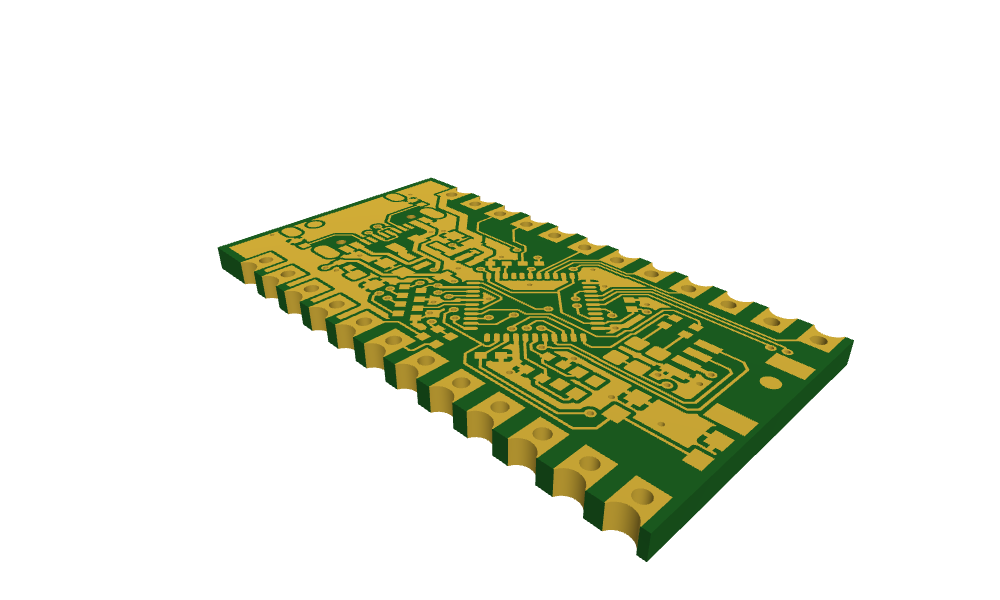
With a stackup instead of a layer name, FromKiCad returns the board as one glued OpenCASCADE shape, as described in The board in 3D on the KiCad page. The Eagle file stores no stackup, and the manufacturers’ tables in px.stackups hold boards of four and six layers, so a two-layer board takes its stackup as a dict, from the number of copper layers to the dielectric thicknesses in millimeters. A common board of 1.6 mm has a core of about 1.5 mm between its
two copper layers:
[8]:
from ngsolve_webgpu.jupyter import Draw

solid = px.FromKiCad("SparkFun_Pro_Micro.brd", {2: [1.5]})
print("solids", [s.name for s in solid.solids], "|", sum(1 for f in solid.faces if f.name == "pth"), "plated hole walls")
Draw(solid, settings={"Objects": {"Edges": False}})
PlanexWarning: FromKiCad: 1 text left out (not supported yet)
solids ['dielectric_1'] | 107 plated hole walls