Guide block
A guide block carries a T-slot for the bolts or sliding nuts of a fixture and is screwed down through two counterbored holes. As a solid, it is one profile with the T-slot, padded through, and two stepped holes pocketed from the top. Model the block from the drawing in planex2d or in any CAD system, then check its volume, mass and center of mass against the values at the end of the page. A solution in planex2d follows.

[1]:
import math
import netgen.occ as occ
import planex as px
The profile
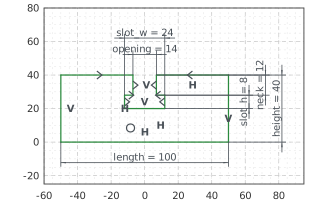
The profile is the front view, sketched in the front plane, the plane with its normal toward the viewer, \(-y\), with \(x\) to the right and \(z\) up and the origin in the middle of the bottom. The outline runs from the bottom left corner around the block and down into the T-slot, over its neck, the ledge out to the wide part, its flank and its bottom, and the same back up on the other side. With auto_constraint=True, the flags px.Horizontal and px.Vertical in the drawing
calls become constraints.
The profile is symmetric about the vertical axis. The left neck, flank, ledge and top mirror the lines of the right ones, and the mirror sets their directions too, so they carry no flags. With the sizes of the front view, nothing in the sketch is left free (Figure 1):
[3]:
front = px.XZ
profile = px.Sketch(front, auto_constraint=True)
profile.Move((-50, 0)).Line(100, px.Horizontal, id="bottom")
profile.Turn(90).Line(40, px.Vertical, id="right_side")  # Turn(90) turns the pen left, Turn(-90) right
profile.Turn(90).Line(40, px.Horizontal, id="right_top")
profile.Turn(90).Line(12, px.Vertical, id="right_neck")
profile.Turn(90).Line(5, px.Horizontal, id="right_ledge")
profile.Turn(-90).Line(8, px.Vertical, id="right_flank")
profile.Turn(-90).Line(24, px.Horizontal, id="slot_bottom")
profile.Turn(-90).Line(8, id="left_flank")
profile.Turn(-90).Line(5, id="left_ledge")
profile.Turn(90).Line(12, id="left_neck")
profile.Turn(90).Line(40, id="left_top")
profile.Close(px.Vertical, id="left_side")
profile.Constrain("bottom.mid", "origin", px.Coincident)
profile.Constrain("bottom", px.Distance, 100, id="length")
profile.Constrain("right_side", px.Distance, 40, id="height")
profile.Constrain("right_neck", "left_neck", px.Distance, 14, id="opening")
profile.Constrain("right_neck", px.Distance, 12, id="neck")
profile.Constrain("right_flank", "left_flank", px.Distance, 24, id="slot_w")
profile.Constrain("right_flank", px.Distance, 8, id="slot_h")
profile.Constrain("left_neck", "right_neck", "V", px.SymmetricCarriers)
profile.Constrain("left_flank", "right_flank", "V", px.SymmetricCarriers)
profile.Constrain("left_ledge", "right_ledge", "V", px.SymmetricCarriers)
profile.Constrain("left_top", "right_top", "V", px.SymmetricCarriers)
print("status", profile.status, "| degrees of freedom", profile.dof)
status full | degrees of freedom 0
The block
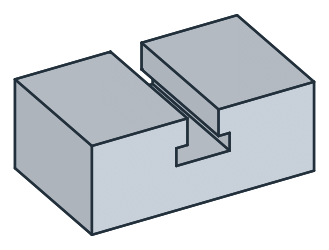
px.Pad extrudes the profile 30 to both sides of the front plane, 60 in all, so that the T-slot runs through the block from front to back. Its volume is the area of the profile times 60 (Figure 2):
[5]:
block = px.Pad(profile, 30, length2=30)
print("volume", block.mass, "area × 60", profile.Face().mass * 60)
volume 218399.99999999997 area × 60 218400.0
The holes
The counterbores, 15 across and 9 deep, are sketched on the top of the block, its face highest in \(z\). The T-slot splits the top in two, but both halves lie in the plane of the sketch. They are placed roughly, 60 apart, and the spacing of 70 moves them to their place (Figure 3a). The block shows them pocketed (Figure 3b):
[7]:
top = block.faces.Max(occ.Z)  # one half of the top; the sketch takes its whole plane
counterbores = px.Sketch(top)
counterbores.Circle(15 / 2, center=(-30, 0), id="left_counterbore")
counterbores.Circle(15 / 2, center=(30, 0), id="right_counterbore")
counterbores.Constrain("left_counterbore", px.Diameter, 15, id="counterbore_d")
counterbores.Constrain("left_counterbore", "right_counterbore", px.Equal)
counterbores.Constrain("left_counterbore.center", "right_counterbore.center", px.Distance, 70, id="spacing")
counterbores.Constrain("left_counterbore.center", "H", px.Coincident)
counterbores.Constrain("left_counterbore.center", "right_counterbore.center", "V", px.Symmetric)
block = px.Pocket(block, counterbores, 9)  # 9 deep, against the face's normal: down
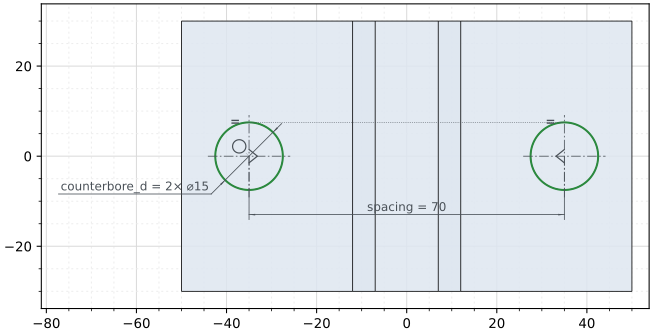
(a) The sketch on the top, the block under it
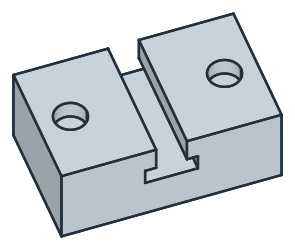
(b) Both counterbores in the top
The through holes, 9 across, go through the counterbores’ centers, sketched on the same top, and until=px.last cuts them down through the bottom (Figure 4):
[9]:
holes = px.Sketch(top)
for side in ("left", "right"):
    holes.Circle(9 / 2, center=counterbores.Location(side + "_counterbore.center"), id=side + "_hole")  # the solved center
holes.Constrain("left_hole", px.Diameter, 9, id="hole_d")
holes.Constrain("left_hole", "right_hole", px.Equal)
block = px.Pocket(block, holes, until=px.last)  # through to the last flat face it crosses
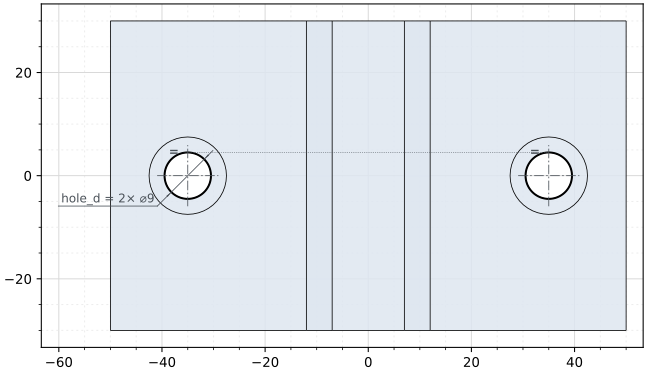
(a) The sketch of the holes on the top, the block under it
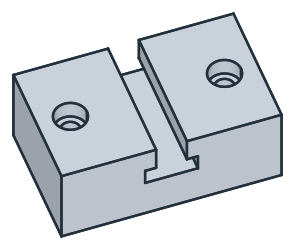
(b) The through holes from the counterbores down
The checks
These are the volume, the mass in steel S235 (7.85 g/cm³) and the center of mass, with the origin in the middle of the bottom, to compare with your own model. The block is symmetric about two planes, so its center of mass lies on the vertical axis:
[11]:
c = block.center
print("volume", round(block.mass, 1), "mm³")
print("mass", round(block.mass * 7.85e-6, 3), "kg")
print("center of mass", round(c.z, 2), "above the bottom, off the axis by", round(math.hypot(c.x, c.y), 6))
volume 211274.9 mm³
mass 1.659 kg
center of mass 18.96 above the bottom, off the axis by 0.0
The block as STEP, for another CAD system:
[12]:
block.WriteStep("guide_block.step")
The block as STEP: guide_block.step