Spring clip
A spring clip snaps around a tube of 24. Its bend wraps 300° around the tube, and at its opening a small reverse bend at each lip turns the legs outward, so that they guide the tube in. It is a strip of constant thickness, 2, bent along a center line. The clip is drawn and dimensioned on that center line, and Offset makes the strip from it. Model the clip from the drawing in planex2d or in any CAD system, then check its area against the value at the end of the page. A solution in planex2d
follows.

[1]:
import math
import planex as px
The center line
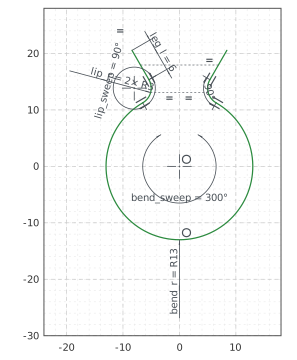
The center line is one chain, drawn roughly from the outer end of the left leg. It runs along the leg, the left lip’s reverse bend, which turns right, the bend of 300° around the tube, the right lip and the right leg. With auto_constraint=True, every joint becomes a tangency. The bend’s center is the origin and its radius 13, the tube’s 12 and half the strip’s thickness. Its middle lies on the vertical axis, so that the clip is symmetric. Each lip turns 90° on a radius of 3, and both legs
are 6 long (Figure 1):
[3]:
clip = px.Sketch(auto_constraint=True)
clip.Move((-8.4, 20.6), dir=(0.5, -0.866)).Line(6, id="left_leg")
clip.Arc(3, -90, id="left_lip")  # a negative sweep turns right: the reverse bend
clip.Arc(13, 300, id="bend")
clip.Arc(3, -90, id="right_lip")
clip.Line(6, id="right_leg")
clip.Constrain("bend.center", "origin", px.Coincident)
clip.Constrain("bend", px.Radius, 13, id="bend_r")
clip.Constrain("bend", px.Angle, 300, id="bend_sweep")  # an arc's sweep
clip.Constrain("bend.mid", "V", px.Coincident)
clip.Constrain("left_lip", px.Radius, 3, id="lip_r")
clip.Constrain("right_lip", "left_lip", px.Equal)
clip.Constrain("left_lip", px.Angle, -90, id="lip_sweep")
clip.Constrain("right_lip", px.Angle, -90)
clip.Constrain("left_leg", px.Distance, 6, id="leg_l")
clip.Constrain("right_leg", "left_leg", px.Equal)
print("status", clip.status, "| degrees of freedom", clip.dof)
status full | degrees of freedom 0
The strip
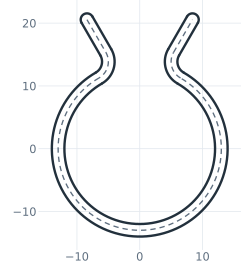
Offset draws the strip around the center line, 1 to each side. An open chain gets both sides and round caps at its ends, and the offset follows the center line when a dimension changes. Its distance is a dimension too, strip.d. The center line then becomes construction, so that only the strip’s outline bounds the face (Figure 2):
[5]:
clip.Offset(["left_leg", "left_lip", "bend", "right_lip", "right_leg"], 1, id="strip")
for line in ("left_leg", "left_lip", "bend", "right_lip", "right_leg"):
    clip(line).construction = True  # the center line stays, as construction
print("status", clip.status, "| degrees of freedom", clip.dof)
status full | degrees of freedom 0
The checks
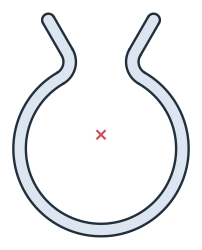
This is the area, to compare with your own model. A strip of constant thickness along a center line, with round ends, is the center line’s length times the thickness plus a disc of the thickness. Here the length is the two legs of 6, the two lips’ \(3 \cdot 90^\circ\) and the bend’s \(13 \cdot 300^\circ\), with the angles in radians. Times the thickness of 2, plus \(\pi \cdot 1^2\), that is the area. The clip is symmetric about the vertical axis, so its centroid lies on it (Figure 3):
[7]:
face = clip.Face()
length = 2 * 6 + 2 * 3 * math.radians(90) + 13 * math.radians(300)  # the center line
exact = length * 2 + math.pi * 1**2
c = face.center
print("area", round(face.mass, 4), "mm², exact", round(exact, 4))
print("centroid", tuple(round(v, 4) for v in c[:2]))
area 182.1268 mm², exact 182.1268
centroid (0.0, 2.2264)
The clip as DXF in millimeters, for another CAD system or a laser cutter:
[9]:
clip.WriteDXF("spring_clip.dxf", unit=px.mm, scale=1) # scale=1: the numbers as they are
The clip as DXF: spring_clip.dxf