Tools / Truss calculator
Truss calculator
Calculate the member forces and support reactions of a plane truss online and for free, with the method of joints and the method of sections step by step. planex2d solves it in this tab with Python, running on Pyodide/ngapp. Nothing is uploaded.
The joints, members, supports and loads go into four tables, as an exercise gives them, and every field takes a calculation such as 4*cos(30). Supports may be pinned, rollers, inclined rollers or springs, and loads act at joints, on members or as the members' own weight. Statically indeterminate trusses are solved as well. A truss is saved as CSV, exported as a PDF report, or shared as a link that carries the truss itself, so whoever opens it gets the same truss and its solution without any upload.
- Method of joints step by step
- Share links carry the truss
- Built on the planex2d library
| Member | Joints | Force kN |
|---|
| Joint | Rx kN | Ry kN |
|---|
Step-by-step solution
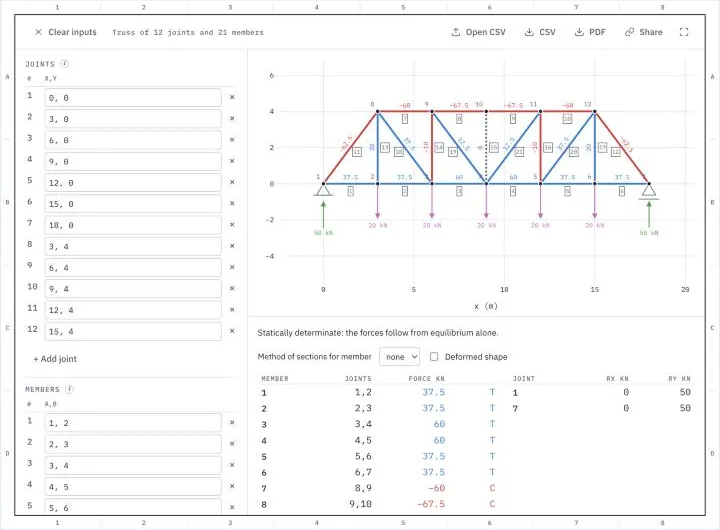
Change a field and the truss is solved again, and the drawing highlights the joint or member of the row being edited. Joints and members keep the numbers on their left when other rows are removed, and a new row takes the next number. A load at a joint names the joint, and a load on a member its two joints, such as 2,3. A force is Fx,Fy, or its size and angle counterclockwise from x, such as 10,-90deg for 10 down. Every value may be a calculation with + − * / ^, sqrt, sin, cos and tan in degrees, and x1 or y1 for the coordinates of joint 1. A comma separates two values, and with a semicolon in its place, as in 3,5; 4, the commas are decimal commas. In the bar above the tables, Share copies a link that carries the truss, CSV saves the truss with its results and Open CSV reads it back, PDF makes a report, and Clear inputs empties the tables.
Try a sample truss
Each one opens in the truss calculator above with its supports and loads. Download them as CSV files to change them in a spreadsheet and open them again.
-
Fig. 1CSV
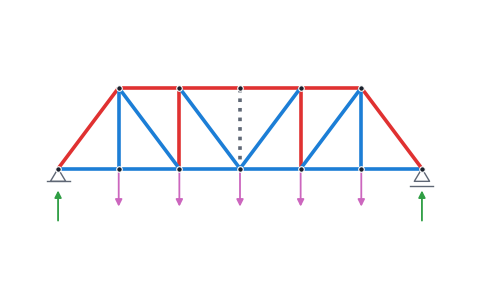
Pratt bridge
A bridge truss of six panels, 3 m wide and 4 m high, carries 20 kN at each inner bottom joint. Its diagonals slope down toward the middle, so they are in tension and the inner verticals in compression, while the middle vertical carries no force. The end posts take −62.5 kN, the top chord at midspan −67.5 kN and the bottom chord there 60 kN.
-
Fig. 2CSV
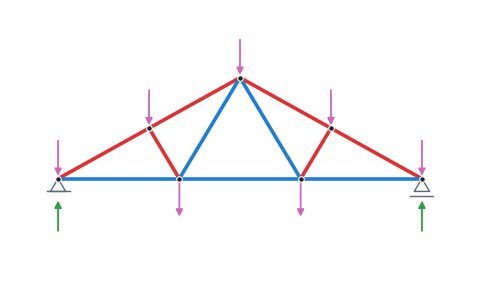
Roof truss
A Fink roof truss of 9 m span and 2.5 m rise carries 1.5 kN/m down along each rafter, entered as loads on the members, and its own weight in steel. The rafters are in compression and the bottom chord in tension.
-
Fig. 3CSV
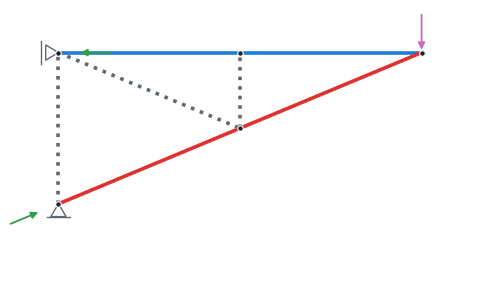
Crane jib
The jib of a wall crane is pinned to the wall at its lower joint and held at its upper joint by a side roller, which takes only a horizontal reaction. A load of 12 kN hangs from its tip. The upper chord is in tension with 28.8 kN and the lower chord in compression with 31.2 kN, while three members carry no force.
-
Fig. 4CSV
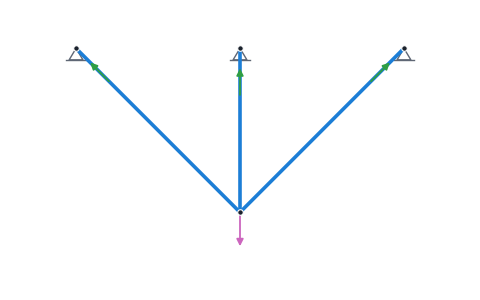
Three bars
Three bars run from a ceiling to one joint that carries 10 kN, the outer two at 45° to the middle one. With three pinned supports, the truss is statically indeterminate, so the stiffness of the bars decides how they share the load. The middle bar takes 5.858 kN, P/(1 + 2 cos³45°), and each outer bar 2.929 kN.
What the truss calculator computes
The member forces, the support reactions and the displacements of a plane truss, and the method of joints and the method of sections step by step.
A truss is a frame of straight members joined at their ends by pins and loaded only at its joints. Each member then carries only an axial force, tension or compression, and the truss carries its loads to its supports through these forces. The calculator finds every member's force, the reaction at every support and how far every joint moves.
Joints and members
The Joints table holds one row per joint with its position x,y. The number on the row's left is the joint's number. It stays the same when another row is removed, so the members, supports and loads that refer to it keep their joints, and a new row takes the next number after the highest. A position may refer to other joints, such as x2 + 1.5, y2 for a joint 1.5 to the right of joint 2. The Members table holds one row per member with the numbers of its two joints, such as 1,2, and numbers its members the same way. Members that cross without a joint are listed in a note, because the calculator does not join them where they cross.
Supports
A pinned support holds its joint in place and takes a reaction in any direction. A roller takes only a vertical reaction and a side roller only a horizontal one. An inclined roller rolls on a surface tilted by its angle, counterclockwise from horizontal, and takes its reaction normal to that surface. A spring holds its joint with the spring rates kx,ky in x and y. A fixed support, which would also hold its joint against rotation, acts as a pinned support in a truss, because the members are pinned to the joint and pass no moment to it.
Loads
A load at a joint is a force, given as Fx,Fy or as its size and its angle counterclockwise from x, such as 10,-90deg for a force of 10 pointing down. A load on a member, given by its two joints such as 2,3, is a load per length in the same two forms. Half of its total goes to each of the member's joints, which is the usual way to load a truss. With the members' own weight switched on, each member weighs ρ g A per length, and again half of its weight goes to each end.
Method of joints and method of sections
For a statically determinate truss on rigid supports, the calculator also writes out the solution by hand. When three support reactions hold the truss, they follow from the equilibrium of the whole truss, with the forces in x, the forces in y and the moments each summing to zero. Each joint is in equilibrium as well, which gives two equations per joint, enough for a joint with at most two unknown member forces. The steps go from joint to joint in such an order and write each equation with the numbers filled in. The method of sections cuts the truss through the chosen member and two others and takes the moments of one part about the point where the other two meet. Their forces have no moment about that point, so the chosen member's force follows from one equation. When the other two members are parallel, the sum of the forces at right angles to them does the same.
Statically determinate or not
A plane truss with j joints, m members and r support reactions is statically determinate when m + r = 2j and no part of it can move. With more members or supports, it is statically indeterminate, and its forces depend on the members' axial stiffness EA/L, with the area A and the modulus E the same for every member. With fewer, or with members arranged so that part of the truss can move without stretching a member, it is a mechanism, and the calculator names the joints that would move.
Units
The whole truss uses one unit system, chosen from meters and kN, millimeters and N, feet and kip, and inches and lbf. The area is in mm² or in², the modulus in GPa or ksi, the density in kg/m³ or lb/ft³ and the displacements in millimeters or inches. Forces are positive in tension.
How the truss calculator works
The calculator is a small page around the planex2d Python library, running on Pyodide/ngapp in this tab.
- Load
The page loads Python and planex2d into this tab. Your browser keeps both in its cache, so later visits start faster.
- Solve
The tables are read and the truss is solved, and solved again whenever a field changes.
- Save
The truss and its results are saved as a CSV file or a PDF report, made in the tab as well.
- Share
Share copies a link that carries the truss itself. Nothing is stored anywhere else.
The stiffness method
Each member is a bar element with the axial stiffness EA/L. Together, the elements give the stiffness matrix of the truss, with two unknown displacements per joint. The supports hold their joints in the directions they act in, and springs add their rates. Solving the system gives the displacements and from them every member's elongation and force and every support's reaction, for determinate and indeterminate trusses alike. A truss that could move without stretching a member makes the system singular, and the calculator names the joints that would move. Before the solve, planex2d checks the drawing for members that cross without a joint.
How it is tested
The tests solve trusses whose member forces, reactions or displacements are known in closed form and compare the tool's values with them. A bar element is exact for a member that carries only an axial force, so the stiffness solution agrees with these values up to rounding errors. This holds for statically determinate and indeterminate trusses alike, and on an inclined roller and a spring as well. The tests also check that the step-by-step solution gives every member the same force as the solver.
| Case | Exact value | The tool | Difference |
|---|---|---|---|
| Equilateral triangle, side 4 m, 10 kN at the apex: force in each leg | −P/√3 = −5.7735 kN | −5.7735 kN | below 10⁻¹⁵ |
| The same triangle: force in the base | P/(2√3) = 2.8868 kN | 2.8868 kN | below 10⁻¹⁵ |
| Truss of four panels 3 m wide and 4 m high, 10 kN at the three inner bottom joints: top chord at midspan | −M/h = −15 kN | −15.0000 kN | 1.4 × 10⁻¹⁵ |
| The same truss: bottom chord in the end panel | M/h = 11.25 kN | 11.2500 kN | below 10⁻¹⁵ |
| The same truss: end diagonal | −R/sin α = −18.75 kN | −18.7500 kN | below 10⁻¹⁵ |
| Three bars from a ceiling to one joint, the outer two at 45°, equal EA, 10 kN: middle bar (indeterminate) | P/(1 + 2 cos³α) = 5.8579 kN | 5.8579 kN | below 10⁻¹⁵ |
| The same: each outer bar | P cos²α/(1 + 2 cos³α) = 2.9289 kN | 2.9289 kN | below 10⁻¹⁵ |
| Triangle on a pin and a roller inclined at 30°, 12 kN at the apex midway: roller reaction | P/(2 cos 30°) = 6.9282 kN | 6.9282 kN | below 10⁻¹⁵ |
| Bar 2 m long, EA 210 MN, held by a spring of 5000 kN/m at its free end, 10 kN along it: displacement | P/(EA/L + k) = 0.090909 mm | 0.090909 mm | below 10⁻¹⁵ |
| Triangle of steel members, A 1000 mm², under its own weight: sum of the reactions | ρ g A ΣL = 743.660 N | 743.660 N | below 10⁻¹⁵ |
Supported files
| Format | Extensions | Notes |
|---|---|---|
| CSV | .csv | The truss as typed, one row per setting, joint, member, support and load, with the numbers of the joints and members, and below them the member forces, reactions and displacements. Open CSV reads the truss back, also from a spreadsheet that saves with semicolons. |
.pdf | The drawing with the forces, the tables of member forces and reactions and the step-by-step solution with the method of sections for the chosen member, on A4 pages. |
Sharing
Share puts the truss, compressed, into the link after the # sign, with the joints and members and their numbers, the supports, the loads, the units and the material, and the planex2d version it was solved with. Whoever opens the link gets the same tables, and their browser solves the truss again, with the same results and the same step-by-step solution. The member chosen for the method of sections is not part of the link.
Nothing is stored on a server, so a shared truss needs no account and no upload, and the link is its only copy. A change to the truss after sharing needs a new link. The sample trusses, with 3 to 21 members, give links of 300 to 460 characters, and a link over 2,000 characters gets a warning, since some chat apps cut such links.
Privacy
Nothing is uploaded. The truss stays in this tab and is gone when you close it, unless you save it as CSV or share it as a link. A shared link carries the truss in the part after its # sign, which the browser does not send to the server. Python, planex2d and its packages come from public package servers (jsDelivr and PyPI). See the privacy notice.
Limits
- The calculator solves plane trusses with pinned joints, for a linear elastic material and small displacements.
- Members carry only axial forces. A load on a member goes to its joints, and the member's own bending under it is not computed.
- Buckling of members in compression and the checks of a design code are not included.
- The step-by-step solution needs a statically determinate truss on rigid supports.
- A truss that gives a wrong result? Open an issue on GitHub and attach its CSV file.
Questions and answers
How do I enter a truss from an exercise?
Enter the joints in the order the exercise numbers them, so that the numbers in the table match, and give each its position as x,y, such as 3,4. A member is the numbers of its two joints, such as 1,2. A support names its joint and its type, and a load its joint and the force, as Fx,Fy such as 0,-10 for 10 kN down or as its size and angle such as 10,-90deg. Any value may be a calculation, such as 4*cos(30) or x1 + 3, the x of joint 1 plus 3.
Does it show the method of joints step by step?
Yes, it does for a statically determinate truss on rigid supports. The steps start with the support reactions from the equilibrium of the whole truss and then go from joint to joint, always to a joint with at most two unknown forces, and write each joint's two equations with the numbers filled in. Above the result tables, a list picks a member for the method of sections, which gives its force from a cut through it and two other members.
Can it solve statically indeterminate trusses?
Yes. The calculator solves every truss with the stiffness method, so a truss with more members or supports than it needs is solved as well, and so is one on springs. A and E are the same for every member. The method of joints and the method of sections need a statically determinate truss, so such a truss gets its results without the steps.
What do negative member forces mean?
A positive force is tension, a member being pulled, and a negative force is compression, a member being pushed. The drawing shows tension in blue and compression in red, and a member without force, a zero-force member, dotted.
What are Fachwerk, Stabkräfte, Knotenpunktverfahren and Ritterschnitt?
They are the German terms for a truss, its member forces, the method of joints and the method of sections. The calculator computes the member forces of a plane truss and shows both methods step by step.
Can I store or export my results?
Yes. Once the truss is solved, the CSV and PDF buttons at the top right of the calculator save it to your computer. The CSV file holds the truss as typed, with the units and material, the joints and members with their numbers, the supports and the loads, followed by the member forces, the reactions and the displacements. Open CSV reads such a file back into the tables, so a truss can be stored and continued later, and the file can also be changed in a spreadsheet, including one that saves with semicolons. The PDF report holds the drawing with its forces, the tables of member forces and reactions and the step-by-step solution, with the method of sections for the chosen member, on A4 pages. Both files are made in this tab. To pass a truss on without a file, Share copies a link that carries it.
How do I share a truss?
Share copies a link to this page that carries the whole truss, with its joints and members and their numbers, the supports, the loads, the units and the material. Whoever opens the link gets the same tables and the same results, solved in their own browser. Nothing is stored on a server, so there is no account and no upload, and the link itself is the only copy of the shared truss.
Is my truss uploaded?
No. The calculator works in this browser tab, running on Pyodide/ngapp. A truss saved as CSV is written to your computer, and Open CSV reads it back into the tab. A shared link carries the truss in the part after its # sign, which the browser does not send to the server.
Other tools on planex2d.org
Every tool runs on the planex2d library, in your browser.
-
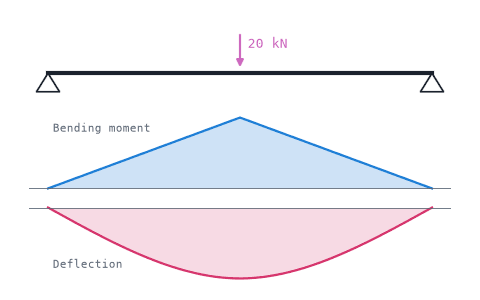
Beam calculator
Shear force, bending moment, deflection and bending stress of beams on several supports, for standard profiles or sections from DXF or STEP files, with a PDF report.
-
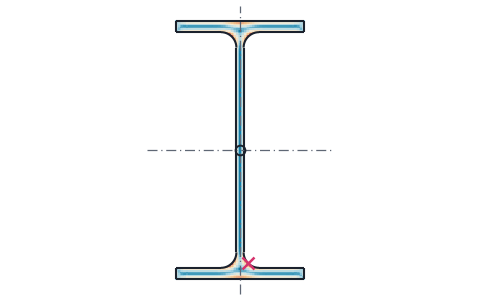
Section properties
Area, centroid, second moments and section moduli of any drawn or standard section, the mass of a sheet part, and the torsion constant and shear center from a finite element solve.
-
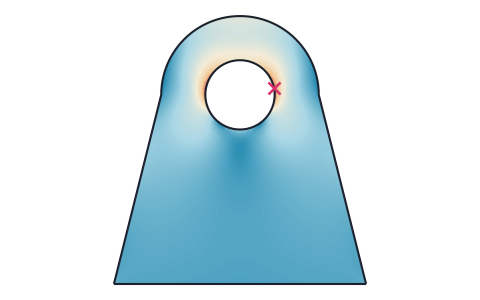
Stress analysis
Finite element stress analysis of flat parts from DXF, SVG or STEP files, with supports and loads by edge and hole number, the von Mises and principal stresses, the deformed shape and a safety factor.
-
Plate frequencies
Natural frequencies and mode shapes of flat plates from DXF, SVG, STEP or KiCad files, with each edge free, clamped or simply supported, and their Chladni figures.
-
Playground
planex2d code in the browser, with OpenCASCADE for 3D solids and netgen and NGSolve for finite elements, shared as a link that carries the code.
The planex2d Online Tools page lists every tool, and the planex2d documentation shows the library behind them.